Office bingo is a bingo game played with your colleagues: instead of numbers, the squares hold phrases, tasks or find-someone-who prompts, and the first person to complete a line wins. It takes about ten minutes to set up with free tools and works in a meeting, at an onboarding lunch, on a video call or at the holiday party. This guide shows five formats of the office bingo game, three complete sample lists of squares, the rules that keep it friendly, and exact odds for how long a game lasts.
In short: pick a format (buzzword card for meetings, mingle card for team building, task card for new hires, number bingo for a party), make the cards in the free card maker, and say two things before you start: playing is optional, and squares are about words and situations, never about people. A 5×5 card with a free center needs 24 squares. Print a different card for everybody, up to 100 per set.
Which office bingo game fits your team?
The name office bingo covers several different games, and the right one depends on what you want the group to feel at the end. A buzzword card turns a long meeting into a shared joke, and it is the best known form of the game. A mingle card gets a new team talking. A task card gives a new hire a friendly tour of the first week. A number game fills an hour at a party with almost no preparation. The table compares the five formats side by side.
| Format | Best for | Group size | Time | You will need |
|---|---|---|---|---|
| Buzzword card | Regular meetings, all-hands, training sessions | 3 to 200 (each person plays alone) | The length of the meeting | Printed or on-screen cards, no caller |
| Mingle card (find someone who) | Team building, offsites, kickoffs | 10 to 100 | 10 to 20 minutes | Cards, pens, room to walk around |
| New-hire task card | First week or first month at a company | 1 new hire, with a buddy | Over several days | One card per person, a buddy or manager |
| Remote card | Video calls, hybrid teams, social hours | 5 to 60 | 15 to 30 minutes | Shared screen, links, optional chat |
| Number bingo | Holiday party, company day, charity event | 20 to 500 | 30 to 60 minutes | Cards, a caller, a few prizes |
If you are not sure, start with the simplest: a buzzword card in your next team meeting costs nothing and needs no explanation, and it shows the team what the game is in one minute. Once people have seen it, the other formats are easy to introduce, and the group will already know the rules. The sections below take each format in turn, and the rules section comes first because it applies to all of them.
Office bingo rules that keep the game friendly
A workplace game is different from a family game, because people have to go back to their desks together on Monday. A few simple rules stop an office bingo game from becoming awkward and make it easier to say yes to. They are written here for the host, and you can paste them on the first slide or at the bottom of the card.
- Playing is optional. Say it out loud and mean it. Nobody needs to explain why they are watching instead of playing.
- Squares describe words, tasks and situations, never people. “Someone says ‘synergy’” is fine. A square that points at a named colleague, a habit of one person or a personal trait is not.
- Mark quietly. In a meeting, tick a square silently. A loud “Bingo!” in the middle of a presentation is rude to the speaker, so claim your win at the end or in a break.
- Keep it about the meeting, not the speaker. Buzzwords are shared company habits. Do not use the game to mock how someone talks, their accent, their slides or their ideas.
- Leaders go first. If a manager puts their own habits on the card, the game feels like it belongs to everyone.
- Prizes are small and shared. A coffee voucher or a team lunch matters less than the laugh, and a small prize avoids hurt feelings.
Squares to avoid on a workplace card
The fastest way to ruin office bingo is one thoughtless square. The table lists categories to keep off a workplace card, with a safer replacement for each. When you are unsure, ask a colleague from a different team to read the list before you print it.
| Avoid | Why | Use instead |
|---|---|---|
| Anything about age, health, family plans or religion | It singles people out and can be private or painful | Neutral habits such as “Reads on the commute” |
| Accents, names, languages or the way someone speaks | It turns a game into mockery | Shared jargon such as “Bandwidth” or “Roadmap” |
| Named colleagues or “the boss does X” | It targets a person, and it is hard to undo | Situations such as “Meeting runs over” |
| Salary, promotions, layoffs or performance | Raises anxiety and can break confidentiality | Positive team moments such as “A shout-out in chat” |
| Alcohol or party habits | Excludes people and can create policy problems | Snacks, drinks of any kind and hobbies |
| Squares that need a private answer | Forces people to share more than they want | Squares anyone can answer in one easy sentence |
The last row matters most for mingle cards. Every square should be something a person can answer with a quick “yes” or “no” and no explanation, so that people who prefer to share less can still take part. If a square needs a story, it belongs in a different game.
Buzzword bingo for meetings
Buzzword bingo is the best known kind of office bingo. Each player gets a card filled with phrases that are likely to come up, ticks them off when they hear them, and wins with a line. The Wikipedia article on buzzword bingo describes the game and how it is played in meetings. It works because every meeting has its own vocabulary, and everybody in the room already knows it.
The twist for the host is that a well-made card does not ask people to stop listening. It asks them to listen for a phrase, which is the opposite of daydreaming. Treat that as a light-hearted bonus and not as a promise: the aim is a laugh during a long agenda, not a measurable productivity boost.
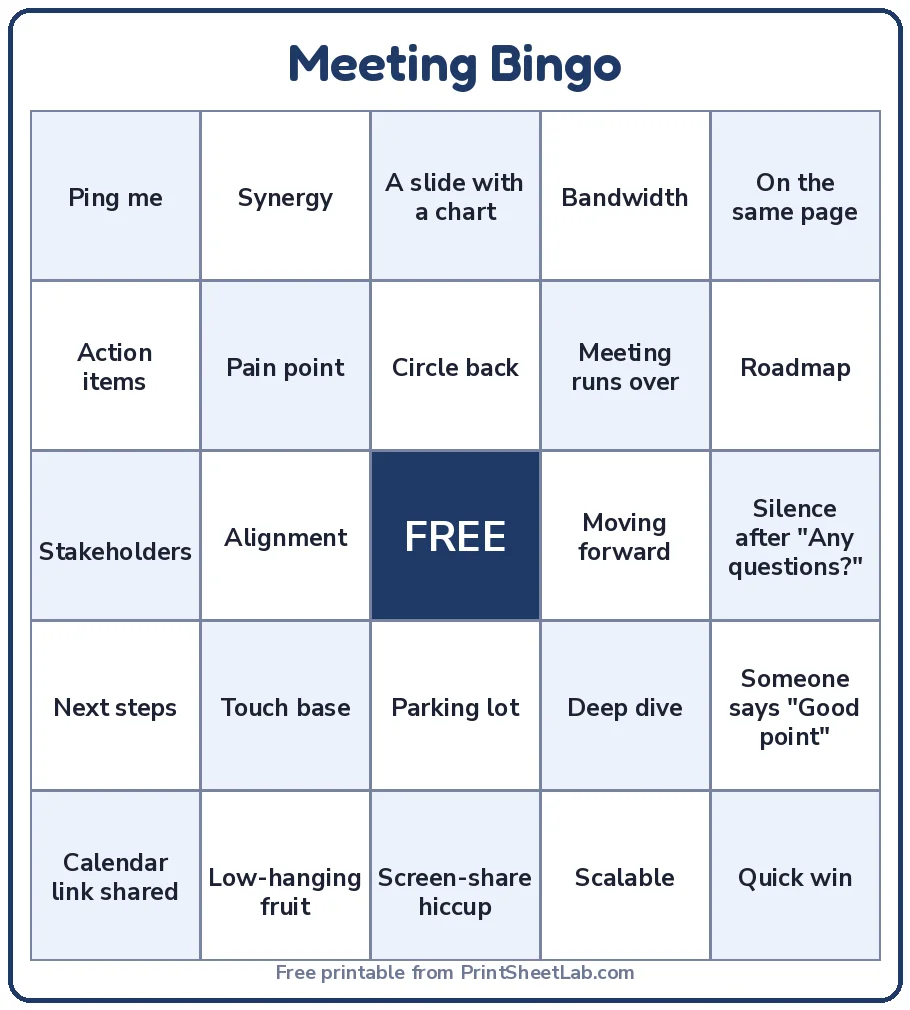
Sample list 1: meeting buzzword squares
These 24 squares are written for a general office. Replace a few with phrases that are special to your company, because inside jokes are what make office bingo stick. A 5×5 card with a free center needs exactly 24, which is why this list has 24. If you add more squares, every card will use a different selection of them.
| Column A | Column B | Column C | Column D |
|---|---|---|---|
| Circle back | Moving forward | Low-hanging fruit | Bandwidth |
| Synergy | Deep dive | Touch base | Alignment |
| Stakeholders | Scalable | Pain point | Quick win |
| Action items | Next steps | On the same page | Ping me |
| Parking lot | Roadmap | A slide with a chart | Meeting runs over |
| Calendar link shared | Screen-share hiccup | Silence after “Any questions?” | Someone says “Good point” |
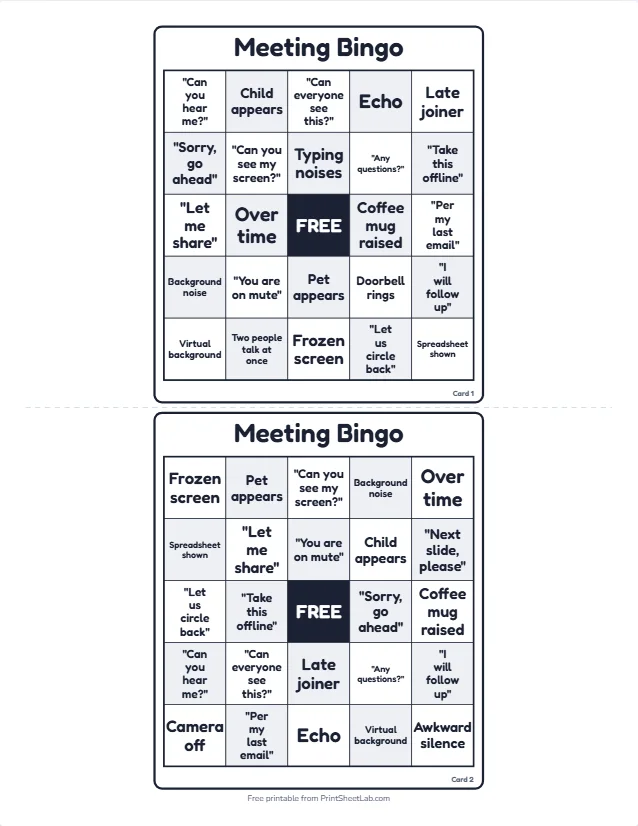
Paste the list into the bingo card generator, pick the Custom card type with a 5×5 grid, and the maker shuffles the squares so every card is different. The meeting bingo card template on the cards hub starts with a ready-made list, and you can edit every square. Here is what a printed set looks like, two cards to a page.
How to run buzzword bingo in a real meeting
- Hand out cards at the start (or share a link to the printable page) and say the rules in one sentence.
- Tell the speaker. If a presenter does not know about the game, the first “Bingo!” can hurt. Invite them to play too.
- Claim at the break. Agree that wins are shown after the session, so nobody interrupts. A small prize goes to the first line, and a second to the first blackout.
- Keep a flow of new squares. Change at least five squares every month so the game never turns stale.
- Stop if it stops being fun. If the game starts to feel like a way to mock a colleague, end it immediately and talk about it.
How likely is a bingo in an hour-long meeting?
This is the question that decides whether office bingo is fun. If a card almost never wins, people lose interest. If it wins in ten minutes, it is over before the meeting starts. To answer it, we calculated the exact chance that one card completes a line when every square on it comes up independently with the same probability.
All 16,777,216 possible combinations of the 24 squares were counted, which makes it an exact answer and not an estimate, and a check with 200,000 random meetings agrees with it (at 25% per square it gave 2.27% against the exact 2.29%).
| Chance each square comes up | Squares you expect to mark | Chance of a line on one 5×5 card | That means |
|---|---|---|---|
| 10% | 2.4 | <0.1% | 1 in 2,085 |
| 20% | 4.8 | 0.9% | 1 in 113 |
| 30% | 7.2 | 4.9% | 1 in 20 |
| 40% | 9.6 | 16% | 1 in 6 |
| 50% | 12.0 | 37% | 1 in 3 |
| 60% | 14.4 | 63% | about 2 in 3 |
The numbers are lower than most hosts expect. A card needs at least four squares marked to complete a line (the free center helps), but it needs them in the right places. When each square has a 30% chance of coming up, which is already a very common phrase, a single card wins only about 4.9% of the time. To get close to a coin flip, every square on the card would have to come up in half of all meetings.
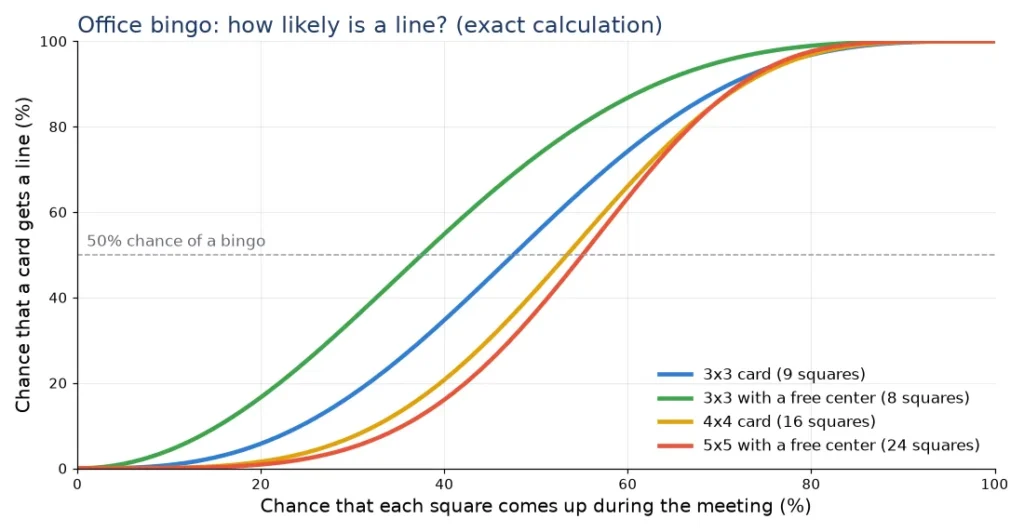
The chart shows why the size of the grid is the host’s best control. The same squares that give a 5×5 card a 4.9% chance (when each has a 30% chance) give a 4×4 card 7.4% and a 3×3 card with a free center 35%. For a half-hour stand-up, a 3×3 card is the right tool. For a 90-minute workshop, use a 5×5 card or mix in squares that are almost sure to happen.
| Grid size | Squares needed | Fewest squares for a line | Line chance at 30% per square | At 40% | At 50% |
|---|---|---|---|---|---|
| 3×3 | 9 | 3 | 17% | 35% | 55% |
| 3×3 with free center | 8 | 2 | 35% | 55% | 73% |
| 4×4 | 16 | 4 | 7.4% | 21% | 42% |
| 5×5 with free center | 24 | 4 | 4.9% | 16% | 37% |
Every row of the table counts the same eight lines on a 3×3 card (three rows, three columns and two diagonals) and twelve lines on a 5×5 card. The 4×4 card has ten. The card maker supports every grid from 3×3 to 7×7, so you can match the card to the meeting without extra work.
What happens when the whole room plays?
Most meetings have several players, and every card is different, so the chance that somebody wins is much higher than for one card. We simulated a team in which the squares come from a pool of 30 phrases and every player holds a different random 24 of them, with the same meeting events for everyone. Each cell below is the share of meetings where at least one player completes a line. It uses 6,000 to 10,000 simulated meetings per cell.
| Players with different cards | Each phrase 15% likely | Each phrase 25% likely | Each phrase 35% likely |
|---|---|---|---|
| 1 player | 0.3% | 2.3% | 9.0% |
| 5 players | 1.1% | 9.7% | 32% |
| 10 players | 2.4% | 16% | 47% |
| 25 players | 5.3% | 31% | 67% |
Because the 30-phrase pool gives every player a different card, the chance that somebody wins rises with the number of players. With 25 players and phrases that come up in about a third of meetings, a bingo happens in roughly two meetings out of three. For a team of five, the same list gives about one meeting in three. This is the practical guidance: if your meeting has 20 or more players, keep the squares to phrases that really come up, and offer the prize for a blackout as the second round.
Team building bingo: the mingle format
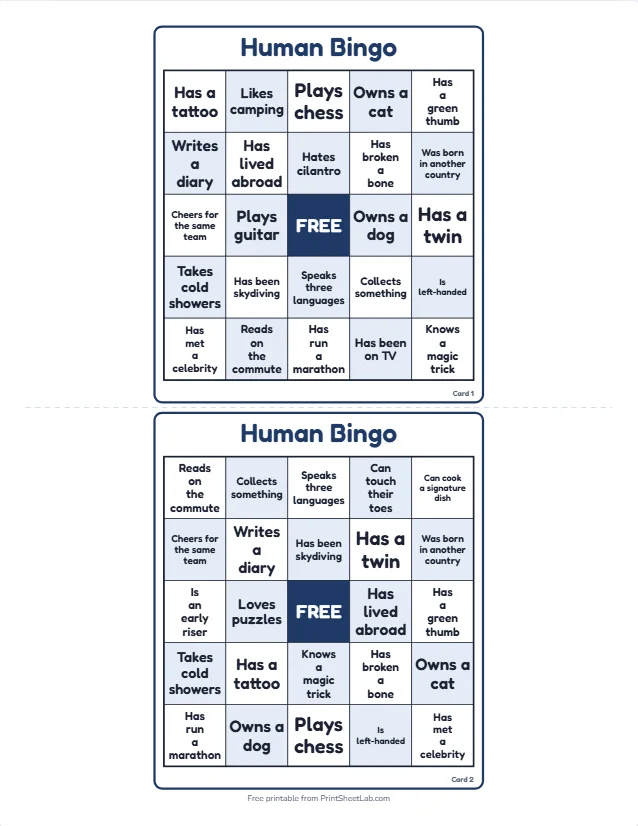
Team building bingo is the version where nobody sits still. Each card has squares such as “Has a plant on their desk”, and players walk around, find a colleague that fits and ask them to initial the square.
The rule that makes this office bingo format work is one signature per person per card, which forces a conversation with at least four or five different people before a line is complete. It is the standard opener at kickoffs, offsites and new-team days, and the human bingo template and the getting to know you bingo template are both built for it.
Sample list 2: team building squares for a hybrid team
This list suits a team that shares an office, a chat tool or both. Every square can be answered with one easy sentence, and none depends on age, family, health, religion or background. It is the second of the three sample lists in this guide.
| Column A | Column B | Column C | Column D |
|---|---|---|---|
| Prefers tea to coffee | Has a plant in view | Takes walking calls | Uses two screens |
| Keeps a favorite desk snack | Works with music on | Has a go-to keyboard shortcut | Starts before 8 a.m. |
| Was in the office this week | Uses a favorite emoji reaction | Has a desk toy | Takes a lunch walk |
| Read a book this month | Has a podcast to recommend | Can teach a hobby in 5 minutes | Has a favorite lunch spot |
| Has lived in another city | Has a favorite team mug | Has a standing desk | Tried a new recipe lately |
| Has a desk view they love | Keeps a to-do notebook | Plays an instrument | Has a weekend project |
How long does mingle bingo take?
The honest answer for this kind of game is that it depends on how many colleagues match each square. We simulated players who talk to one colleague at a time, can mark at most one square per person, and choose the square that moves their best line forward. The group is assumed to be big enough that nobody runs out of people to ask. Each row below uses 6,000 simulated players.
| People matching each square | Median conversations to a line | Middle half of players | Done within 6 | Done within 10 | Done within 15 |
|---|---|---|---|---|---|
| 10% | 12 | 10 to 15 | 3.5% | 31% | 77% |
| 15% | 10 | 8 to 12 | 12% | 61% | 97% |
| 20% | 8 | 7 to 10 | 23% | 81% | 99% |
| 30% | 7 | 5 to 8 | 47% | 97% | 100% |
| 40% | 6 | 5 to 7 | 66% | 100% | 100% |
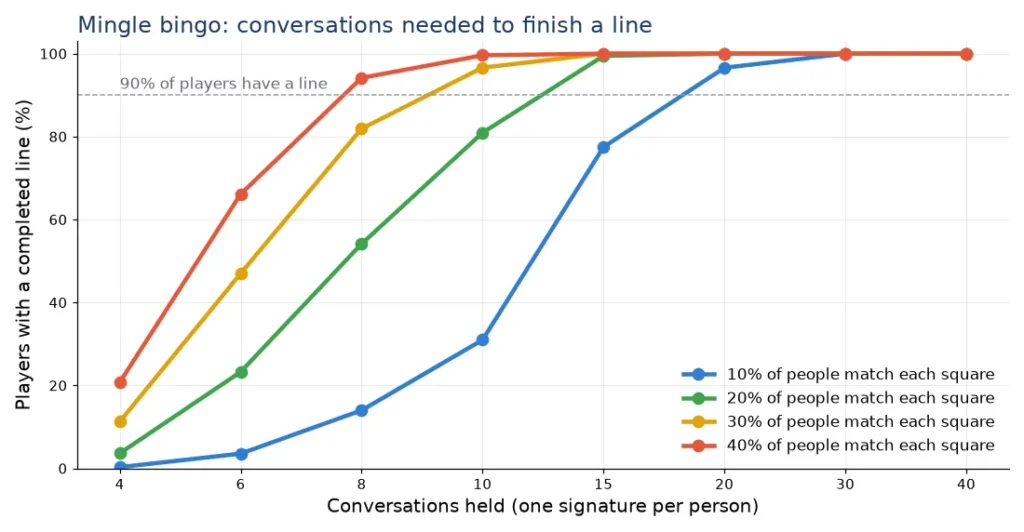
If a conversation takes about 90 seconds, which is a quick hello, a question and a signature, then ten conversations take about 15 minutes. A square that fits one colleague in five (20%) gives a median of eight conversations, so most players have a line in about 12 minutes, and 81% have it after ten. Pick squares that match one in five or one in four people and a 15-minute mingle fills the slot almost exactly.
Two rules change the pace of this format dramatically. If one person may sign several squares, which is the “sign twice” rule, the median at 20% falls from 8 to 4 conversations, and 93% of players finish within six. If the squares are rare (10%), the median climbs to 12 conversations, and many players do not finish a line in a 15-minute window. Test your list on a few colleagues first and drop any square that nobody could sign.
Running team building bingo in 15 minutes
- Explain in one minute. Show the card, the one-signature rule and the end signal, such as a bell or a song.
- Give a short window. Ten to fifteen minutes. A timer on the screen helps.
- Offer a quiet option. People who prefer not to walk around can swap a square with a neighbor or play the card over chat.
- Stop at the first three lines. Cheer the winners, then let the rest finish for fun without the pressure of a prize.
- Close with a question. Ask what was the most surprising signature, and let people share only what they want.
New hire bingo for the first week
New hire bingo turns a first-week checklist into a game. Instead of a long list of tasks from HR, the new employee gets a card with squares such as “Meet your buddy”, “Find the help desk” and “Join the team chat”, and completes a line before the end of the week. It does not replace formal onboarding, security training or paperwork. What it adds is a friendly tour of the unwritten parts: who to ask, where to go, what is normal here.
Sample list 3: new hire squares for week one
The third sample list is task-based. Every square is something a new colleague can do at their own pace, and many involve talking to other people, which is the real purpose of the card. Edit them to match your tools and your building, and replace any task that is not true at your company.
| Column A | Column B | Column C | Column D |
|---|---|---|---|
| Meet your buddy | Join the team chat | Read the team handbook | Attend a team meeting |
| Find the help desk | Book a meeting room | Ask a question in chat | Coffee with a teammate |
| Learn who handles HR | Find the team calendar | Finish security training | Set up two-step sign-in |
| Add a photo to the directory | Shadow a colleague | Meet another department | Learn a team acronym |
| Find the shared drive | Request time off once | See the weekly rhythm | Attend an all-hands |
| Write 3 questions for your manager | Get a welcome note | Tour the building or tools | Book your 30-day check-in |
The bingo card template page explains how to start from a template and change every square. For new hires, use the Custom card type, set a 5×5 grid, and print one card with the new colleague’s name in the footer. You can also add the company logo and a welcome line in the Design tab. Because one card is enough, there is no need to shuffle anything.
Make new hire bingo work
- Name a buddy. The card works best when one colleague agrees to help with it, and a few squares point to the buddy.
- Give a deadline that is kind. “By the end of the first month” is better than “by Friday” for a role with training.
- Reward completion, not speed. A welcome lunch for a finished card works better than a prize for the fastest.
- Let colleagues add squares. A new hire card that the team helps to write feels like a welcome, not a test.
- Check in at 30 days. The card ends with a conversation, and that conversation is the point.
Remote team bingo for video calls and hybrid teams
Remote team bingo keeps the same idea but uses what people can see and say on a call. A card with squares such as “Plant in view”, “Headphones” and “Pet cameo” asks players to watch the screen for something that is naturally in the picture, and there is no pressure on anyone to share more than they choose. For hybrid teams, the same card works for people in the office and at home, because it is based on what everybody can notice, not on where they sit.
Three ways to play online
- Print or share cards. Share a link to the card list or send a PDF that everyone prints. Players mark their own card and say “Bingo” in the chat.
- Call numbers on a shared screen. Open the bingo caller in big-screen mode and share the window. Everyone sees the number at once. This works for a number game at a virtual party.
- Host a live game. The play bingo online page runs a live game where guests join by link and their cards mark themselves. The card maker has a Play online button for custom cards, explained on the custom bingo online page.
For a longer guide to the set-up, see how to play bingo online with friends, and for squares made for video calls, the Zoom bingo template has a ready list. Both are written for friends, so adapt the tone to your team and keep the opt-out rule from earlier.
Make remote team bingo inclusive
- Cameras are optional. Never make a square depend on someone showing their home. Use squares about things people say, do or share in chat.
- Think about time zones. Run it at a time that suits at least two zones, and share the card in advance for people who cannot join live.
- Offer a text-only version. A card read aloud or pasted into the chat helps people who use screen readers or have poor connections.
- Keep the call short. Fifteen minutes of office bingo is enough for a virtual round, and people will thank you for ending early.
Office party bingo: number bingo for the holiday party
Office party bingo is the classic version with numbers, a caller and prizes. It suits a holiday party or a company day because anyone can play without preparation, there are no wrong answers, and the host controls the pace. For a themed card you can start from the Christmas bingo or New Year bingo templates and add the company name. If your team likes tambola, read the corporate tambola guide for the 90-number version.
How long does number bingo take?
The length of a round depends on the number of cards in play and on the pattern. The table uses our 75-ball simulation with a free center and shows the median call at which the first card wins, for 1, 10, 30 and 100 cards. The time column assumes one call every 10 seconds (one of the speeds the caller offers for auto-calling) and adds a minute for checking the winner.
| Cards in play | Any line | Four corners | Letter X | Blackout |
|---|---|---|---|---|
| 1 card | 41 calls (about 8 min) | 64 calls (about 12 min) | 70 calls (about 13 min) | 74 calls (about 13 min) |
| 10 cards | 26 calls (about 5 min) | 40 calls (about 8 min) | 55 calls (about 10 min) | 69 calls (about 12 min) |
| 30 cards | 21 calls (about 4 min) | 33 calls (about 6 min) | 48 calls (about 9 min) | 66 calls (about 12 min) |
| 100 cards | 15 calls (about 4 min) | 24 calls (about 5 min) | 42 calls (about 8 min) | 64 calls (about 12 min) |
Two things stand out. A line is quick whatever the crowd, because with 100 cards it is won after about 15 calls, but a blackout needs about 64 to 66 calls whether 30 or 100 people play.
So for a party of 30 cards, plan a line round of about four minutes, a four corners round of about seven and an X round of about nine, and keep the blackout for the end if there is time. The guide to bingo patterns shows every shape with its odds, and how to play bingo covers the basic rules for newcomers.
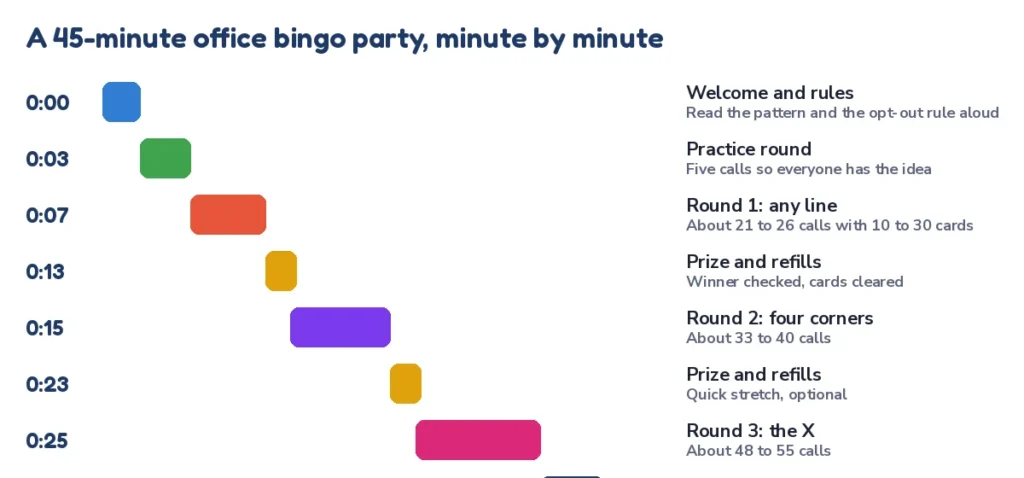
The run sheet above fits a 45-minute slot with about five minutes of buffer, and it works for 10 to 30 cards in play. Round lengths include the claim check and a short prize moment. A larger crowd finishes the line and corners rounds a little sooner. Keep a clock and end on time. People remember office bingo that stopped while it was still fun.
The caller and the cards
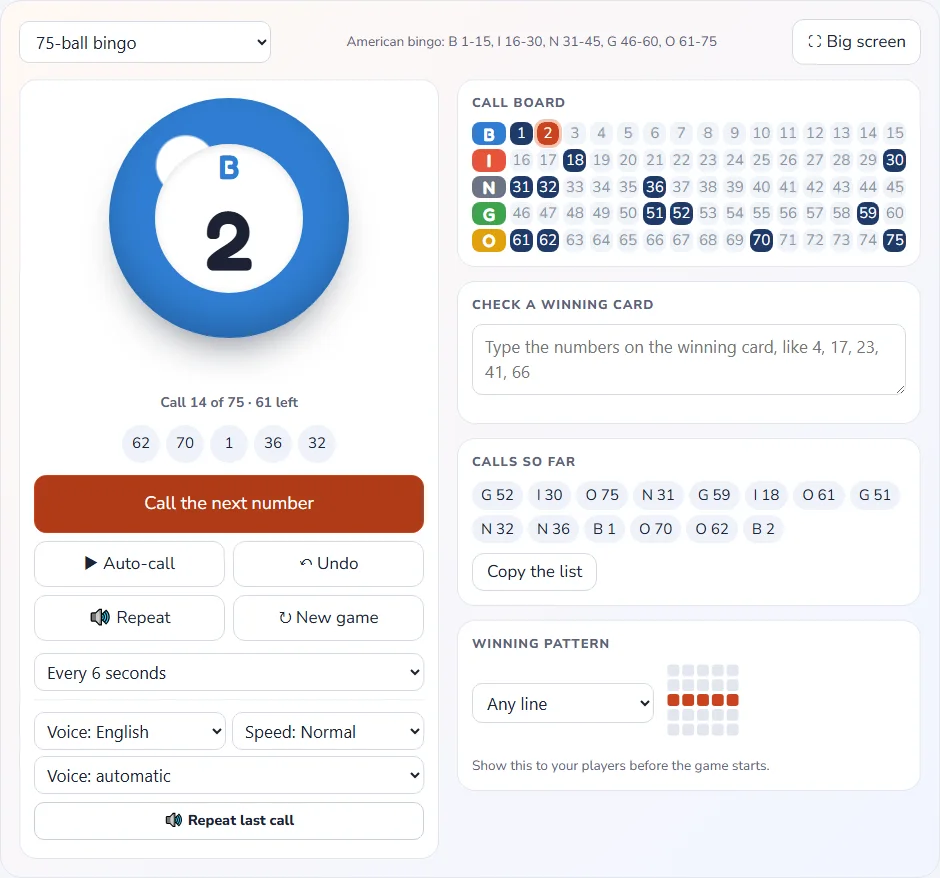
Open the free bingo caller on the big screen. It shows a large ball with the called number, the call board, the last five calls and the chosen pattern, and it can read each call aloud. Use Space or Enter for the next call, or switch on auto-call at the speed you want. If a player shouts, the “Check a winning card” panel tells you whether the numbers on the card were all called.
For cards, print 75-ball cards from the card maker, with the company name as the title and a number on every card (“Card 1”), so a claim is quick to check. One set gives you up to 100 different cards. A larger crowd needs several sets, so put a set letter in the footer and have the caller check every winner against the calls, because two sets can share arrangements.
How to make the cards in five steps
The fastest way to make cards is the browser-based Card Studio, which is free, needs no account and keeps what you type on your own device. The steps are the same for every format, and each takes a minute or two.
- Open the bingo card generator and choose Custom for words or Bingo 75 for numbers. Pick the grid, such as 5×5.
- Paste your squares in the Items tab. One per line. A 5×5 card with a free center needs 24, and giving the maker more than that means different cards use different squares.
- Design the card. Choose a color theme and font, type the title (for example “Q3 All-Hands Bingo”), add a footer and your logo, and decide whether to print names.
- Print. Pick how many different cards you need (1 to 100), 1, 2, 4 or 6 per page, Letter or A4, then download the PDF or print. You can add a caller sheet and calling cards.
- Share or play. The share link sends your words to colleagues, and the Play online button starts a live game from the same list.
Everything in the card maker is chosen with plain controls and runs in your browser, so making cards needs no design skills. If you want to start from a template instead of an empty list, the cards hub has them in one place, and the printable bingo cards page links to every template used in this guide.
Why every card should differ
If every card is the same, everyone wins at the same moment, which makes the game pointless. A good generator shuffles the squares for each card. With a list of 30 phrases, there are 593,775 different ways to choose 24 of them, and each choice can be arranged on the grid in 24! (about 6.2 × 10²³) ways, so duplicates are not a worry for a 100-person set. With 40 phrases there are 62,852,101,650 ways to choose 24.
Prizes and rewards that keep it light
The best prizes for office bingo are small, useful and easy to share. Before you buy anything, check your company’s rules on gifts, prizes and spending, because they differ by company and country. The table gives ideas by budget, and none of them needs a big spend.
| Budget | Prize idea | Why it works |
|---|---|---|
| Free | Pick the opening playlist, choose the next meeting’s first topic, a round of applause | No cost and a moment of control |
| Small | A coffee voucher, snacks, a desk plant, a notebook | Easy to buy in bulk and to share |
| Medium | A team lunch, a book, an hour of learning time | Rewards the whole team when a team wins |
| Team prize | A shared reward for everyone if the room completes a blackout together | Keeps people from competing |
A “free to play, small to win” model keeps the game light. If a sponsor or a manager offers prizes, say so, and keep the prize table visible. Avoid prizes that depend on alcohol, personal taste or physical activity, because they exclude colleagues without telling you.
Accessibility and inclusion checklist
An office bingo game should work for everyone who wants to play, and most of the fixes are small. Use this list before every event. It takes two minutes, and it prevents most of the problems people remember.
- Large print. Use a bigger text size in the Design tab, or print one card per page for anyone who asks.
- Strong contrast. Dark text on a light square prints well in black and white and is easy to read.
- Plain language. Use short words and avoid slang that is not shared by every team and country.
- No color-only cues. Do not rely on color alone to mark squares or patterns.
- Quiet participation. Let people play at their desk, with a partner or without a card at all.
- Read-aloud option. Offer the list as text for those who use a screen reader or cannot see the shared screen.
Common mistakes and how to fix them
| Mistake | What happens | Fix |
|---|---|---|
| The card is too hard (5×5, rare squares) | Nobody wins and interest fades | Use a 4×4 or 3×3 grid, or add squares that nearly always happen |
| The game is too easy | A win in the first ten minutes | Ask for four corners, an X or a blackout instead of a line |
| A square singles someone out | Hurt feelings and a bad story | Review every list with a second reader before printing |
| Everyone has the same card | Ties and arguments | Print different cards from one list |
| The host explains for five minutes | The energy is gone before the first call | Use one sentence, a demo round, and the opt-out line |
| No end time | The game overruns the meeting | Set a timer and stop at the first three winners |
The last row is the one hosts forget. Office bingo with no end time often drags on, and a round that ends a little early leaves people wanting a repeat. Treat the clock as part of the design and the rest follows.
A one-week plan for your first game
If you have never run office bingo, the safest first step is a single small game. The plan below takes one week, uses one of the three sample lists, and gets you feedback before you commit to a larger event. Run it with one team, not the whole company, and ask for suggestions at the end.
- Monday: choose the format and the sample list that fits, then edit five squares to match your team.
- Tuesday: ask a colleague to read the list for anything that could single somebody out.
- Wednesday: make the cards in the card maker and print a few more than you need.
- Thursday: tell people it is coming, say it is optional and name the prize.
- Friday: run the game, stop on time and ask two questions: what was fun, and what would you change?
With the feedback you can run it again next month. Change a few squares each time, move to a bigger event once the team asks for it, and share the work: let someone else host the next one. That is how a game turns from a one-off idea into a small tradition.
Frequently asked questions
8 quick answers
What is office bingo?
Office bingo is a bingo game for coworkers in which the squares hold work-related phrases, tasks or find-someone-who prompts, and a player wins by completing a line. It can be played in meetings, at onboarding, on video calls or as a number game at a party.
How do you play office bingo in a meeting?
Give each person a card with phrases that are likely to come up. They tick a square silently when they hear a phrase, and the first person with a line shows the card at the break. Nobody interrupts the speaker, and playing is optional.
How many squares does an office bingo card need?
A 3×3 card needs 9 squares, a 4×4 card needs 16, and a 5×5 card with a free center needs 24. Give the card maker a longer list and it will use different squares on different cards.
Is office bingo appropriate at work?
Yes, if it is optional, the squares are about words and situations and not about people, and the prizes are small. Review every list with a second reader first, and never include squares about age, health, religion, family, pay or performance.
How do I run office bingo with remote teams?
Share a card link or PDF and let people mark their own card, or share the number caller on screen, or host a live game with a link. Keep cameras optional, think about time zones and keep the call to 15 minutes.
How many people can play office party bingo?
Any number. One set of cards from the card maker holds up to 100 different cards, so a larger event needs several sets. The caller handles any crowd, and a big screen makes it easy for the room to follow.
What prizes work best for an office bingo game?
Small, shareable prizes: a coffee voucher, snacks, a desk plant, a team lunch or a free choice such as picking the next playlist. Check your company rules on prizes before you buy.
Is the card maker free?
Yes. The card maker and the bingo caller are free, need no sign-up and run in your browser, and the words you type are not uploaded.