You can play custom bingo online with any list of words you can type: vocabulary, inside jokes, family trivia, songs or holiday traditions. Paste the words, press Create game, share one link, and every guest gets a different card on their phone. No app and no sign-up is needed for guests, and the game is free to host.
In short: a custom game needs a list of words (one per line), a card style, a number of cards and a calling mode. After you press Create game you share one guest link or the TV view, call the items yourself or let the game call them, and confirm each bingo from the claims list.
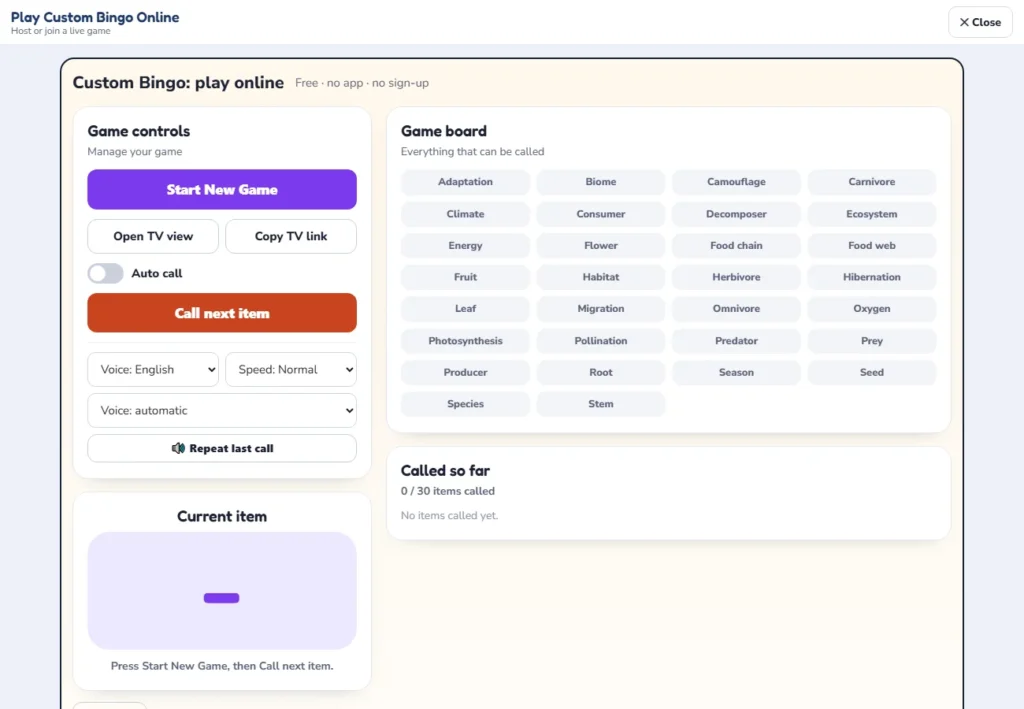
Play custom bingo online: the host screen
The screen you use to play custom bingo online is built for the person running the party. It shows everything that can be called on a game board, the item that is on air, and a growing list of what has been called. On the left are the controls: start a new game, open or copy the TV view, switch automatic calling on or off, call the next item, choose a voice language and speed and repeat the last call.
Under the board you find the game code and the number of cards, the guest link (with a button for WhatsApp), the option to download the cards of your game as a PDF for guests who prefer paper, a list of players with their avatars, the Bingo claims list and a box to check a claim by card number. Everything the host needs sits on one screen, so a teacher can run it from a laptop while the class watches the TV view.
You can play custom bingo online with a classroom of 25, a family of eight on a video call or an office team of 60. For classic number bingo with a B-I-N-G-O card, use play bingo online instead; this page is for games built from your own words.
Custom bingo online: how to run a game in 6 steps
- Write your list. Type or paste one word or short phrase per line in the box labeled Personalize. Names, jokes, songs, vocabulary words and holiday items all work.
- Choose the card style. The game offers a 5 by 5 bingo card, a 4 by 4 bingo card and a tambola ticket with 15 squares.
- Set the number of cards. Enter how many guests you expect. The box starts at 30, and each guest gets a different card.
- Choose how items are called. Either you reveal each call (best for songs and trivia) or the game calls automatically and the phones mark themselves. For automatic calls you pick the time between calls.
- Press Create game and share. Copy the guest link into WhatsApp, email or the video-call chat, or show the TV view with its QR code.
- Start the game. Press Start New Game, then Call next item, or switch on Auto call. When a guest presses Bingo, the claim appears in the list already checked, and you confirm the win.
To play custom bingo online, each guest only opens the link, picks an avatar, types a name and receives a card made from your list. They appear in the Players list as soon as they join, so you can see who is ready before the first call.
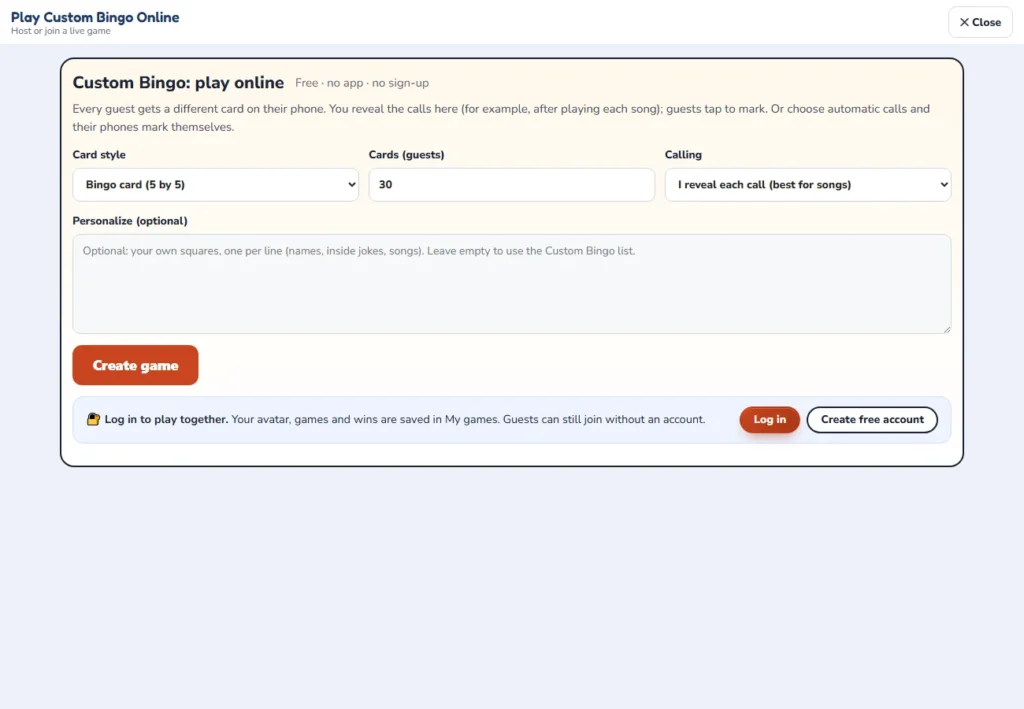
If you started in the card maker, there is a shortcut to play custom bingo online: the bingo card generator has a Play online button that carries the words you typed over to this game, so you do not have to type them twice.
Online bingo with your own words: what works
Before you play custom bingo online, write a list with three qualities: every item is easy to recognize, no two items could be confused, and the list is longer than one card. Short words and short phrases fit the squares best, and items that guests can spot or hear in the moment make the game fun, because the host can call them in any order.
| Use | Example items | Items you need |
|---|---|---|
| Classroom vocabulary | habitat, predator, prey, producer, consumer, decomposer, food chain, adaptation | 24 to 40 |
| Team and office inside jokes | “you are on mute”, a dog barks, a pet joins the call, “can everyone see my screen”, someone is late | 30 to 40 |
| Family trivia | Grandma’s hometown, the first family pet, the favorite holiday dish, the old family car | 30 to 50 |
| Holiday traditions | stockings, candy canes, carols, gift wrap, a snowman, hot cocoa, a tree topper | 30 to 40 |
| Songs for a music round | the first lines of eight or ten songs you will play, shuffled with other songs | 30 to 60 |
| Baby or bridal shower | a rattle, a onesie, “the ring”, a veil, a toast, a cake knife | 30 to 40 |
A 24-word classroom example to play custom bingo online
The list below is a ready-made science review of 24 items for a 5×5 card. Paste it as it is, then add a few more words from your unit so that the cards are not all the same.
| Words 1 to 6 | Words 7 to 12 | Words 13 to 18 | Words 19 to 24 |
|---|---|---|---|
| photosynthesis | herbivore | food web | pollination |
| habitat | carnivore | adaptation | seed |
| predator | omnivore | camouflage | root |
| prey | producer | migration | stem |
| ecosystem | consumer | hibernation | leaf |
| decomposer | food chain | climate | flower |
For young players, call out the definition rather than the word: “an animal that eats only plants” is the clue for herbivore, and the guest marks the word on the card. That turns the game into a quick review without a worksheet. If your list is about sight words or letters, see what are sight words for ideas.
What makes a bad list
- Two items that mean the same thing, because guests will argue about which one was called.
- Very long sentences, which do not fit in a square on a phone.
- Fewer words than the card needs. In our test a short list was replaced by the built-in word list, so check the Game board after you create the game.
- A list with the same word spelled in two ways. Repeated entries were counted once in our test, but different spellings count as different words.
Make your own bingo online: how many words per grid?
When you make your own bingo online and play custom bingo online with it, the card style decides how many words each card holds. A 5 by 5 card has 25 squares, a 4 by 4 card has 16 and a tambola ticket has 15. A list with exactly as many words as one card gives every guest the same words in a different order, so add spare words to make the cards differ.
| Card style | Squares | Words on a card | Good list size | Different word sets from 30 words |
|---|---|---|---|---|
| 5 by 5 bingo card | 25 (24 with a free middle) | 24 or 25 | 30 to 60 | 593,775 (for 24 words) |
| 4 by 4 bingo card | 16 | 16 | 20 to 40 | 145,422,675 |
| Tambola ticket | 15 | 15 | 20 to 40 | 155,117,520 |
The last column is the number of ways to choose a card’s words from a list of 30, written C(30, k). Each set can then be arranged in many orders, so every guest holds a card nobody else has. With 40 words and 24 on a card the figure is 62,852,101,650 sets, with 60 words it is 36,052,387,482,172,425, and with 75 words it is about 2.6 x 10¹⁹.
Our test accepted a 5×5 list of 23 words, a 4×4 list of 15 words and a tambola list of 15 words, but a list that was much shorter than the card was replaced by the built-in word list. Use at least 24 words for a 5×5 card, 16 for a 4×4 card and 15 for a ticket, and aim for 30 or more.
Custom bingo game: how long will it last?
The length of a custom bingo game depends on the size of your list and the number of guests. We simulated the game: each card is a random set of 24 words from your list (a 5×5 card with a free middle square), the words are called in random order, and the table gives the median call at which the first card completes a line, four corners and a full card (blackout). The numbers in brackets are the middle half of the results.
| Words in the list | Guests | First line (call) | Four corners (call) | Blackout (call) |
|---|---|---|---|---|
| 30 | 1 | 17 (14 to 19) | 26 (22 to 29) | 30 (30 to 30) |
| 30 | 10 | 11 (10 to 13) | 16 (14 to 19) | 29 (28 to 29) |
| 30 | 30 | 9 (8 to 11) | 13 (11 to 15) | 28 (28 to 29) |
| 40 | 1 | 23 (19 to 26) | 34 (29 to 38) | 40 (39 to 40) |
| 40 | 10 | 14 (12 to 17) | 22 (18 to 25) | 38 (37 to 38) |
| 40 | 30 | 12 (10 to 13) | 17 (14 to 20) | 37 (36 to 37) |
| 60 | 1 | 33.5 (28 to 39) | 51 (44 to 57) | 59 (58 to 60) |
| 60 | 10 | 21 (17 to 24) | 32 (26 to 37) | 56 (54 to 57) |
| 60 | 30 | 17 (14 to 19) | 25 (20 to 29) | 54 (52 to 55) |
| 75 | 1 | 42 (35 to 48) | 64 (54 to 70) | 74 (72 to 75) |
| 75 | 10 | 26 (22 to 30) | 39 (32 to 46) | 69 (67 to 70) |
| 75 | 30 | 20 (17 to 24) | 31 (25 to 36) | 66 (64 to 68) |
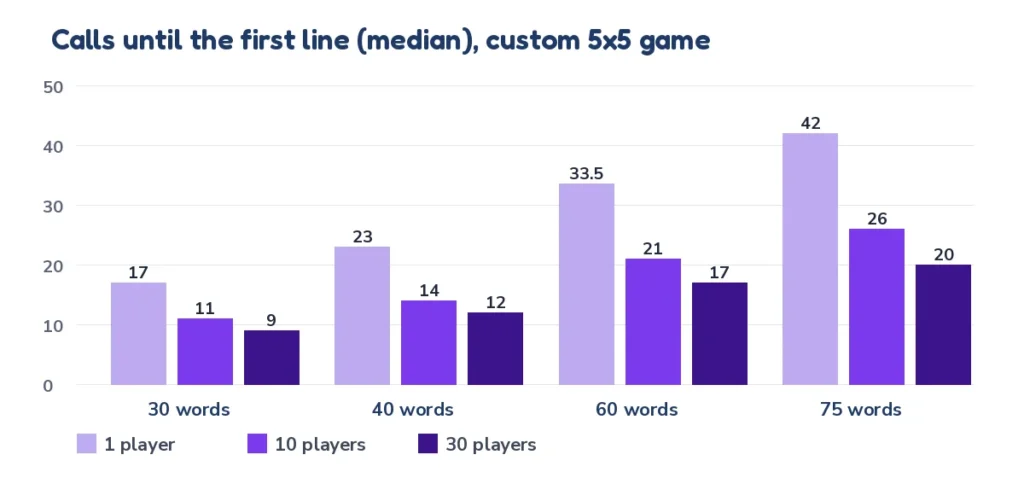
Two rules of thumb for anyone who wants to play custom bingo online follow from the table. First, every extra guest makes a quick win more likely, but the gains shrink: going from 1 to 10 guests saves about a third to 40 percent of the calls, and going from 10 to 30 guests saves a few more. Second, a blackout takes almost the whole list, so a 75-word game with 30 guests is over after about 66 of 75 calls.
If your cards use 25 words (no free middle square), expect a line to take about one to two calls longer. When you play custom bingo online, the time for each call is yours to set: choose manual calls, or pick 15, 20, 30, 45 or 60 seconds between automatic calls.
| Time between calls | First line, 40 words and 10 guests (14 calls) | Four corners (22 calls) | Blackout (38 calls) |
|---|---|---|---|
| 15 seconds | 3.5 minutes | 5.5 minutes | 9.5 minutes |
| 20 seconds | 4.7 minutes | 7.3 minutes | 12.7 minutes |
| 30 seconds | 7 minutes | 11 minutes | 19 minutes |
| 45 seconds | 10.5 minutes | 16.5 minutes | 28.5 minutes |
| 60 seconds | 14 minutes | 22 minutes | 38 minutes |
For a classroom period of 40 minutes, a list of 40 words with 30-second calls and 10 guests lets you play custom bingo online for a line, four corners and a blackout round, which together take about 37 minutes. For a video call, slower calls such as 30 seconds leave time for chat; for songs, call manually, after each track.
Virtual custom bingo: hosting on Zoom, Meet or Teams
Virtual custom bingo works on any video-call app, and you can play custom bingo online on the same call. You need two windows: the call, and the game screen. The host steps below keep the call tidy.
- Create the game before the call starts and keep the guest link ready.
- Paste the guest link in the chat as soon as people arrive, and ask them to open it on a phone.
- Share your screen or open the TV view on a second display so that everyone who wants to play custom bingo online sees the current item.
- Turn off the spoken voice while you share your screen, otherwise it can echo through the call. You can switch the voice off in the controls.
- Say the winning pattern before each round and write it in the chat.
- When a claim arrives, read the card aloud and confirm it from the claims list.
TV view for a big screen
To play custom bingo online with a room, use the TV view. It is meant for a TV, a projector or a second monitor. It shows the calls for everyone in the room, and it has a QR code that guests can scan to join with their phones. Press Open TV view to open it, or Copy TV link to send it to another device. In a classroom, project it and keep your own laptop for the host controls.
Pace and voice controls
The controls on the left of the host screen are simple: the Auto call switch turns automatic calling on and off, Call next item moves on by hand, and Repeat last call reads the last item again. You can change the voice language (English or off), the speed (slow, normal or fast) and the device voice. A slower speed helps young children who are still learning to read.
Fair play and prizes
Custom lists are personal, so a few rules keep it friendly when you play custom bingo online. Announce the pattern before you start. Check every claim from the list before you announce a winner, because the claim arrives already checked against the items that were called, and you confirm the win. If two guests claim on the same call, they share the prize or play a short tie-breaker round.
- Prizes: keep them small: a sticker, a pencil, choosing the next song, or being the next caller.
- Rounds: play one line, then four corners, then a full card, with the best prize for the last round.
- Late joiners: ask them to join before the first call, so that the calls they missed do not matter.
- Teams: to play custom bingo online in a classroom, let pairs share one phone and one card.
This is bingo for fun, not for money. For the history of the game, see the Wikipedia article on bingo.
Privacy: what to know before you play
To play custom bingo online you need no app, and the game does not ask guests for an account; it is free. Guests choose an avatar and type a name, and that is all they need to enter. As host you can log in if you want your games, players and winners saved in My games, so that you can reopen the host screen later; logging in is optional.
Because the words you paste are shown to your guests, do not put private information such as addresses or phone numbers in a list. Use first names or nicknames for people, and keep inside jokes friendly. If a school is playing, tell parents that students only type a first name.
Printable cards or play custom bingo online?
Both use the same list, so you can switch at any time between printable cards and the option to play custom bingo online. The card maker is the better choice when everybody is in the same room, when there are no phones, or when you want cards that last, and the online game is better when guests are far away or when you want cards that mark themselves.
| Printable custom cards | Play custom bingo online | |
|---|---|---|
| Where it runs | On paper, in any room | On guests’ phones, with a host screen or TV view |
| Marking | With pens, chips or dots | Cards mark themselves in automatic mode, or guests tap to mark |
| Different cards | Up to 100 different cards per PDF | A different card for every guest |
| Calling | Caller sheet and calling cards, or the bingo caller | Built into the host screen |
| Best for | Classrooms without devices, parties, laminating and reuse | Video calls, remote teams, families in different cities |
You can mix them: download the cards of your online game as a PDF for guests who prefer paper. To make cards from scratch, open the bingo card generator or start with blank bingo cards in five sizes. The printable bingo cards hub has ready-made themes, such as classroom bingo, baby shower bingo, Christmas bingo and road trip bingo.
If you want to call numbers instead of words, use the bingo caller, and read how to play bingo online with friends for more video-call ideas.
Ideas for your first custom bingo game
- Music bingo: to play custom bingo online with songs, list 30 titles, reveal one after each track, and let guests mark the one they heard.
- Getting to know you: short facts such as “has a pet” or “speaks three languages” make an icebreaker.
- Review game: call definitions, guests mark the vocabulary word.
- Movie night: list props, quotes and scenes, and call them as they appear.
- Family reunion: list relatives, places and memories, and call out clues.
- Holiday party: decorations, foods and traditions of the day.
Frequently asked questions
10 quick answers
Is it free to play custom bingo online?
Yes. You can play custom bingo online as host or guest for free, with no app and no sign-up for guests. It is bingo for fun, not for money.
How do guests join when I play custom bingo online?
The host shares one guest link by WhatsApp, email or chat, or shows the TV view with a QR code. Each guest opens it on a phone, picks an avatar and types a name to get a card.
Can I use my own words?
Yes. Paste one word or phrase per line into the box labeled Personalize. If you leave it empty, the game uses its built-in list.
How many words do I need?
At least 24 for a 5 by 5 card, 16 for a 4 by 4 card and 15 for a tambola ticket. Thirty to 60 words work best, because the cards then differ.
Can I call the items myself?
Yes. Choose the option where you reveal each call, which is best for songs and trivia. Guests then tap to mark their cards.
Can the game call the items automatically?
Yes. Choose automatic calling and the phones mark themselves. You pick the time between calls, from 15 to 60 seconds, and can switch Auto call off again.
How do I check that someone really won?
When a guest presses Bingo, the claim appears in the claims list already checked. You confirm the win, and you can also check a card by its number.
Can I use a TV or projector?
Yes. Open the TV view for a big screen, or copy its link. It has a QR code for guests to scan.
Can I print the cards instead?
Yes. Download the cards of your game as a PDF from the host screen, or make printable cards with the card maker.
How long does a custom game last?
When you play custom bingo online with 40 words and 10 guests, the first line usually arrives at about call 14, four corners at call 22 and a full card at call 38. The table on this page shows more cases.