An invoice template is a ready-made invoice layout with spaces for your details, your client, the work and the total, so you only fill in the blanks. This page has 8 free printable invoice templates for different kinds of work, each in US Letter or A4. Pick one, add your business name if you like, and print the blank invoice or save it as a PDF.
Quick answer: Choose the invoice template that matches how you charge: the freelance template for hours or projects, the contractor template for labor and materials, the auto repair template for parts and labor, or the hourly template for a timesheet. Press Print or save as PDF, then fill it in by hand or on screen.
How to use these printable invoice templates
- Pick the invoice template for your kind of work from the buttons above the preview.
- Choose US Letter or A4, and a color for the headings.
- Optional: type your business name, address, email and tax ID so they print on every invoice.
- Press Print or save as PDF. In the print window, choose your printer, or Save as PDF to keep a digital copy.
- Fill in the invoice number, dates, client and lines by hand, or keep the PDF as your blank invoice template.
Your business details are remembered in this browser, so the next printable invoice template you open is already filled in. Nothing is sent to our server.
The 8 invoice templates and when to use each
| Invoice template | Columns | Best for |
|---|---|---|
| Freelance | Description, hours, rate, amount | Writers, designers, developers, virtual assistants |
| Contractor | Separate labor and materials tables, job site address | Handymen, electricians, plumbers, landscapers |
| Consulting | Date, service, hours, rate, amount, PO number | Consultants, coaches, agencies on retainer |
| Cleaning | Date, service, rooms or area, amount | House cleaners and office cleaning services |
| Construction | Item, quantity, unit, unit price, amount, percent done | Builders and remodelers billing in stages |
| Auto repair | Parts and labor tables, vehicle, VIN, mileage | Mechanics and mobile repair |
| Photography | Package, quantity, price, deposit and balance | Photographers and videographers |
| Hourly work | Date, start, end, task, hours, amount | Tutors, sitters and anyone billing a timesheet |
Freelance invoice template
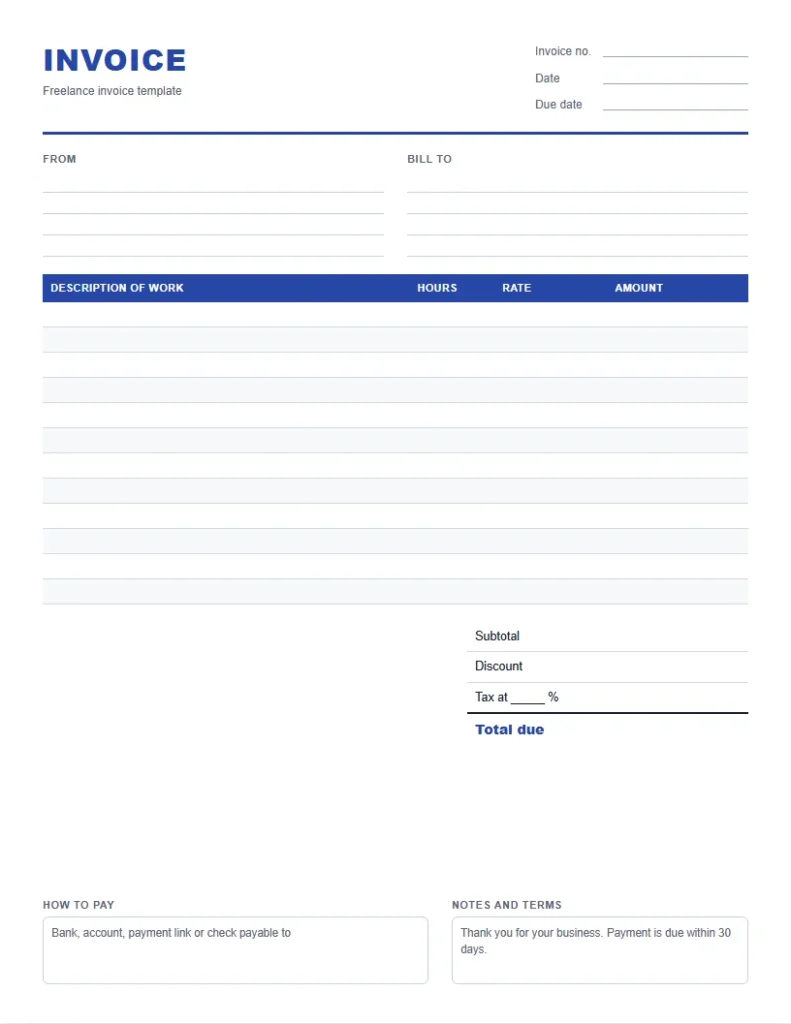
The freelance invoice template is the simplest layout: one table with a description, hours, rate and amount. It works for hourly work and for project fees. For a project, write one line per deliverable and leave the hours column empty, or write 1 as the quantity.
Write descriptions a client’s accounts team can approve without asking you, such as Blog article, 1,500 words, two rounds of edits. Add the project name or purchase order number in the notes box when a large client needs it.
Contractor invoice template
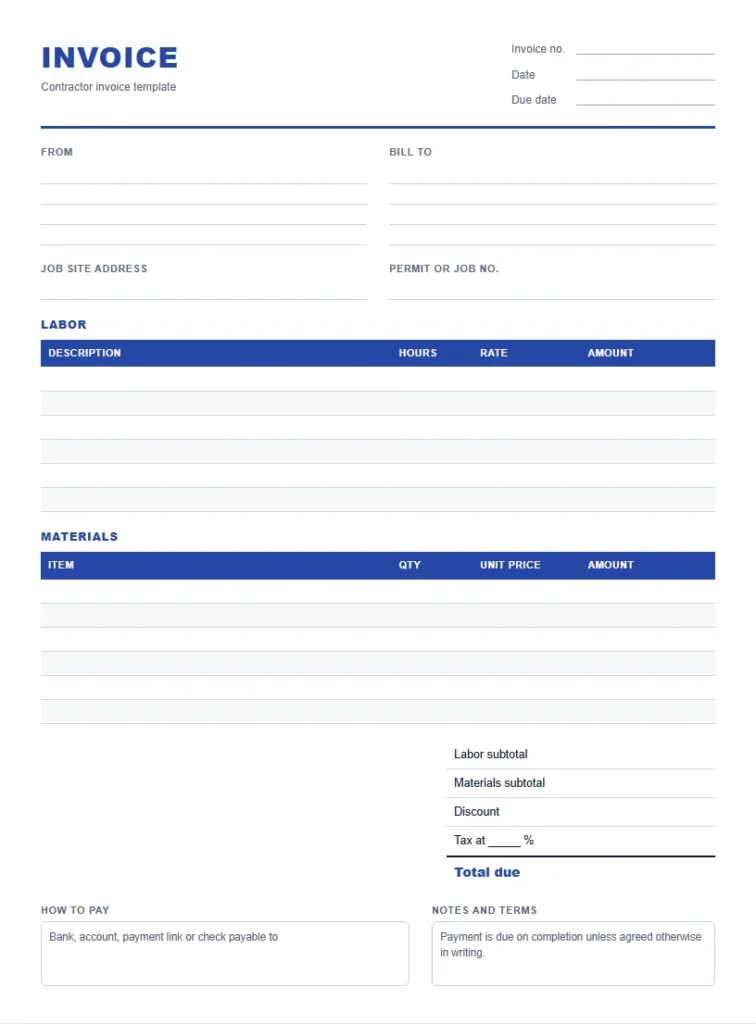
The contractor invoice template splits labor and materials into two tables with their own subtotals. That makes the bill easier to check, and it helps where sales tax applies to materials but not to labor. There is also space for the job site address and a permit or job number.
List each material with its quantity and unit price, and keep the receipts. For labor, write the task and the hours. If you charge a fixed price for the job, write it as one labor line and list the materials for reference.
Auto repair invoice template
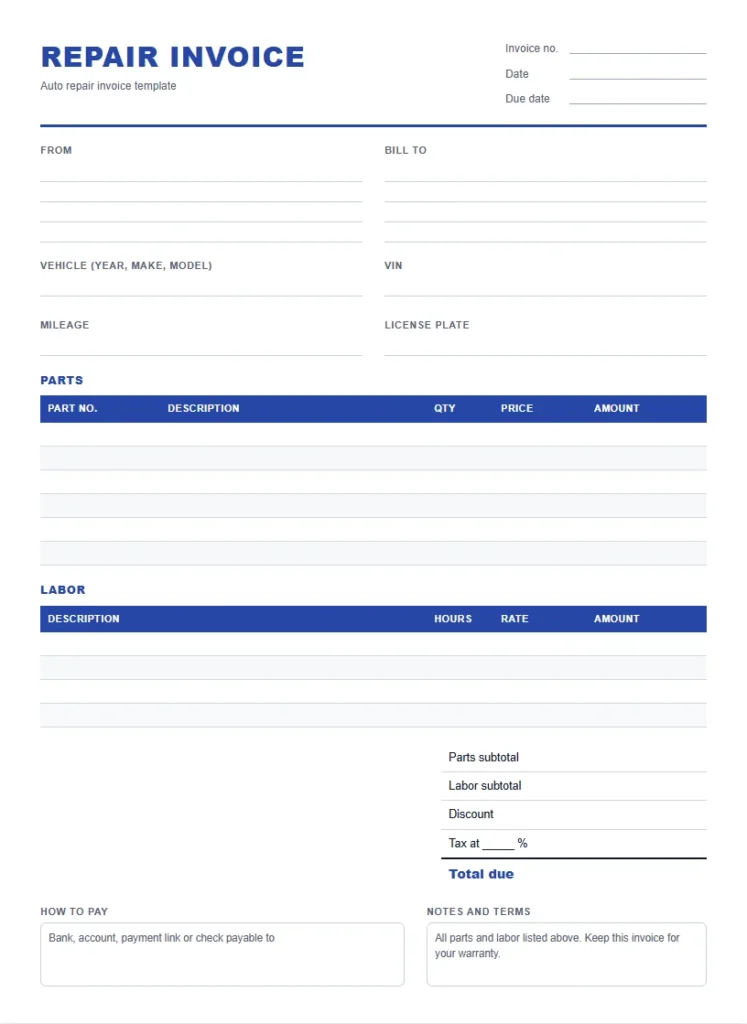
The auto repair template has spaces for the vehicle, VIN, mileage and license plate, then a parts table with part numbers and a labor table with hours. Customers keep it for warranty claims, so write the part numbers clearly.
Hourly and timesheet invoice template
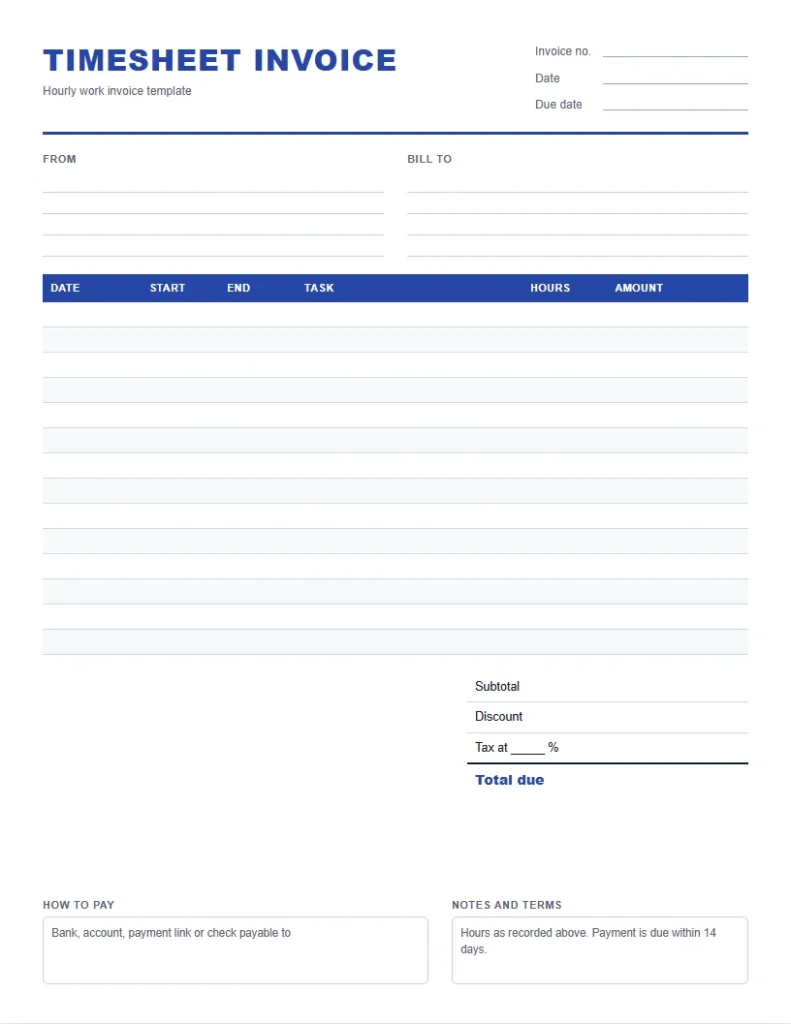
The hourly invoice template doubles as a timesheet, with the date, start time, end time, task and hours on each row. It suits tutors, sitters, caregivers and anyone who bills by the hour across many short sessions. Add up the hours column, multiply by your rate and write the total at the bottom.
Cleaning, consulting, construction and photography layouts
Cleaning. Each row has the date, the service, the rooms or area and the amount, with a box for the service address. For a regular weekly clean, write one row per visit, so the client can match the bill to the days you came.
Consulting. Rows show the date, the session or service, the hours and the rate. There are boxes for a project or retainer name and a purchase order number, which many companies ask for before they pay a supplier.
Construction. The table adds a unit column, such as square feet or linear feet, and a percent done column for progress billing. Bill each stage as it is finished and show the share of the contract it covers.
Photography. Rows list each package or print with its price, and the totals box has a deposit line and a balance due. Write the session date and location at the top, so the client knows which shoot the bill is for.
How to fill in an invoice by hand
- Write the next number in your sequence and today’s date at the top right. Add the due date from your payment terms.
- Fill in your details under From, unless they are already printed, and the client’s details under Bill to.
- Write one line for each task, item or visit. Use quantity and rate, then multiply for the amount.
- Add the amounts for the subtotal, take off any discount, and add tax at the rate you charge.
- Write the total due clearly, then how the client can pay you.
- Take a photo or scan before you hand it over, and keep it with your records.
Use a pen that will not smudge, and write numbers with two decimal places. If you make a mistake, start a fresh copy rather than crossing out an amount, because a clean page is easier for a client to approve.
How to get paid faster
- Send or hand over the bill the day the work is done.
- Make the total and the due date the easiest things to find on the page.
- Offer more than one way to pay, such as a bank transfer and a payment link.
- Agree payment terms before you start, and repeat them in the notes.
- Follow up politely the day after the due date, with the number and the total.
Invoice terms explained
| Term | Meaning |
|---|---|
| Net 30 | Payment is due within 30 days of the invoice date |
| Due on receipt | Payment is due as soon as the client receives the bill |
| Subtotal | The total of all lines before discount and tax |
| Deposit | An amount paid before the work, taken off the final total |
| Retainage | A share of a construction payment held back until the job is finished |
| Credit note | A document that cancels or reduces an earlier bill |
| Purchase order (PO) | The client’s own reference number for the order |
Simple invoice template or invoice generator?
A blank printable invoice template is best when you write invoices by hand, carry a printed pad to jobs, or want a ready PDF to fill in later. If you would rather type everything and have the totals added up, use the free invoice generator. It works out the subtotal, discount and tax for you and prints a finished invoice.
| You want to | Use |
|---|---|
| Write invoices by hand on the job | A printable invoice template |
| Keep a blank invoice template PDF on your phone or computer | A printable invoice template, saved as PDF |
| Type the lines and have the totals worked out | The free invoice generator |
| Add your logo and send a finished PDF the same day | The free invoice generator |
What to write on an invoice template
Every invoice template on this page has the same core parts. Fill in each one, because a missing detail is the most common reason a client pays late.
- Invoice number: a unique number that never repeats, such as INV-0001.
- Date and due date: the day you issue it and the day payment is due.
- From: your name or business name, address and contact details.
- Bill to: your client’s name and address.
- Lines: what you did or supplied, with quantity, rate and amount.
- Totals: subtotal, any discount, tax with its rate, and the total due.
- How to pay: bank details, a payment link or who to make a check out to.
If you charge VAT, GST or HST, write your registration number in the tax ID box and show the tax on its own line. In the UK, GOV.UK lists the details an invoice must include; in Australia, a tax invoice also carries the words tax invoice and your ABN.
Invoice template PDF: printing tips
- In the print window, turn off headers and footers so the page prints clean.
- Choose the same paper size as the template, US Letter or A4, and set the scale to 100%.
- Save one copy as a PDF named with your business, such as Rivera Design invoice template, to reuse.
- Print a stack of blank copies for jobs where you invoice on site.
- Number blank invoices by hand in order as you use them, and never skip or reuse a number.
Choosing how clients pay you
The How to pay box is often left blank, and it is the box that matters most for getting paid on time. Write every method you accept, in the order you prefer, with the details a client needs to pay without asking you.
| Method | What to write | Good to know |
|---|---|---|
| Bank transfer | Account name, bank, account and routing or sort code | Low cost; standard for business clients |
| Card or online payment | A payment link from your card processor | Fast, but the processor takes a fee |
| Check | Who to make the check payable to, and your mailing address | Slow; still common with some companies |
| Cash | Write Paid in cash and the date when you receive it | Give a receipt and keep a copy |
For international clients, add the currency you expect and your international bank details, so the payment arrives in full. Ask the client which method their accounts team uses before you send the first bill.
Mistakes to avoid on a paper invoice
- Leaving out the invoice number or the date, which makes the bill hard to file and to chase.
- Writing vague lines such as Work done, which clients often query before paying.
- Adding tax you are not registered to charge, or leaving out tax you must charge.
- Forgetting the due date, so the client decides when to pay.
- Not keeping a copy, which leaves you with no record if the bill is lost.
Sending a printed or PDF bill by email
If you fill in the PDF on screen or scan a handwritten copy, send it as an attachment with a short email. Put the invoice number and the total in the subject line, such as Invoice INV-0042, $1,250, due November 8. In the email, repeat the total, the due date and how to pay, and thank the client for the work.
Name the file with the number and the client, such as INV-0042-Northwind.pdf, so you can find it in your folder later. Keep all sent bills in one folder per year.
Payment terms to write in the notes
The notes box on each invoice template comes with a suggested line you can keep or cross out. Common terms are Due on receipt, Net 15 and Net 30, which mean payment within 15 or 30 days of the invoice date. If you charge a late fee, such as 1.5% a month, write it in the notes and agree it with the client first.
For photography and other booked work, the photography invoice template has a Deposit paid line, so the balance due is clear. Write the deposit amount and date, then the balance and when it is due.
Keeping invoice records
Keep a copy of every invoice you send, whether it is a photo of a handwritten invoice template or the saved PDF. File them by invoice number with the date each one was paid. That list is your income record for taxes; freelancers in the US can use it with the self-employment tax calculator to set aside the right amount each quarter.
A simple way to track payments is a one-page log with five columns: number, client, date sent, amount and date paid. Update it each time you send a bill and each time money arrives. At the end of each month, any row without a paid date is a reminder to follow up.
At the end of the year, the log adds up to your total income, and the unpaid rows show what is still owed to you. Keep the log and the copies together for at least as long as your tax records, which is usually three years or more after you file.
n
Frequently asked questions
10 quick answers
Are these invoice templates free?
Yes. All 8 printable invoice templates are free to print and use for your business, with no sign-up and no watermark.
How do I save an invoice template as a PDF?
Press Print or save as PDF, then choose Save as PDF as the printer in the print window. The PDF keeps the layout and paper size you picked.
Can I add my business name to the template?
Yes. Type your business name, address, contact details and tax ID above the preview and they print on the invoice. They are remembered in your browser.
Which invoice template should a contractor use?
The contractor invoice template, which has separate labor and materials tables with their own subtotals, plus space for the job site address.
Is there a simple invoice template?
The freelance invoice template is the simplest: one table with description, hours, rate and amount, and a totals box.
Can I use these templates in Word or Excel?
These are print and PDF templates. To type an invoice and have the totals added up, use the free invoice generator instead.
What paper sizes are available?
Every invoice template prints on US Letter or A4. Pick the size before printing and keep the scale at 100%.
Do I need an invoice number?
Yes. A unique invoice number makes each invoice easy to find and is required on VAT and GST invoices in many countries.
What is the difference between an invoice and a receipt?
An invoice asks for payment. A receipt confirms a payment was received.
Can I print blank invoices in bulk?
Yes. Print as many copies as you need of any blank invoice template, then number them in order as you use them.
Related tools
- Free invoice generator to type and total an invoice online
- Self-employment tax calculator
- Sales tax and discount calculator
- Work hours calculator for timesheets
- Printable planner generator
Sources
- GOV.UK: Invoices, what they must include
- Australian Taxation Office: Tax invoices
- IRS: Recordkeeping for small businesses
These invoice templates are general business forms, not legal or tax advice. Check the invoice rules in your country before you rely on them.
Last updated: October 2026.