Paste or type any text and this free word counter instantly counts the words, characters with and without spaces, sentences and paragraphs. It also estimates reading time and speaking time, lists your most repeated words as keyword density, and checks the text against limits such as a 280-character post or a 650-word essay.
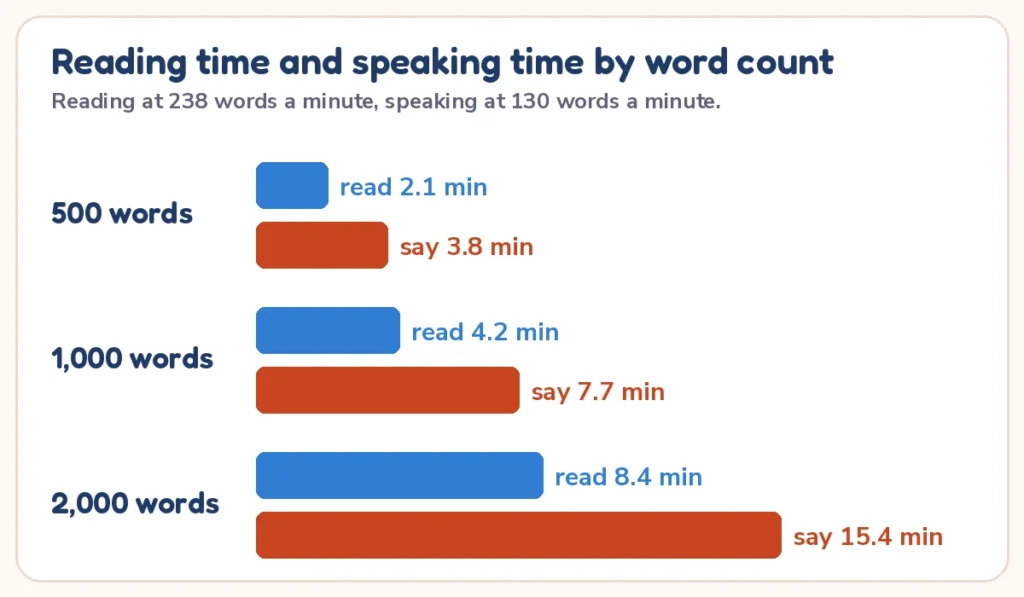
Quick answer: a word is any group of letters or numbers between spaces, so “The quick brown fox” is 4 words. Characters count every letter, number, symbol and space. Reading time is words ÷ 238 words a minute and speaking time is words ÷ 130, so 1,000 words takes about 4 minutes 12 seconds to read and 7 minutes 42 seconds to say.
Private by design: the text you type is counted in your browser. It is never saved, sent to a server or added to the page link, so it is safe for drafts, homework and work documents.
How to use the word counter
- Paste your text into the box, or type it. Text copied from Word, Google Docs or a web page works fine.
- The counts update as you type; there is no button to press. Words, characters, sentences, paragraphs, reading time and speaking time appear on the right.
- Pick a limit in the Check against a limit menu, such as an X post or the Common App essay, to see how many words or characters are left.
- Choose single words or 2-word and 3-word phrases to see the keyword density table, and change the reading and speaking speeds if yours differ.
| Result | What it shows |
|---|---|
| Words | Groups of characters separated by spaces or line breaks that contain a letter or a number |
| Characters and without spaces | Every character, and the same count after all spaces, tabs and line breaks are removed |
| Sentences and paragraphs | Sentences end in a period, question mark or exclamation mark; each line starts a new paragraph |
| Reading and speaking time | Words ÷ your reading speed and words ÷ your speaking speed |
| Keyword density | The words or phrases you repeat most, with how many times and the share of the text |
| Limit check | Characters or words used, left or over, for the limit you choose |
Word counter examples and a printable reading time chart
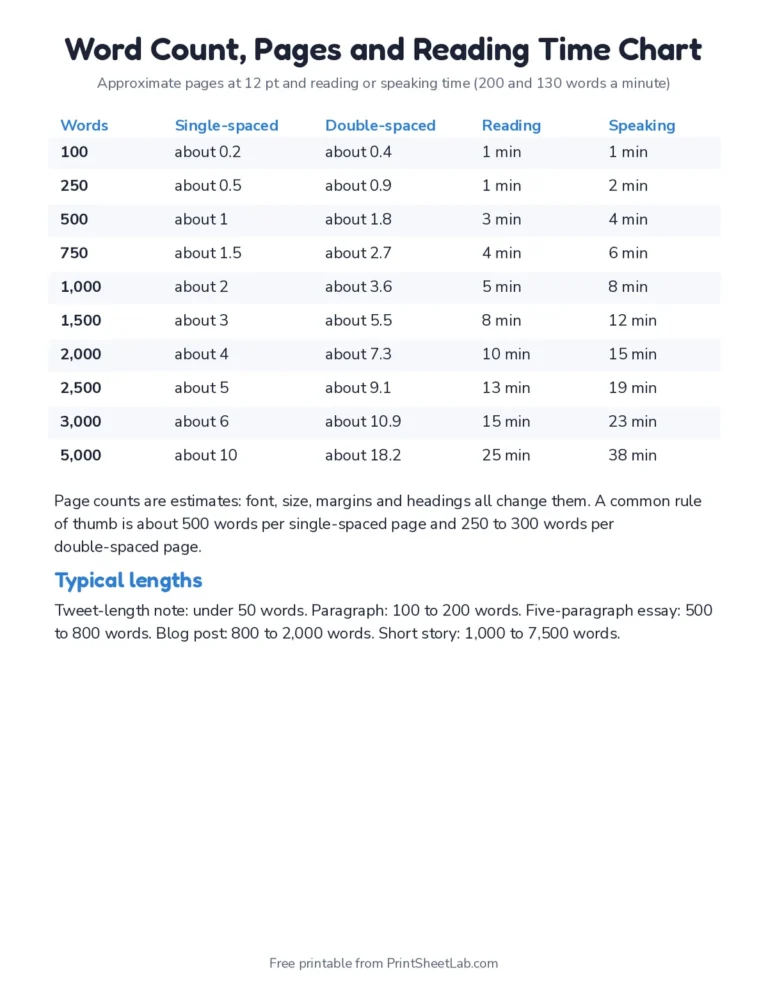
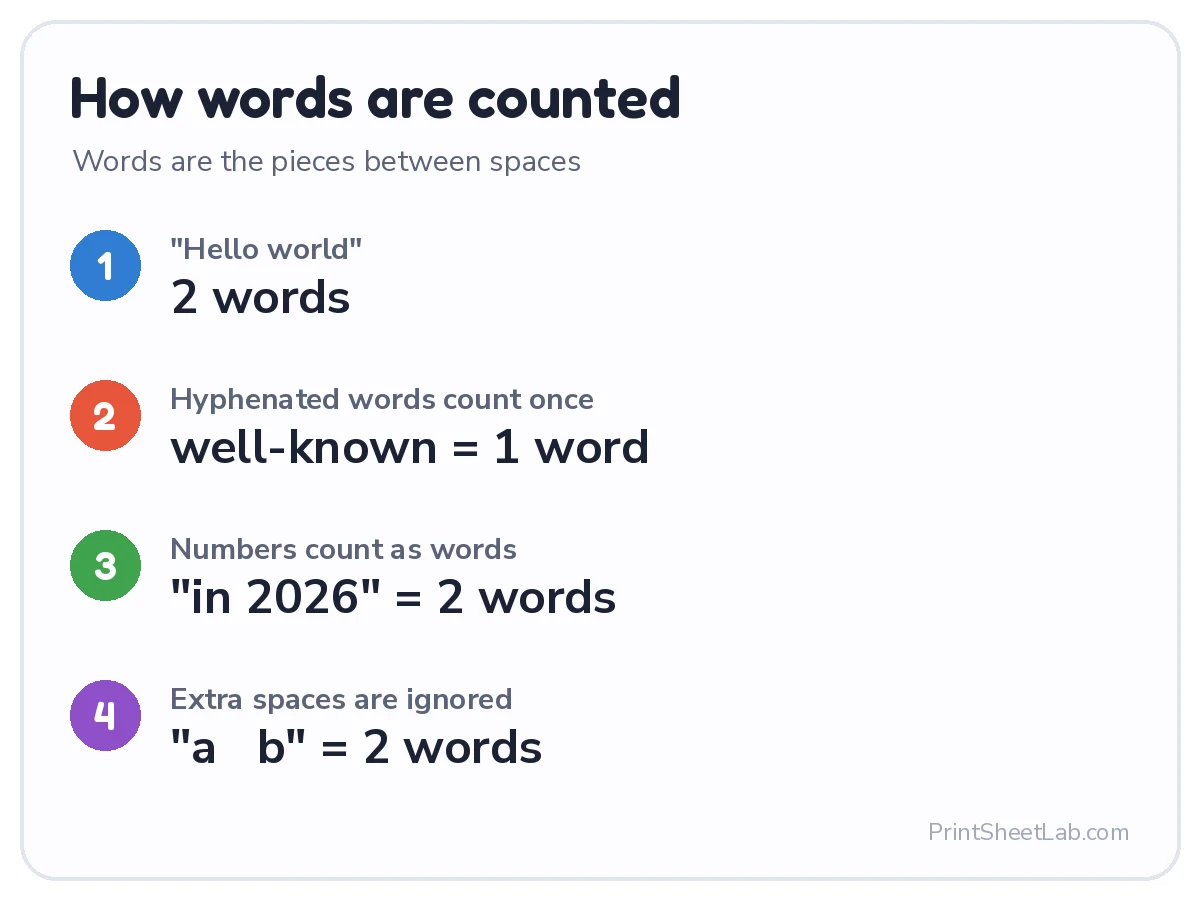
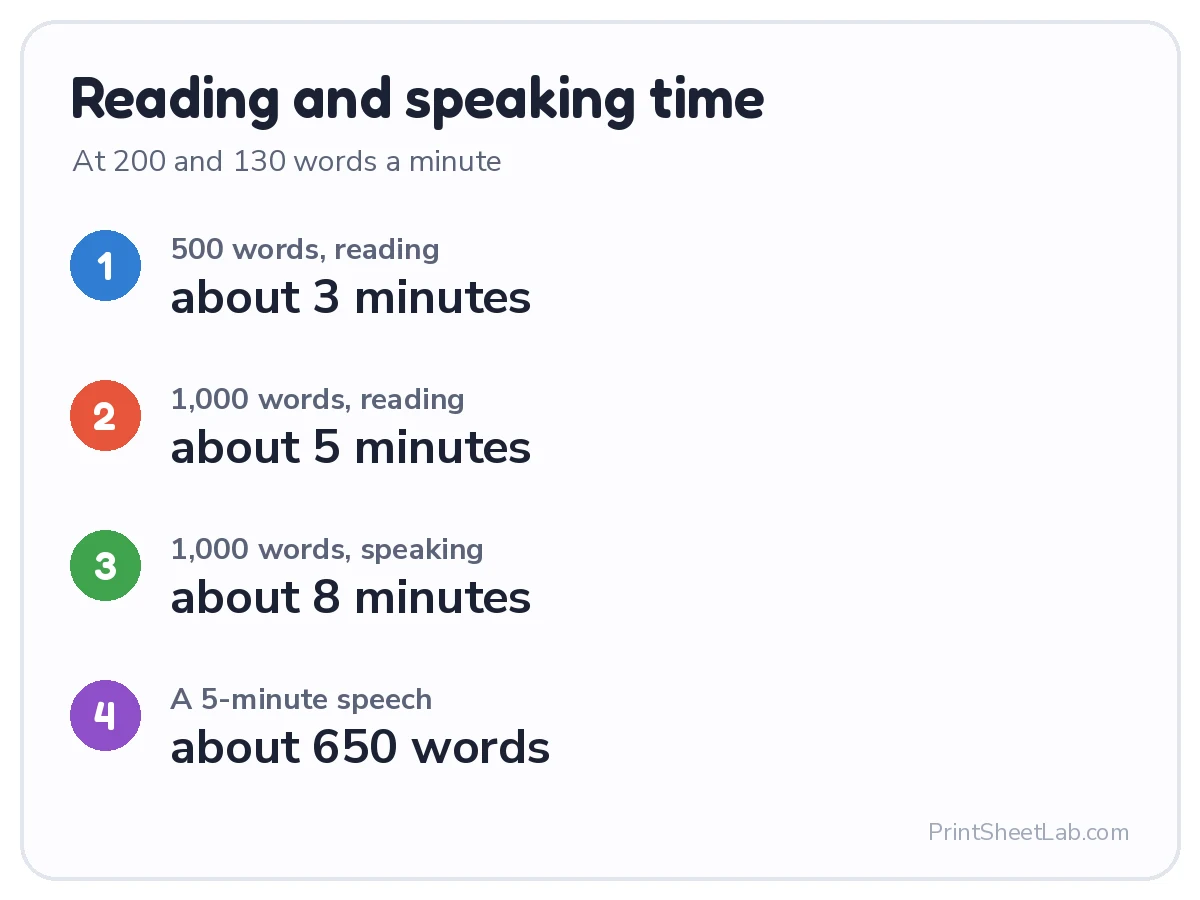
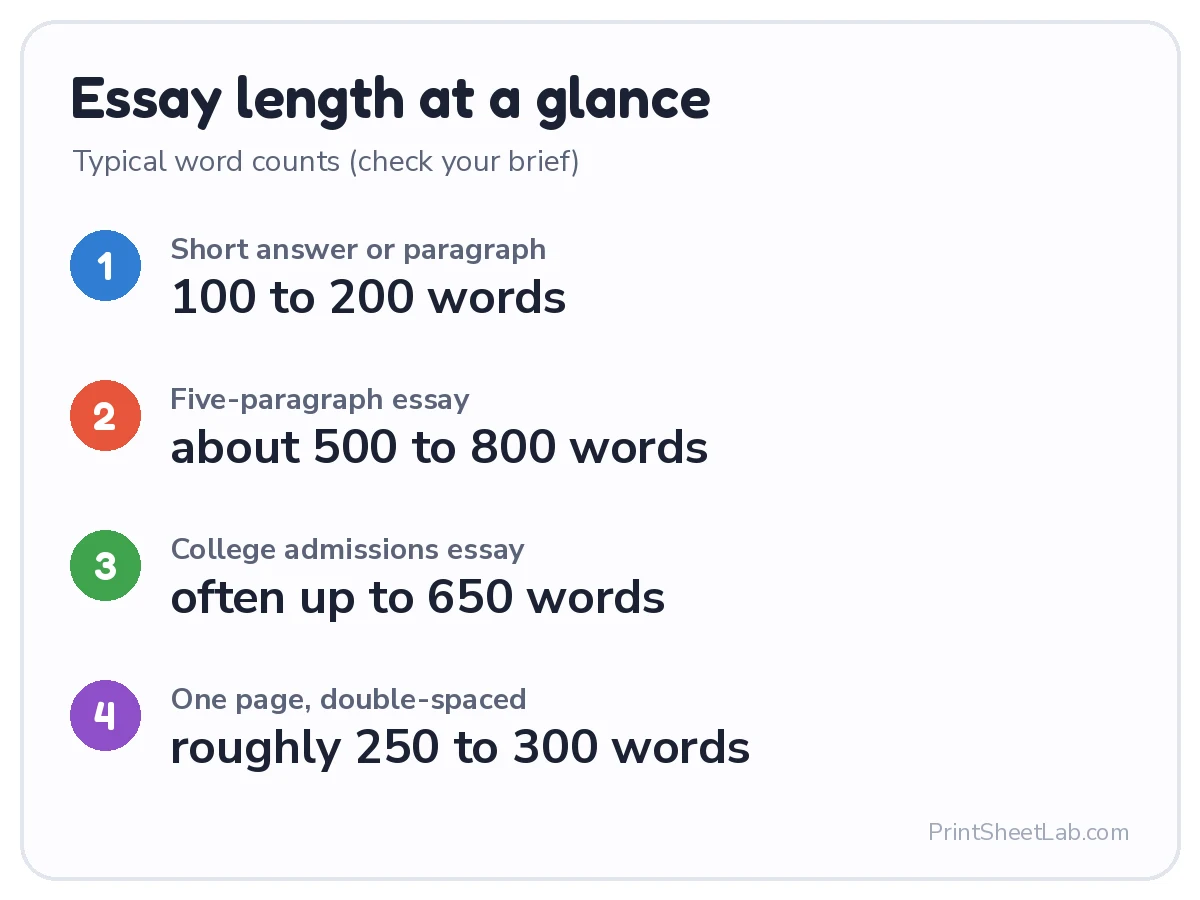
The cards explain how words are counted, how reading and speaking time are worked out, and what typical essay lengths look like. The printable chart turns word counts from 100 to 5,000 into approximate pages and minutes, handy beside a desk or in a writing lesson.
How the word count tool counts words
The word count tool treats a word as any group of characters between spaces or line breaks that contains at least one letter or number. That matches how most word processors count, and it means stray symbols do not inflate the total. The table shows how common cases are counted.
| Text | Counted as | Why |
|---|---|---|
| The quick brown fox | 4 words | Spaces separate the words |
| well-known, mother-in-law | 2 words | Hyphenated words count once |
| 2026 and 3.5 | 3 words | Numbers count as words |
| don’t, e.g., www.example.com/page | 3 words | Apostrophes, periods and web addresses stay inside one word |
| word—word (no spaces) | 1 word | No space, so no break |
| word — word | 2 words | A dash with no letter or number is ignored |
| A lone – or & | 0 words | No letter or number |
Different programs can disagree by a few words, usually over dashes, slashes or web addresses. Google Docs excludes headers, footers and footnotes from its count unless you select them, and Microsoft Word shows the count for the whole document or for the part you select. If a teacher or editor checks with a particular program, a difference of a word or two is normal.
Character counter: characters with and without spaces
The character counter shows two totals: all characters including spaces, and characters without spaces. Limits on forms, applications and most social platforms use characters with spaces, while some translation and publishing work is priced by characters without spaces. “Hello, world!” has 13 characters with spaces and 12 without. Line breaks count as one character each, and an emoji counts as one character here, though some platforms weigh it differently.
When a box has a strict limit, paste your text into the character counter first, trim it, then paste the final version back. The Check against a limit menu does the subtraction for you.
Common word and character limits
These limits come from the official pages linked in the sources. Platforms change their rules, so check the current page before you rely on a number (last checked October 2026).
| Where | Limit | Notes |
|---|---|---|
| X post | 280 characters | X counting rules: emoji, links and some characters are weighted differently |
| Text message (SMS) | 160 characters per message | Standard 160-character message; longer texts are split into several parts |
| Google title and meta description | No fixed limit | Google truncates to fit the device width; about 60 and 155 characters are common rules of thumb |
| YouTube video title | 100 characters | YouTube Help; the description limit is 5,000 characters |
| Google Ads text ad | Headline 30, description 90 characters | Google Ads Help text ad length limits |
| UCAS personal statement (UK) | 4,000 characters | UCAS: also a line limit in the form |
| Common App personal essay (US) | Up to 650 words | Colleges set their own limits for supplements, so check your Common App account |
Essay word counter: hitting the target length
Most school and college assignments set a word range rather than an exact number. As an essay word counter, this tool helps you check the total as you draft and revise. Typical lengths are a paragraph of 100 to 200 words, a five-paragraph essay of 500 to 800 words and a college application essay of up to 650 words. A common rule of thumb is about 500 words per single-spaced page and 250 words per double-spaced page in a 12-point font, but margins and fonts change that.
| Words | Pages, single-spaced | Pages, double-spaced | Reading time | Speaking time |
|---|---|---|---|---|
| 100 | 0.2 | 0.4 | 25 sec | 46 sec |
| 250 | 0.5 | 1 | 1 min 3 sec | 1 min 55 sec |
| 500 | 1 | 2 | 2 min 6 sec | 3 min 51 sec |
| 650 | 1.3 | 2.6 | 2 min 44 sec | 5 min |
| 1,000 | 2 | 4 | 4 min 12 sec | 7 min 42 sec |
| 1,500 | 3 | 6 | 6 min 18 sec | 11 min 32 sec |
| 2,000 | 4 | 8 | 8 min 24 sec | 15 min 23 sec |
| 3,000 | 6 | 12 | 12 min 36 sec | 23 min 5 sec |
| 5,000 | 10 | 20 | 21 min 1 sec | 38 min 28 sec |
Too long? Cut repeated ideas, filler such as “very” and “really”, and long introductions. Too short? Add a specific example, a quotation with your own explanation or a counter-argument. Paste your outline in first to see how much room each section has: in a 600-word essay, an introduction and conclusion of about 75 words each leaves roughly 450 words for the body. For practice material, try the free story paper and writing prompts and grammar worksheets.
Reading time calculator for essays, articles and speeches
This reading time calculator divides your word count by a reading speed. The default is 238 words a minute, the average silent reading rate for adult non-fiction readers in the meta-analysis by Brysbaert (2019) of 190 studies; fiction readers average about 260 and reading aloud is slower, around 183. Change the speed in the box to match your audience: children and people reading in a second language read more slowly.
Speaking time: how many words is a speech?
The speaking time uses 130 words a minute, a comfortable pace between the 100 to 125 words a minute that suits slide presentations and the 150 to 160 of audiobooks, as listed on Wikipedia’s words per minute page. Working backward from a time limit gives you a target length. Rehearse with a timer as well, because pauses, slides and questions all add time.
| Speech length (minutes) | Slow pace: 100 wpm | Typical pace: 130 wpm | Fast pace: 160 wpm |
|---|---|---|---|
| 1 | 100 | 130 | 160 |
| 2 | 200 | 260 | 320 |
| 3 | 300 | 390 | 480 |
| 5 | 500 | 650 | 800 |
| 10 | 1,000 | 1,300 | 1,600 |
| 15 | 1,500 | 1,950 | 2,400 |
| 20 | 2,000 | 2,600 | 3,200 |
Keyword density: your most repeated words
Keyword density is how often a word or phrase appears compared with the total word count: times used ÷ total words × 100. A 500-word article that uses “worksheet” 10 times has a density of 2%. Choose single words, 2-word or 3-word phrases, and the table lists your top ten repeated terms. Tick Ignore common words to hide filler such as the, and, of. Search engines do not publish an ideal density, so use the table to spot accidental repetition and to confirm that your topic words appear, then write for people.
Sentences and paragraphs
The sentence count looks for endings such as periods, question marks and exclamation marks. It is an estimate: an abbreviation such as “Dr.” can add an extra sentence, while a decimal such as 3.5 does not. Paragraphs are counted as separate lines, the way word processors count them. Average sentence length is words ÷ sentences: around 15 to 20 words reads comfortably for most audiences, and many sentences over 30 words can make writing hard to follow.
Writing length targets for young writers
Teachers and parents can use the count to set a clear goal for a writing task. These targets are suggestions, not standards, so adjust them to the child and the assignment. A child who writes a little more each week is making progress.
| Writing task | Suggested length | Reading time at 238 wpm |
|---|---|---|
| A few sentences about a picture | 20 to 40 words | 8 sec |
| A short paragraph | 50 to 100 words | 19 sec |
| A story or a letter | 150 to 250 words | 50 sec |
| A report or book review | 300 to 500 words | 1 min 41 sec |
| A five-paragraph essay | 500 to 800 words | 2 min 44 sec |
A worked example: what the results look like
The sample paragraph that loads with the calculator is 65 words long. The word counter reports 395 characters, 330 without spaces, 5 sentences and 2 paragraphs. Reading time is 65 ÷ 238 = 0.27 minutes, or 16 seconds, and speaking time is 65 ÷ 130 = 0.5 minutes, or 30 seconds. The most repeated words are “worksheets” and “print”, each used 3 times, which is 3 ÷ 65 = 4.62% of the text.
Replace the sample with your own text and every figure updates at once. Delete the text and the counts return to zero.
An editing checklist that uses the numbers
- Compare the word count with the assignment range, then trim or add in the section that is furthest from its share.
- Check words per sentence: if it is above 25, split the longest sentences.
- Look at the repeated words table and swap a few repeats for precise alternatives.
- Read the speaking time aloud once with a timer, then adjust the speaking speed to match your real pace.
Word counter for other languages and special text
The counter separates words by spaces, so it works for English, Spanish, French, German and other space-separated languages. Chinese and Japanese are written without spaces between words, so use the character counts for those. Text copied from a PDF may contain extra line breaks that add paragraphs; the character total is unaffected.
Word counter tips for students and writers
- Check early: paste your outline to see how much room each section has before you write it in full.
- Count what counts: many teachers exclude titles, references and quotations from the limit, so paste only the part that is being counted.
- Keep a margin: aim a few words under a hard limit, because form fields and word processors may count differently.
- Time your talk: divide your word count by 130 to estimate speaking minutes before you rehearse.
- Edit in rounds: check the count after each round of edits, not only at the end.
Questions people ask about word counters
How many words is a page?
About 500 words single-spaced or 250 words double-spaced in a 12-point font with 1-inch margins. 1,000 words is therefore about 2 pages single-spaced or 4 pages double-spaced.
How many words is a 5-minute speech?
About 650 words at 130 words a minute. A 3-minute speech is about 390 words and a 10-minute talk about 1,300.
How do I count words in Google Docs or Word?
In Google Docs, open Tools and choose Word count, which also shows characters and characters without spaces. In Word, the count shows in the status bar at the bottom. Paste your text here to compare, and to get reading time and keyword density as well.
Does a word counter include spaces in the character count?
This one shows both. The main figure includes spaces and line breaks, and the second figure removes them, so you can match whichever rule your form or publisher uses.
Word counter: frequently asked questions
Does the word counter save my text?
No. Everything is counted in your browser. Nothing is stored, sent to a server or added to the page link, even when you press Copy link.
How is reading time worked out?
Reading time is the word count divided by a reading speed, 238 words a minute by default. You can change the speed to match a younger reader or a harder text.
How is speaking time worked out?
Speaking time is the word count divided by 130 words a minute. Change the speed if you speak faster or slower, or add time for pauses and slides.
Do hyphenated words count as one word?
Yes. Words joined with a hyphen, such as self-esteem, count once, as in most word processors.
Why does my word processor show a different number?
Programs handle dashes, slashes, numbers, links, footnotes and text boxes in slightly different ways, so differences of a word or two are normal.
How many characters can an X post have?
A standard X post can have up to 280 characters, with emoji and links weighted differently. Choose X post in the limit menu to see characters left.
What is the best length for a meta description?
Google sets no fixed limit and truncates by device width, but about 155 characters is a safe target. Choose Meta description in the limit menu to check.
How many words is the Common App essay?
The Common App personal essay is capped at 650 words. Choose Common App essay in the limit menu to see how many words you have left.
Can I count characters without spaces?
Yes. The second character figure removes spaces, tabs and line breaks before counting.
Is the word counter free?
Yes. It is free, needs no sign-up, and works on phones, tablets and computers.
Related calculators
- Number to words converter
- Percentage calculator: turn a count into a percent
- Time calculator: add reading and speaking times
- Random number generator
- Lined paper for handwritten drafts
- All calculators
Sources and further reading
- British Psychological Society: reading speed meta-analysis
- Wikipedia: Words per minute
- X Developer docs: Counting characters
- Google Search Central: Snippets and meta descriptions
- Google Docs Help: Count words
Last updated: October 2026.