This free calendar maker builds a printable calendar in a few clicks: one month, all 12 months, or the whole year on one sheet. Pick a design, colors and fonts, start weeks on Sunday or Monday, switch on public holidays for the US, UK, Canada, Australia, Ireland, India or the UAE, type in your own events and birthdays, and download a PDF for US Letter, A4 or A5. It works online with no sign-up, and your dates never leave your device.
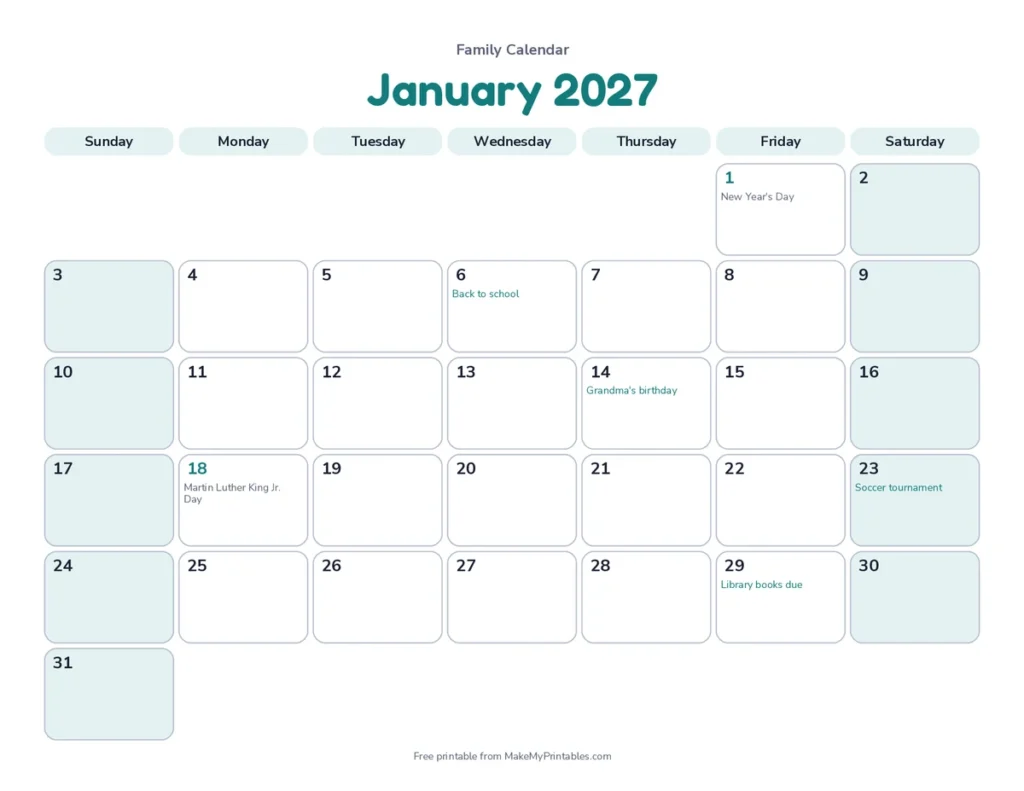
In short: a free calendar maker online with no sign-up: make your own calendar for any year from last year to three years ahead, add holidays for seven countries and five faiths plus your own events, and download a free printable PDF. If you were looking for a calendar generator, this is the same thing, with full control over the design.
How to make a calendar with the calendar maker
- Choose the layout. Make your own calendar in the format you need: One month for the fridge or a planner, all 12 months for a wall calendar, or the year at a glance on a single sheet.
- Pick the year and month. The preview updates straight away.
- Set the week start. US calendars usually start on Sunday; the UK and most of Europe start on Monday.
- Add holidays and events. Pick holidays for one of seven countries, layer faith festivals on top (Christian, Islamic, Hindu, Jewish or Chinese) if you like, and type your own dates in the events box.
- Style it. Choose one of five designs, a color theme and fonts, or add your own photos for a photo calendar.
- Download the PDF or click Print to send it straight to your printer.
What you can make with the calendar maker
| Calendar | Layout to choose | Good for |
|---|---|---|
| Monthly calendar | One month | Fridge, desk, school newsletters, planners |
| 12-month wall calendar | All 12 months, with an optional cover page | Stapled or ring-bound wall calendars and gifts |
| Yearly calendar | Year at a glance | Planning the whole year, holidays and school terms on one sheet |
| Photo calendar | Photo calendar design | Personalised gifts for family and friends |
| Blank calendar | Any layout, holidays off | Writing in your own plans by hand |
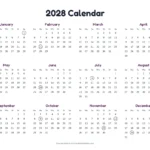
The calendar maker handles all five layouts with the same options. When you choose the year at a glance, the PDF adds a page that lists each holiday and event in full, so nothing is lost in the tiny boxes.


Add your own events, birthdays and deadlines
Type one date per line in the events box, as month/day and a short label, for example:
03/14 Mom's birthday9/8 First day of school12/18 Office party
The calendar maker prints each label (up to 40 characters) in the right day box, and two events on the same day are joined together. Because events use month and day only, the same list works for any year, which makes birthday and anniversary calendars quick to update. It also works for turning a class syllabus into a calendar: type each assignment or exam date on its own line.
Your events and titles stay in your browser. They are not uploaded and not added to the page link, unless you choose “Copy share link” to share them yourself.
Free calendar maker designs, colors and fonts
| Design | Looks like | Best for |
|---|---|---|
| Classic | Boxed grid, shaded weekday row, colored year | Fridge and wall calendars |
| Modern | Big colored month name, open rows | Offices and planners |
| Minimal | Fine lines and a centered title | Clean, ink-light printing |
| Bold band | Full-width colored title band | Classrooms and notice boards |
| Playful | Rounded day tiles | Kids’ rooms and family calendars |
| Photo calendar | Your photo above each month | Gifts and keepsakes |
Pick one of eight color themes (tomato, navy, forest, plum, teal, mustard, rose or charcoal), or set the accent, tint, text and grid line colors yourself. Month names can use a rounded, clean, elegant serif, marker script, handwritten or tall poster font. Numbers can use an easy-to-read, school print or dyslexia-friendly font. Add a title such as “Smith Family 2027” and it prints on every page.
Calendar generator options explained
| Option | What it does |
|---|---|
| Shade weekends | Tints Saturday and Sunday so working days stand out. |
| Notes lines | Adds a ruled notes area under the month grid. |
| Week numbers | Shows the ISO week number beside each row, used by many offices and schools for planning. |
| Cover page | Adds a title page to a 12-month calendar. |
| Ink saver | Removes shading and color so the page prints in plain black lines. |
| Landscape or portrait | Landscape gives wider day boxes; portrait fits a binder or clipboard. |
| Paper size | US Letter, A4 or A5, each drawn at its real size. |
Calendar ideas
Here are five ways to use the free calendar maker, from a family fridge calendar to a classroom notice board.
- Family calendar: one color theme, everyone’s birthdays in the events box, and notes lines for weekly chores.
- School and classroom calendar: term dates, tests and trips, printed in the bold band design for the notice board.
- Kids’ calendar: the playful design with the rounded font, so children can cross off the days until a birthday or holiday.
- Work planner: Monday start, week numbers and the minimal design.
- Gift calendar: twelve family photos with the photo calendar maker and a cover page.
About the holidays
In the calendar maker, US holidays are the 11 federal holidays. When one falls on a weekend, the day off for most workers moves to the nearest weekday, but the calendar shows the actual holiday date. UK holidays are the bank holidays for England and Wales, including substitute days, calculated from the standard rules and checked against GOV.UK for 2026 to 2028. The government occasionally adds a one-off bank holiday, so check the official GOV.UK list for dates further ahead.
Canada, Australia, Ireland, India and the UAE are built in too, and festival dates can be added on top of any country.
Islamic dates are worked out with the Umm al-Qura calendar and shown as expected dates, since a local moon sighting can shift them by a day. For a country that is not listed, turn holidays off and add your own dates in the events box.
Frequently asked questions
8 quick answers
Is there a calendar maker online free of charge?
Yes. The calendar maker is free: make and print as many calendars as you like for home, school or work, with no sign-up and no watermark.
Can I make a calendar with my own events?
Yes. Type each date as month/day and a label, one per line, and it prints in the right day box. Birthdays, school days, deadlines and appointments all work.
Can I make a calendar with pictures?
Yes. Choose the photo calendar design, or open the photo calendar maker, to use a single photo all year or give each month its own picture. Photos are placed in your browser and are never uploaded.
Can I print all 12 months at once?
Yes. Choose “All 12 months” and the PDF has one page per month, January to December, with an optional cover page.
Can I edit the calendar after downloading?
The PDF is ready to print rather than editable. To change it, come back to this page, make your changes and download a new copy. Your settings stay in the page address so you can bookmark them.
How do I make a calendar in Word, Excel or Google Docs?
Those programs have calendar templates, but changing designs, holidays and dates takes time. This maker does the layout for you. If you need the calendar inside a document, download the PDF and insert it as a page or image.
Which years can I make?
Any year from last year to three years ahead, so the list moves forward each January.
Does it work on a phone?
Yes. On a phone, tap “Customise” to open the options, then download the PDF and print it from your phone or send it to a computer.
Ready-made calendars
- 2027 calendar, year at a glance or one page per month
- October 2026, November 2026 and December 2026 calendars
- Photo calendar maker for personalised gifts
- Need ruled pages for a planner? Try the printable paper maker.