Zoom bingo is a game for video calls in which every player holds a card of things that might appear on a screen, such as a bookshelf, a cat, a plant or a funny hat, and marks a square when it shows up in someone’s frame. It turns an ordinary call into a relaxed virtual happy hour. The card maker above has a ready-made picture set loaded: 29 squares with emoji, a free center and up to 100 different cards per print.
In short: press Edit and print this card, rename any square, pick a color theme and download one PDF. Everyone gets a different card made from 24 of the 29 squares plus a free space. It runs in your browser, with no sign-up, and nothing is uploaded. It is an independent tool, not part of any video call product.
What Zoom bingo is and when to play it
A video call gives everybody a small window into someone else’s home. That window is full of detail: a guitar leaning on a wall, a dog asleep on a couch, a lamp, a trophy, a view of the rain. Most of the time these details go unremarked. Zoom bingo asks people to notice them, and that noticing is what makes a group of faces on a screen feel like a group of people.
Zoom bingo suits several occasions. Remote teams use it at the start of a call as a warm-up, friends use it at an online party, and families use it for a call with relatives across several countries. It is also a gentle way to introduce new colleagues, because the squares invite small stories: “That is my grandfather’s guitar.” The rules of Zoom bingo are the ones everybody already knows, so nobody needs a tutorial.
Video calls are a form of videotelephony, which has a longer history than most people assume. For background, read the Wikipedia article on videotelephony. Our Zoom bingo set is independent of any call product: it is a card you print or open in a browser, and you play it with whatever video software your group already uses.
Zoom bingo cards: the 29 squares in this set
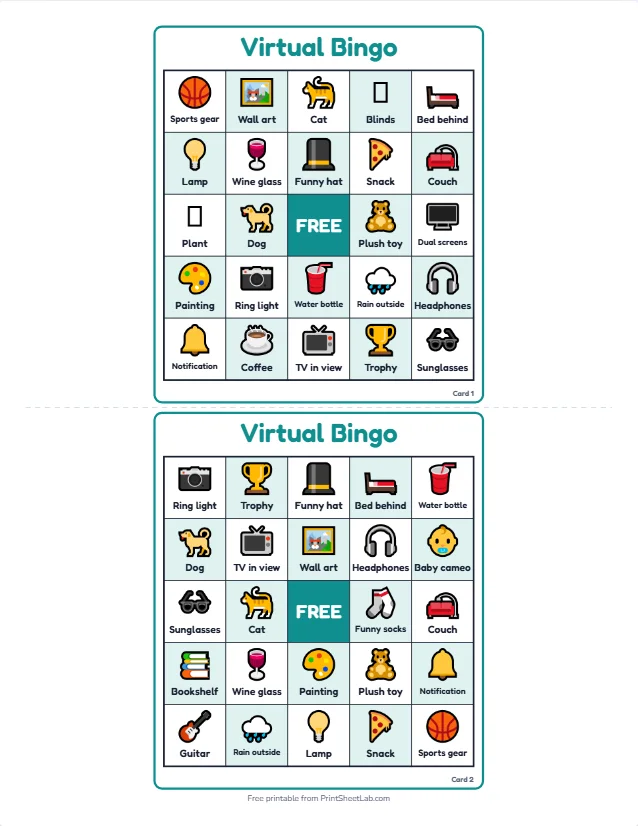
The set has 29 picture squares in six families. Each card shows 24 of them, so cards differ while every square stays equally likely. The table lists the squares exactly as they appear on the cards.
| Family | Squares in the set | What to know |
|---|---|---|
| Gear and tech | 🎧 Headphones, 🖥️ Dual screens, 📷 Ring light, 🔔 Notification, 💡 Lamp | Equipment that shows up in a webcam frame. Headphones are almost guaranteed on any remote team call. |
| Pets and people | 🐕 Dog, 🐈 Cat, 🧸 Plush toy, 👶 Baby cameo | Living (and plush) creatures wandering into view. These are the squares that make a group laugh together. |
| Walls and furniture | 📚 Bookshelf, 🖼️ Wall art, 🎨 Painting, 🛋️ Couch, 🛏️ Bed behind, 🪟 Blinds, 📺 TV in view, 🪴 Plant | The room itself. This is the biggest family because every background contains something from it. |
| Drinks and snacks | ☕ Coffee, 🍷 Wine glass, 🥤 Water bottle, 🍕 Snack | Whatever people are sipping or eating. Swap the wine glass for tea if your group is mixed. |
| Hobbies and style | 🎸 Guitar, 🏆 Trophy, 🏀 Sports gear, 🎩 Funny hat, 🕶️ Sunglasses, 🧦 Funny socks | Things that reveal a person’s personality. These are the squares that start conversations. |
| Weather and window | 🌳 Window view, 🌧️ Rain outside | What is happening outside. Helpful on calls that span several time zones. |
A sample card, square by square
The preview above shows two real cards. Card 1 starts with Sports gear, Wall art, Cat, Blinds and Bed behind in the top row, and its middle row reads Plant, Dog, FREE, Plush toy and Dual screens. It leaves out five squares: Bookshelf, Guitar, Funny socks, Baby cameo and Window view.
Card 2 has four of those squares (Bookshelf, Guitar, Funny socks and Baby cameo) but misses Coffee, Plant, Window view, Dual screens and Blinds. A player with card 1 hopes for a dog, whereas the one with card 2 hopes for a guitar. That is why a host can safely say “I see a cat” without giving away the winner.
The free center can be anything: a smiley, a logo or the name of your team. Some hosts use it for a picture of the group.
Virtual happy hour bingo: five ways to play
Virtual happy hour bingo is the same card used five different ways. Choose one mode per call, or run two of them back to back. Every mode ends the same way: someone completes a line and says “Bingo”.
Spot it
Players watch the gallery view and mark a square whenever they see it in anyone’s frame. No host calls are needed. It suits a casual call of ten to thirty people, and it also encourages people to look at one another instead of at their own faces. A simple rule helps: the item must be clearly visible, not just guessed.
Host calls
The host reads out squares one at a time from a shuffled list, and players mark the ones they hold. It is a slower, more classic game. For every call, someone in the group may have the item in the room and can show it to the camera, which makes each call a small moment of fun.
Show and tell
The host calls a square and gives players thirty seconds to find that object at home and hold it up. The first person with a complete line wins. It makes the game physical, and it is a lively choice for a team that has been sitting still all day.
Number bingo over video
For a classic game, the host opens the bingo caller in a browser tab, shares that tab on the call and reads the numbers. Players use numbered cards from the bingo card generator. It is ideal as a break between longer activities.
Photo challenge
A week before the party, invite each person to send a photo of one of the squares from their home. The host collects them, and on the call everyone guesses whose room each photo shows. It takes extra preparation but yields a collection of images the team enjoys long after the call.
Zoom bingo printable: paper card, second screen or phone
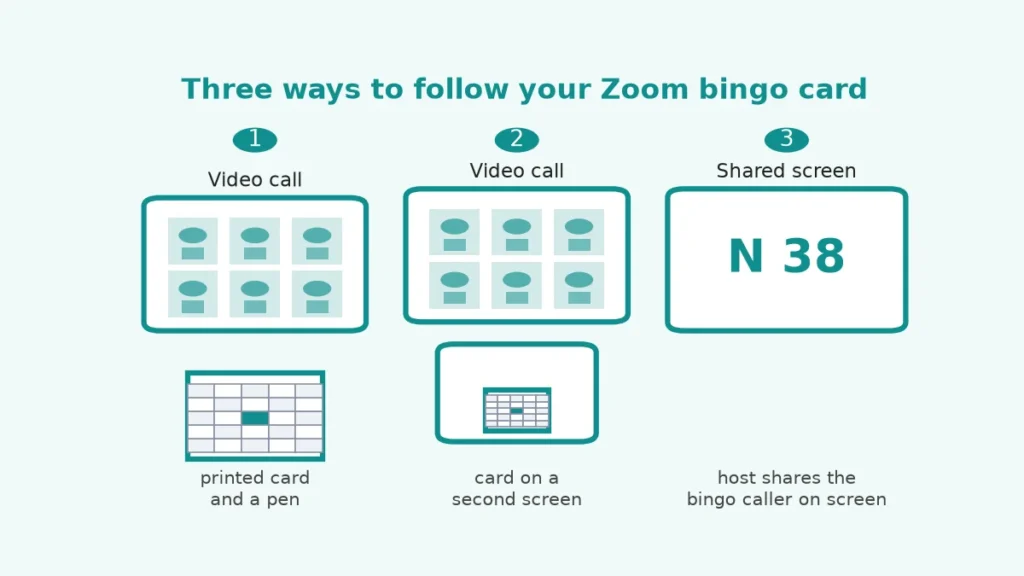
A Zoom bingo printable works in three ways, and the diagram below shows each of them. Choose according to your hardware and the size of your group, and note that the PDF is the same in every case.
Print one card each
Paper has the advantage that it never competes with the call for screen space. Email the PDF a day ahead, ask each person to print one card and keep a pen nearby. People with no printer can use a second device. For an office team, the host can print cards and post them, though that takes planning.
Keep it on a second screen
With a second monitor or a tablet, open the PDF and use a markup tool or just remember your marks. The risk is clutter: a card laid over the video window blocks the faces, and the game is meant to be about the faces. Place the card beside the call, not on top of it.
Let the host share a caller
Where numbers are called, the host shares a window with the called number in large type. The caller has a big-screen mode designed for exactly this purpose. Players follow their own numbered cards. Square-based rounds need no shared screen at all, because everything is visible in the gallery.
How to host Zoom bingo in five steps
A hosted round of Zoom bingo needs about ten minutes of preparation. The steps below use the spot-it mode, which is the easiest to run, and you can adapt them to any other mode.
- Choose the set. Open the card maker above, rename any square that does not fit your group and remove anything that could be awkward, such as the wine glass for a mixed group.
- Make the cards. Print one per person plus a few spare, or save the PDF and email it. Print the caller sheet too if you want a list for hosting.
- Send an invitation. Tell guests the call is a Zoom bingo happy hour, that cards arrive by email and that taking part is optional.
- Explain in thirty seconds. “Mark a square when you see it on screen, complete a line, type Bingo in the chat.”
- Run Zoom bingo. Chat, laugh and let the squares fill. Confirm each winner by asking them to read the line aloud.
Keep the host role light in Zoom bingo. The host does not have to watch every frame, only to take the chat message and verify the line. A co-host helps on calls of more than twenty people, since two people are better than one at spotting a square.
Remote team bingo: rules, prizes and etiquette
Remote team bingo only works if people feel safe taking part. Many people share their homes on camera with some reluctance, so the etiquette matters as much as the rules. Make these points part of the invitation.
- Opt in. Nobody has to play Zoom bingo or switch on their camera. Cards work just as well for people who watch with the camera off.
- Be kind about homes. Squares are about objects, not about how nice or tidy someone’s home is. Never comment on the size or condition of a room.
- No family spotlight. Children and partners are not squares to hunt for. Remove “Baby cameo” if it makes anyone uneasy.
- Alcohol is optional. Swap the wine glass for tea or a soft drink and let guests choose.
- Respect time zones. A call at breakfast for one person is an evening drink for another. Keep squares neutral.
- Keep Zoom bingo prizes light. A virtual trophy, a vote on the next song or the choice of the next game is enough.
If a square causes discomfort, replace it without discussion. The point is shared fun, so a host should feel free to edit the list on the spot and print again.
Video call bingo on Zoom, Teams and Meet
Video call bingo works on any software that shows other people’s cameras. The tool here is a plain browser page and has no link with Zoom, Microsoft Teams or Google Meet, and no add-on to install. Everything you need is already part of your call: the gallery view, the chat and the share-screen button. Here is how the common features fit the game.
| Call feature | How the game uses it | Tip |
|---|---|---|
| Gallery view | Players scan every frame for squares | Ask people to turn on cameras if they wish |
| Chat | Players type “Bingo” when they have a line | The host reads each claim aloud |
| Screen share | The host shares the bingo caller for number rounds | Use big-screen mode in the caller |
| Breakout rooms | Small groups play separate rounds | Give each room its own host |
| Reactions | Players react to a good find | Agree on one reaction for “I have it” |
| Polls | Vote for the funniest room | Use at the end for a bonus prize |
For a bigger event with guests who join from a link, you can run Zoom bingo as a live round instead of a PDF. Play bingo online deals self-marking cards to everyone who opens your link, and play custom bingo online lets you use your own squares. The guide on how to play bingo online with friends covers the hosting side.
How likely is a square to appear on the call?
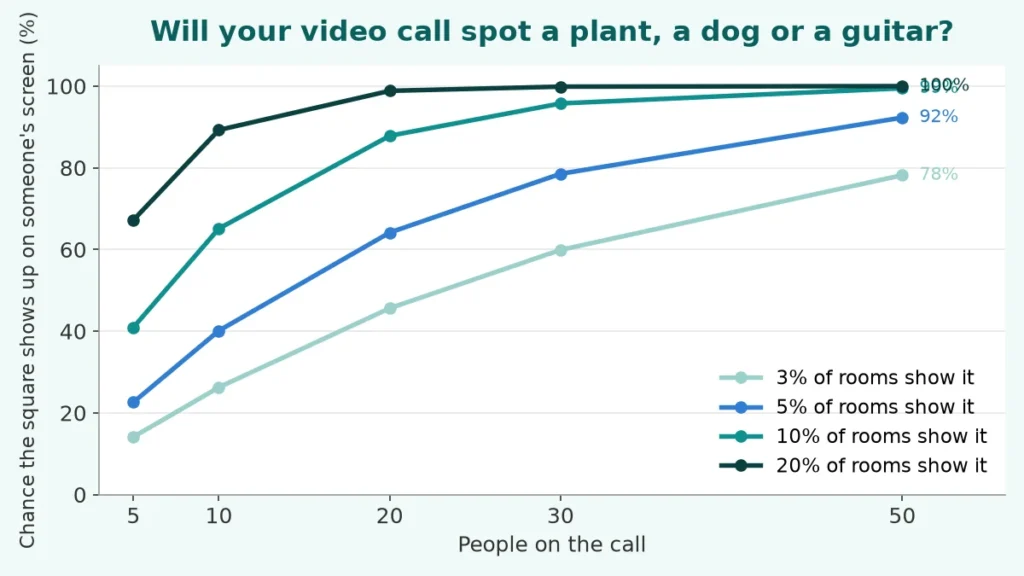
A reasonable worry for a Zoom bingo host is that some squares will never appear. The chance depends on the number of people on the call and how common the object is. If each room has a given item with probability p, the chance that at least one of n rooms shows it is 1 minus (1 minus p) to the power n. This is a model, and the probabilities are assumptions, not measurements.
| People on the call | Item in 3% of rooms | Item in 5% of rooms | Item in 10% of rooms | Item in 20% of rooms |
|---|---|---|---|---|
| 5 | 14% | 23% | 41% | 67% |
| 10 | 26% | 40% | 65% | 89% |
| 20 | 46% | 64% | 88% | 99% |
| 30 | 60% | 79% | 96% | 100% |
| 50 | 78% | 92% | 99% | 100% |
On a call of 20, an item that only one room in twenty has still shows up 64% of the time. A rare item such as a guitar, assumed here at 3%, appears on a call of 30 about 60% of the time. A common one such as a plant, at 20% of rooms, almost always appears for ten or more people. So on small calls, favor common squares such as Coffee, Headphones and Wall art.
Group size and round length
In the host-calls mode of Zoom bingo the host reads the 29 squares in random order, one at a time. We simulated that for different card sizes and group sizes. Each result comes from 6,000 simulated rounds. A card has a free center on odd grids, and every card holds a random selection of the 29 squares.
| Players | 3×3 card: median call of first bingo (middle half) | 4×4 card: median call | 5×5 card: median call |
|---|---|---|---|
| 4 | 6 (5 to 9) | 12 (10 to 14) | 13 (11 to 15) |
| 8 | 5 (4 to 7) | 10 (9 to 12) | 11 (10 to 13) |
| 15 | 4 (3 to 5) | 9 (8 to 11) | 10 (9 to 12) |
| 30 | 3 (2 to 4) | 8 (7 to 9) | 9 (8 to 10) |
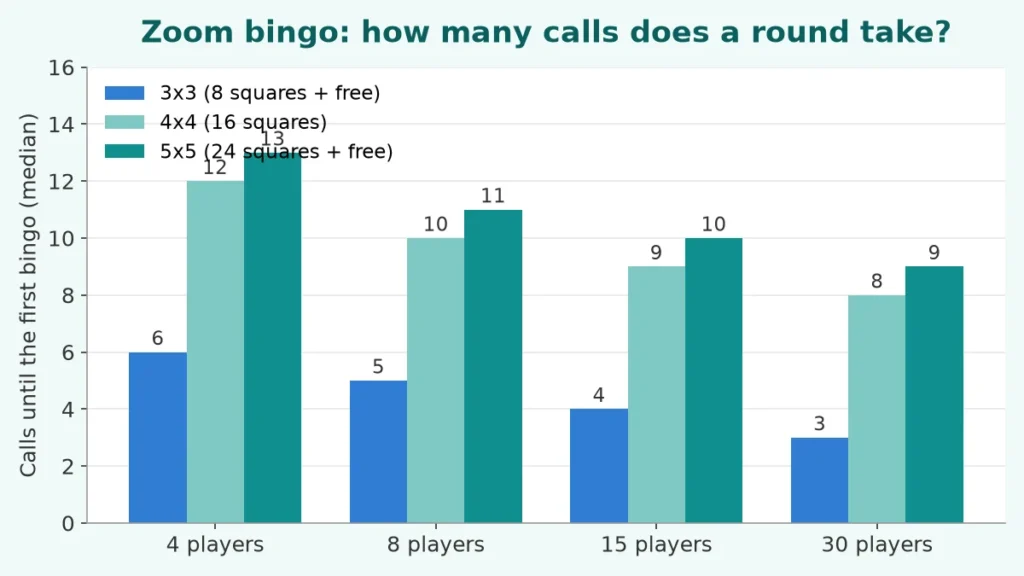
If a host calls one square every 20 seconds, a 5×5 round of Zoom bingo with 15 players needs about 10 calls, or about 3.3 minutes. A 3×3 card ends in about 4 calls, which is roughly a minute and a half. More players shorten the round, but with diminishing returns, because even 30 players still need about 9 calls.
The next table answers a different question: if you can only call a few squares, will anyone win at all? It shows the share of rounds, on 5×5 cards, that had a winner by the given call.
| Players | Winner by call 8 | By call 10 | By call 12 | By call 15 |
|---|---|---|---|---|
| 4 | 6% | 19% | 44% | 86% |
| 8 | 12% | 35% | 67% | 98% |
| 15 | 21% | 55% | 88% | 100% |
| 30 | 38% | 80% | 99% | 100% |
A table like this helps you plan a Zoom bingo time slot. With 15 players and 5×5 cards, a game of 12 calls ends with a winner about 88% of the time. With four players the same 12 calls give a winner less than half the time, so a small group should use a 4×4 or 3×3 card. A full card (blackout) takes nearly all 29 calls, with a median of about 28.
Virtual team building bingo: ideas that fit the format
Virtual team building bingo does not need to be silly. The same card can serve for a serious, relationship-building call if you choose the squares and the rules with care. These ideas work well with the card maker’s ability to change every square.
| Idea | How to set it up | Best for |
|---|---|---|
| Desk tour | Each player shows one square item from their room and tells its story in one sentence | New teams that do not know each other yet |
| Time-zone bingo | Squares such as “Sunrise”, “Late night snack” and “Rush hour” for global teams | Distributed teams across regions |
| Team trivia squares | Squares are facts about colleagues; players find the person who matches | Teams of 10 to 25 people |
| Hobby bingo | Squares hold hobbies and talents; players post a photo when they match one | Long-running teams who want fresh topics |
| Kids and pets corner | A friendly round for families, with squares like “Drawing” and “Pet” | Family video calls |
| Two-minute break | A 3×3 card and a very short round at the start of every weekly call | Teams that meet often |
For other warm-up activities, pair the card with icebreaker questions or this or that questions. Both work well on video, because each person can answer in a sentence.
Customize the squares in the card maker
The card maker is the full-screen editor that opens when you press Edit and print this card. The Zoom bingo picture set is already loaded. It has five tabs, and everything you type stays in your browser.
Setup and Items
Setup picks the card type and the grid size, from 3×3 up to 7×7. In Items you can rename any of the 29 squares, delete or add squares, and give each an emoji or a picture from your device. A 5×5 card with a free center needs 24 squares, a 4×4 card needs 16 and a 3×3 card needs 8.
From 29 squares there are 118,755 ways to choose 24, 67,863,915 ways to choose 16 and 4,292,145 ways to choose 8, and each choice can be placed on the grid in many orders. Every Zoom bingo card in a print run therefore differs.
Design and Templates
Design controls colors, fonts, text size, borders, rounded corners, tiles, tints, backgrounds, a logo and a footer. The Zoom bingo set opens in a teal theme. Add a company logo or the name of your party in the title, such as “Friday Happy Hour Bingo”. The Templates tab switches to another of the 30 starter sets, so you can move from a work call to a family one without losing your design.
Print is where you choose the number of cards (1 to 100), one to six per page, Letter or A4, portrait or landscape and cut guides. You can add a caller sheet and calling cards. The preview with zoom shows the real page. Download the PDF, print it or copy a shareable link that carries your words to a co-host.
Make your Zoom bingo cards your own
- Replace emoji with real photos of your office, your mascot or your team.
- Add squares from your own call culture, such as “Someone says the wrong name” or “Muted again”.
- Use a larger text size if people will view the card on a phone.
- Pick the black-and-white style if everybody will print on a home printer.
More bingo for calls and parties
- Office Bingo: the full guide behind this page
- Meeting bingo has squares about frozen screens, mute mishaps and office phrases.
- Human bingo sends people around to find a match for each square.
- Getting to know you bingo is a good first call for new teams.
- Printable bingo cards lists every template.
- Charades ideas for the next round of your video party.
- Bingo caller for a number round you can share on screen.
Frequently asked questions
10 quick answers
How do you play Zoom bingo?
Every player gets a card of picture squares. When an item shows up on someone’s screen, players mark it. The first person to complete a row, column or diagonal types Bingo in the chat and wins a small prize.
Is this connected to Zoom?
No. The card maker is an independent browser tool and is not affiliated with Zoom, Microsoft Teams or Google Meet. You print or open the card yourself and play it on any video call.
Is Zoom bingo free to print?
Yes. You can download the PDF without an account and there is no watermark. Your words stay in your browser.
How many cards can I print?
Up to 100 different cards in one PDF, with one, two, four or six per page on Letter or A4 paper.
What card size should I use for Zoom bingo?
A 5×5 card suits a call of 15 minutes or more. For a short call or a small group, use 4×4 or 3×3. In the simulation a 3×3 card took about 4 calls with 15 players.
Can I change the pictures and words?
Yes. The Items tab lets you rename, remove or add squares, each with an emoji or a picture. The Design tab changes colors, fonts, borders and the title.
Do people have to turn on their cameras to play Zoom bingo?
No. Taking part must be optional. Players with cameras off can still follow the host calls or the chat.
How do I run a number round on a call?
Open the bingo caller in a browser tab, press its big-screen button and share that tab on the call. Players use numbered cards.
Can I play Zoom bingo without printing?
Yes. Keep the card on a second screen or phone, or host a live game with the online bingo pages, where each guest gets a self-marking card.
Are the simulation numbers exact?
No. They come from 6,000 simulated rounds per row and rest on assumptions, for example how often an item appears in a room. A real call can be faster or slower.