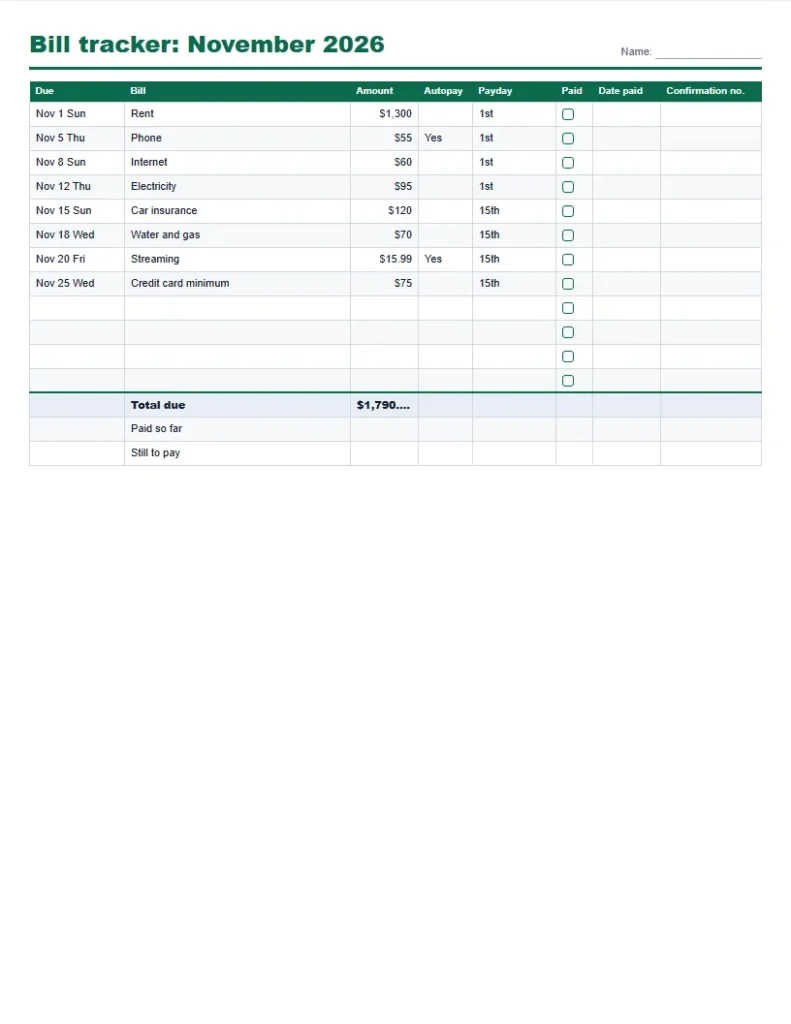
A bill tracker printable is a one-page list of what you owe and when, with a box to tick when each bill is paid. This one is built from your own bills: type the name, amount and due day, add your paydays, and it prints a monthly checklist, a yearly bill grid or a due-date calendar, with each bill marked for the payday that should cover it.
Quick answer: Type your bills with their due days, add your payday dates, and press Print or save as PDF. In the example below, eight bills total $1,790.99 a month, $21,491.88 a year; the 1st payday covers $1,510 of them and the 15th payday covers $280.99.
How to use the bill tracker printable
- List each bill with its monthly amount and the day of the month it is due. Tick Autopay for the ones that leave your account by themselves.
- Type your payday dates as day numbers, for example 1, 15 for two paydays a month, or 28 for one.
- Choose the monthly checklist, the yearly bill grid or the due-date calendar of the bill tracker printable, and pick the month and year.
- Print or save as PDF, then tick the Paid box and note the confirmation number as each bill goes out.
The bills are sorted by due date automatically. A bill due on the 31st sits on the last day of shorter months, and your list stays in this browser, so next month you only need to change the amounts that changed.
Monthly bill tracker printable, yearly grid and calendar
| Layout | What it shows | Best for |
|---|---|---|
| Monthly checklist | Bills sorted by due date with amount, autopay, payday, paid box, date paid and confirmation number | Paying bills each month and keeping a record |
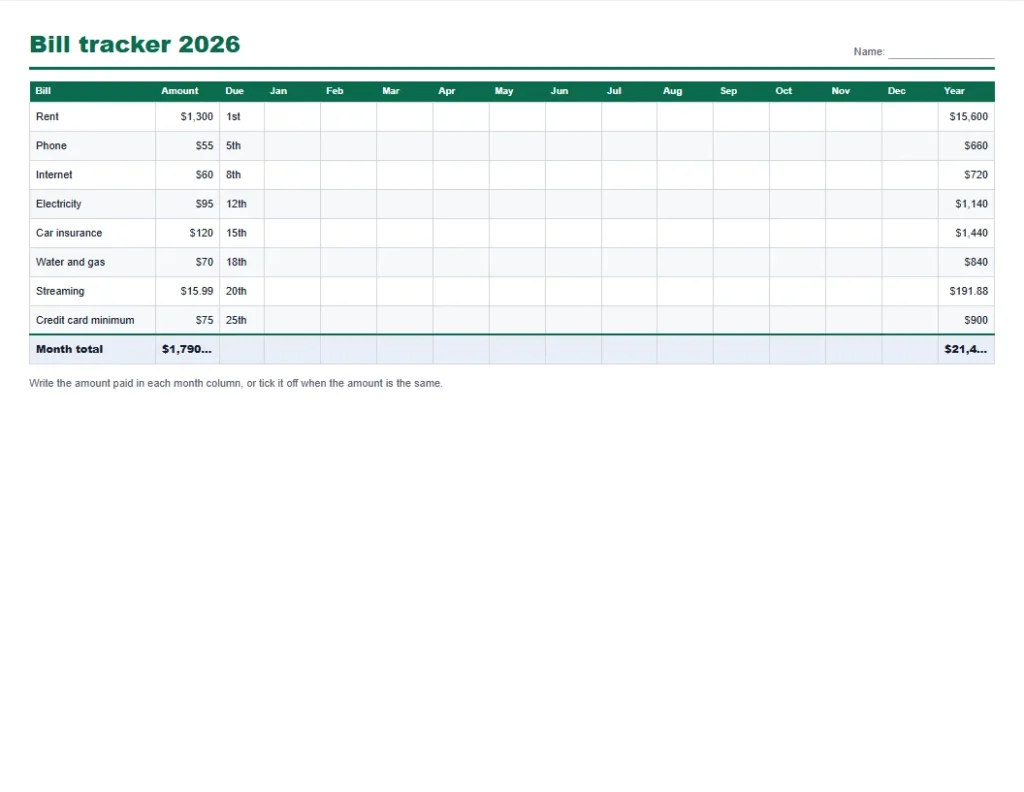
| Yearly bill grid | One row per bill and a column for each month, with the yearly total | Seeing the whole year and catching changes in amount |
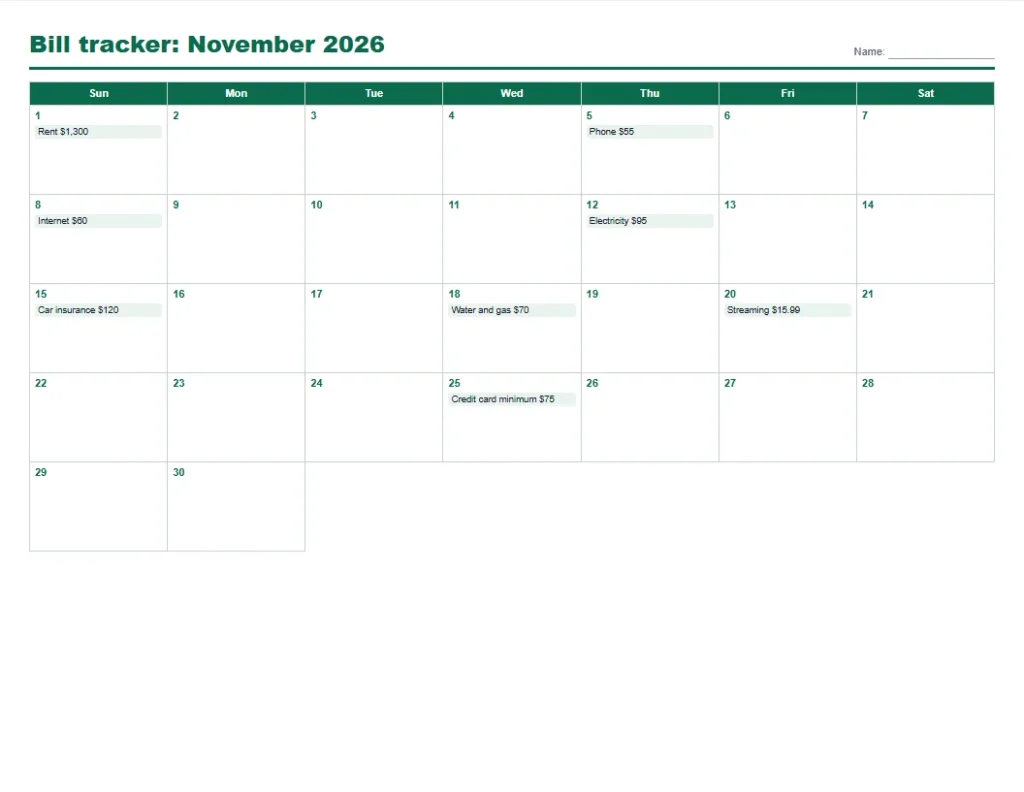
| Due-date calendar | A month calendar with each bill written on its due day | Spotting weeks where several bills land together |
Bill organizer printable: which payday should pay which bill
The tool gives each bill to the latest payday on or before its due day. With paydays on the 1st and the 15th, the eight example bills split like this:
| Bill | Amount | Due day | Paid from payday |
|---|---|---|---|
| Rent | $1,300 | 1st | 1st |
| Phone | $55 | 5th | 1st |
| Internet | $60 | 8th | 1st |
| Electricity | $95 | 12th | 1st |
| Car insurance | $120 | 15th | 15th |
| Water and gas | $70 | 18th | 15th |
| Streaming | $15.99 | 20th | 15th |
| Credit card minimum | $75 | 25th | 15th |
| Payday | Bills it covers |
|---|---|
| 1st | $1,510 |
| 15th | $280.99 |
| Total each month | $1,790.99 |
The split is uneven: the 1st payday carries $1,510 and the 15th only $280.99, because rent is due on the 1st. Seeing it lets you move a due date with the biller if one paycheck is stretched.
Now the same bills for someone paid on the 5th and the 20th:
| Payday | Bills it covers |
|---|---|
| 5th | $400 |
| 20th | $1,390.99 |
| Total each month | $1,790.99 |
Rent, due on the 1st, falls before the first payday of the month, so the tool gives it to the 20th payday of the month before ($1,300 of rent). A bill due early in the month is often paid from the last paycheck of the month before, and the tracker shows that.
Yearly bill tracker printable: where the yearly total goes
Multiplying each bill by 12 gives the yearly bill grid total of $21,491.88. Each bill’s share of the monthly total:
| Bill | Monthly | Yearly | Share of bills |
|---|---|---|---|
| Rent | $1,300 | $15,600 | 72.6% |
| Car insurance | $120 | $1,440 | 6.7% |
| Electricity | $95 | $1,140 | 5.3% |
| Credit card minimum | $75 | $900 | 4.2% |
| Water and gas | $70 | $840 | 3.9% |
| Internet | $60 | $720 | 3.4% |
| Phone | $55 | $660 | 3.1% |
| Streaming | $15.99 | $191.88 | 0.9% |
One bill, the rent, is 72.6% of the total. A small saving on a small bill, such as streaming, helps less than a call about insurance or the internet plan.
Autopay or manual payment
| Autopay | Pay by hand | |
|---|---|---|
| Late payments | Rare if the account has the money | Possible if you forget |
| Control | Amount can change without you noticing | You see every amount before paying |
| Best for | Fixed bills such as phone, insurance and streaming | Variable bills and anything you want to check first |
| Tracker use | Mark Autopay and still tick Paid when it clears | Tick Paid and write the confirmation number |
Under the US Electronic Fund Transfer rules, you can stop a preauthorized payment by telling your bank at least three business days before the scheduled date, and the bank may ask for written confirmation within 14 days. The text is in 12 CFR 1005.10. Write the due dates of autopay bills on the tracker so you notice a change before the money leaves.
A ten-minute monthly routine for your bill tracker printable
- Print the new month and update any amount that changed, such as electricity.
- Tick Autopay bills as they clear in your bank app and note anything that did not.
- On each payday, pay the bills marked for that payday and tick the Paid box with the date and confirmation number.
- At month end, file the sheet and check the yearly grid for amounts that crept up.
Frequently asked questions
7 quick answers
Is this bill tracker printable free?
Yes. It is free to print and save as a PDF, with no sign-up and no watermark.
Can I print a yearly bill tracker printable?
Yes. Choose Yearly bill grid for a landscape sheet with a row for each bill and a column for each month.
How many bills can I list?
Up to 20 bills. Add a row for each bill and remove the rows you do not need.
What if my pay is every two weeks?
List the two typical payday dates as day numbers to see a split, or treat each bill by its due date and pay it from the paycheck that arrives before it. Two months a year have a third paycheck, which is a good one for annual bills or extra payments.
Can I use it as a bill tracker printable calendar?
Yes. Choose Due-date calendar for a month grid with each bill written on its due day, so you can see which weeks are heavy.
Does it send reminders?
No. It is a paper tracker, so it works without an account. Pair it with calendar reminders on your phone for due dates.
Are my bills stored online?
No. Your list stays in this browser on your device and nothing is sent to a server.
Related printables and calculators
- Move-in move-out checklist printable for a room-by-room condition list
- Budget planner printable to plan the whole month
- Expense tracker printable for everyday spending
- Budget calculator to see what is left after bills
- Debt snowball calculator for the debt payments on your list
- Calendars and planners for a yearly calendar to sit beside the tracker
This page gives general information and tools, not financial advice.
Last updated: October 2026.