A bingo caller is the person, or the tool, that draws the numbers and announces them one at a time, and this free bingo caller does that job in your browser. It is a bingo number generator for 75-ball games: it shuffles all 75 numbers once, shows the big ball with its B-I-N-G-O letter, can say each call out loud and can auto-call at a speed you pick. Open it, press the button, and your game is running in a few seconds with nothing to install and no account to create.
In short: press Call the next number (or Space) to draw a ball, or switch on auto-call to hear a new number every 3 to 30 seconds. Every number from 1 to 75 comes up exactly once per game, and you can undo, repeat, check a winning card and put the board on a TV or a Zoom screen share.
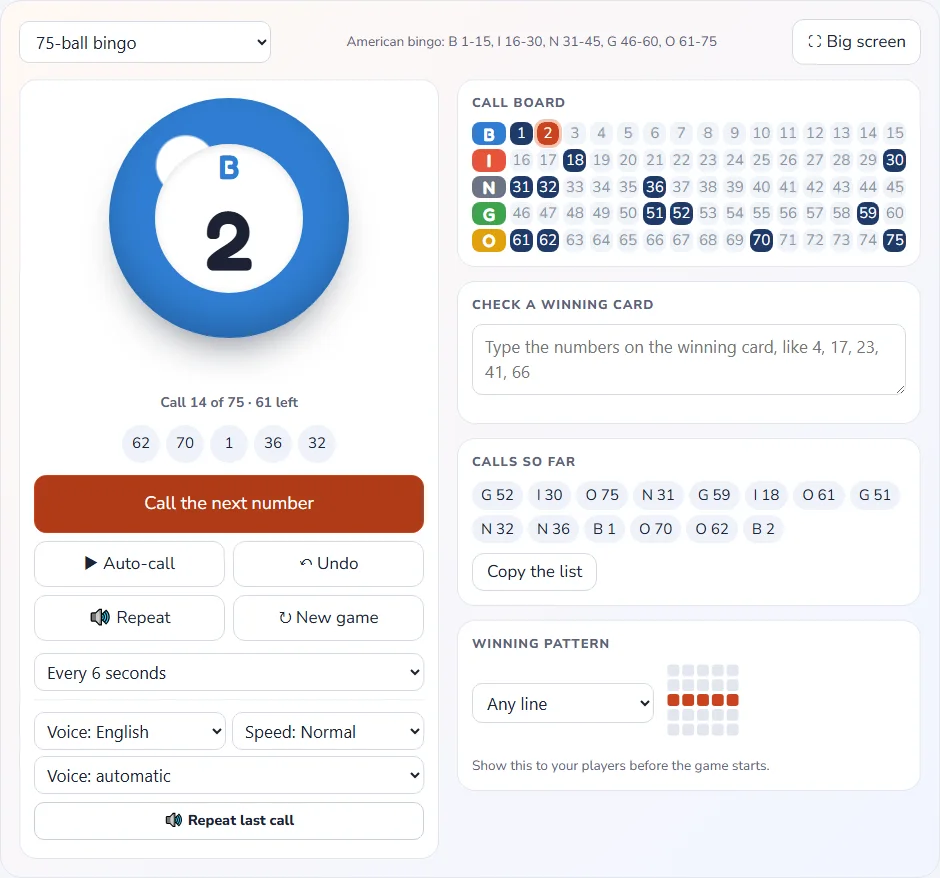
How to run a game with the bingo caller in 6 steps
You do not need to read any instructions to use the bingo caller, but a short routine keeps a game smooth, especially the first time you host. The bingo caller at the top of this page opens on the 75-ball game, which is classic American bingo, so the steps below assume you are playing that version.
- Get the cards ready. Print one or more cards per player from the bingo card generator or use the ready-made sets in the printable bingo cards hub. Players on a screen can use the live game described below instead.
- Pick the winning pattern. Choose any line, four corners, X, letter T, letter L, postage stamp, picture frame or blackout in the pattern picker, and tell the room before the first call.
- Choose how calls are made. Leave the voice on if you want the numbers spoken, pick English or Hindi, and set an auto-call speed, or leave auto-call off and press the button yourself.
- Start calling. Press Call the next number, or hit Space or Enter. The ball shows the letter and number, the call board marks it, and the last five calls stay visible for anyone who missed one.
- Verify a bingo. When a player shouts, pause auto-call, read the numbers off their card into Check a winning card and see at once whether every one of them was called.
- Start the next round. Press New game for a fresh random order, change the pattern if you like, and deal again. A game you leave half finished is saved in the browser and resumes after a reload.
That is the whole workflow. The bingo caller never asks you to log in, and the numbers you call are not sent anywhere, so it works just as well for a church hall, a classroom or a living room with a TV.
What this free bingo caller can do
Many online callers only show a number. This bingo caller is built so a host can actually run an evening, with the controls you reach for during a real game. Here is every feature, what it does and when it helps:
| Feature | What it does | When it helps |
|---|---|---|
| Call the next number | Draws the next ball from the shuffled deck and shows it large | Hosts who like to control the pace by hand |
| Auto-call | Calls a new number every 3, 4, 5, 6, 8, 10, 15, 20 or 30 seconds, with a pause button | Big rooms, long games and hosts who need both hands free |
| Spoken calls | Reads each call in English or Hindi using your device voice, or stays silent | Players who are away from the screen or who cannot read the board |
| Undo last call | Takes the most recent number back and returns it to the deck | Mis-clicks and double presses |
| Repeat last call | Says or shows the latest number again | Noisy rooms where someone missed it |
| Call board | Marks every called number and highlights the newest one | Checking quickly whether a number has been called |
| Last 5 calls | Lists the five most recent numbers beside the big ball | Late arrivals and slow markers |
| Calls so far | A full list of every number called, with a copy button | Settling disputes and keeping a record |
| Check a winning card | You type the numbers on a card and it says whether they were all called | Verifying a bingo without arguments |
| Pattern picker | Eight 75-ball patterns with small diagrams | Announcing the goal for each round |
| Big-screen mode | A large display for a TV, projector or screen share (Esc leaves it) | Zoom, Google Meet and classroom projectors |
| Keyboard shortcuts | Space or Enter for the next call, P to pause or start auto-call, U to undo, R to repeat | Calling without touching the mouse |
| Game types | 75-ball, 90-ball, 80-ball and a junior 30-ball game | Switching between US bingo, tambola and a simple game for young children |
| Saved game | The game is kept in your browser and resumes after a reload | Accidental closed tabs and phone call interruptions |
What the tool does not do is let guests join a game from their own phones, since it is a caller and not a multiplayer room. If you want players to join by link and have their cards mark themselves, use the live game on play bingo online and keep this page for in-person or screen-share calling.
How the bingo number generator keeps every draw fair
A bingo game is only fun if nobody doubts the draw. Under the hood, the bingo number generator does not pick a random number each time, which could repeat a ball or take ages to find the last unused ones. Instead it builds the full list of numbers once, shuffles it with the secure random generator that your browser provides, and then reads the list from the top.
This is the same idea as shuffling a real deck of cards, and it has three consequences that matter to hosts. First, every number from 1 to 75 is called exactly once, so a game always ends after at most 75 calls. Second, each of the 75 balls is equally likely to be next, because a properly shuffled list gives every ordering the same chance. Third, the order is not known in advance, not even to the bingo caller, until you press New game, which shuffles again.
The shuffle uses the secure random generator built into modern browsers, which is designed for security-grade randomness, rather than the simpler pseudo-random function that many small scripts use. For a church hall this is more than enough, but it is reassuring when real prizes are involved, because there is no way to predict or influence the next number.
Undo and repeat do not break that fairness. Undo puts the last number back at the top of the unused list, so it will be the next call, rather than throwing it away or reshuffling. Repeat simply shows the current ball again. Either way, the set of numbers a card needs is called in the same random order the shuffle produced.
Bingo caller 1-75: the five columns and how a call sounds
A bingo caller 1-75 follows one simple rule. The word BINGO is split across five columns, and each letter owns a block of 15 numbers. A call always combines the letter and the number, so a player knows which column of the card to scan. Here are the ranges this bingo caller uses, with example calls:
| Letter | Number range | How many numbers | Example call | Spoken as |
|---|---|---|---|---|
| B | 1 to 15 | 15 | B 7 | “B seven” |
| I | 16 to 30 | 15 | I 22 | “I twenty-two” |
| N | 31 to 45 | 15 | N 38 | “N thirty-eight” |
| G | 46 to 60 | 15 | G 51 | “G fifty-one” |
| O | 61 to 75 | 15 | O 69 | “O sixty-nine” |
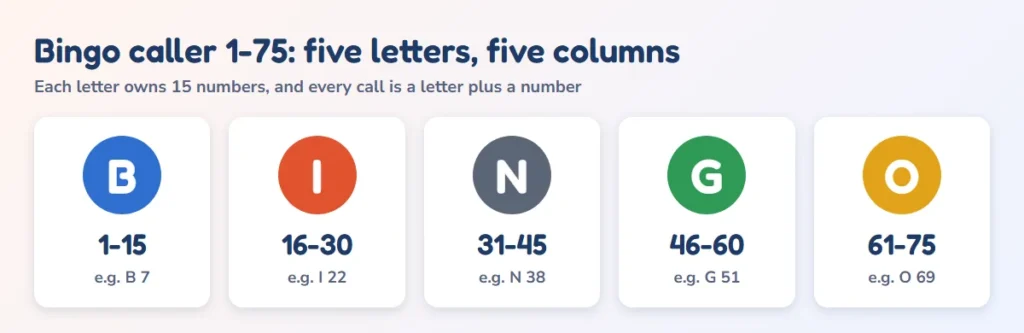
The middle square of the N column on a standard card is a free space, so an N column has only four numbers on a card, drawn from its 15 possible values. Every other column holds five. That is why the card generator can produce so many different cards: there are about 1.1 x 10¹⁵ distinct 75-ball cards, and it is almost impossible for two players in the same room to hold the same one.
When you speak a call yourself, say the letter first, then the number, then repeat it. Many callers say double digits twice, as in “N thirty-eight, three eight”, so there is no confusion between numbers such as 13 and 30 or 16 and 60. The big ball and call board show the digits for anyone who prefers to read, and the repeat button says the last call again when the voice is on.
Bingo calls: saying them clearly and keeping the pace
The wording of bingo calls matters more than most hosts expect. A clear call is slow enough to mark, loud enough to hear and consistent enough that nobody has to ask for it twice. These habits come from running games in halls and classrooms, and they apply whether you press the button or let the bingo caller call for you.
- Letter first, then number. “B seven” tells a player which column to look at before they hear the digit, so they do not have to scan the whole card.
- Repeat every call once. A second reading costs two seconds and saves a lot of “what was that?” later. The repeat button and the last-five list exist for the same reason.
- Pause for markers. A fast caller loses beginners and children. Start at 8 to 10 seconds for a mixed group and speed up only when everyone is keeping up.
- Say the pattern before you start. Players who forget the target pattern are the main source of false calls, so repeat it at the start of each round.
- Keep a running list. The Calls so far list can be copied, so if there is a dispute you can paste it somewhere and settle it from the record.
If you grew up with rhyming nicknames, such as “Two little ducks, twenty-two”, those belong to the 90-ball game that is popular in the UK and India. The bingo caller includes them as an option for that game type. For the full list of 90 traditional calls, with the meaning behind each, see the guide to housie number calls, and for a caller set up with the tambola prizes see the tambola number caller.
How many bingo calls until someone wins?
Planning a party or a classroom lesson means knowing how long a round will last, and the answer depends on two things: the pattern you choose and how many cards are in play. To replace guesswork with numbers, we simulated thousands of games of 75-ball bingo with random cards that have a free center, and recorded the call on which the first card completed each pattern. The table shows the median number of calls, with the middle half of games in brackets.
| Winning pattern | 1 card | 10 cards | 30 cards | 100 cards |
|---|---|---|---|---|
| Any single line | 41 (34 to 48) | 26 (22 to 30) | 21 (17 to 23) | 15 (13 to 18) |
| Four corners | 64 (54 to 70) | 40 (32 to 47) | 33 (26 to 39) | 24 (19 to 29) |
| Letter X | 70 (65 to 73) | 55 (50 to 59) | 48 (44 to 53) | 42 (39 to 46) |
| Blackout (full card) | 74 (72 to 75) | 69 (67 to 70) | 66 (64 to 68) | 64 (62 to 65) |
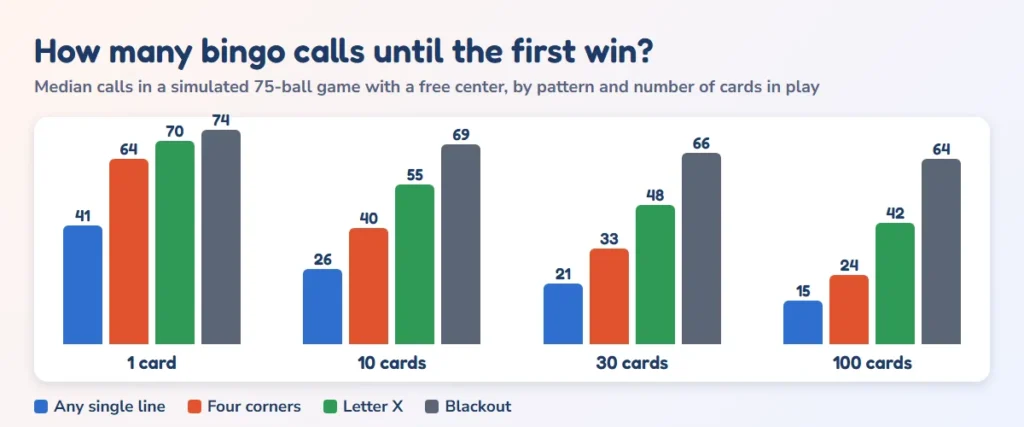
The effect of more cards is large for short patterns and small for long ones. A single line takes a median of 41 calls with one card in play, but only 21 calls with 30 cards and 15 with 100.
A blackout is different: even with 100 cards in play it takes a median of 64 calls, because some card in the room has to match 24 numbers and that rarely happens before the game is nearly finished. If you want fast rounds, choose a line or four corners, and keep blackout for a final jackpot.
How long is that in minutes?
Once you know the number of calls, the time is simple arithmetic: calls multiplied by the seconds between calls. The table converts three common game lengths, 25 calls for a quick line round, 40 for a longer pattern and 75 for a game that calls every ball, into minutes at each auto-call speed the tool offers.
| Seconds between calls | 25 calls (quick line round) | 40 calls (X or long round) | 75 calls (every number) |
|---|---|---|---|
| 3 seconds | 1.2 min | 2 min | 3.8 min |
| 4 seconds | 1.7 min | 2.7 min | 5 min |
| 5 seconds | 2.1 min | 3.3 min | 6.2 min |
| 6 seconds | 2.5 min | 4 min | 7.5 min |
| 8 seconds | 3.3 min | 5.3 min | 10 min |
| 10 seconds | 4.2 min | 6.7 min | 12.5 min |
| 15 seconds | 6.2 min | 10 min | 18.8 min |
| 20 seconds | 8.3 min | 13.3 min | 25 min |
| 30 seconds | 12.5 min | 20 min | 37.5 min |
A reasonable plan for a party of 30 players is a call every 8 seconds. A single line needs a median of 21 calls, which is about 2.8 min, and a four corners round needs 33 calls, around 4.4 min. A full blackout at 15 seconds a call takes about 16.5 min, so schedule it last. Slower speeds suit young children and first-time players, who need time to find the number on the card.
Online bingo caller for Zoom, Meet and a living-room TV
You do not need a special platform to host a game over video. An online bingo caller that runs in a browser tab is enough: you open it, share that tab, and everyone sees and hears the calls. Here is how each common setup works with this page.
Using it as a virtual bingo caller on a video call
For a virtual bingo caller on Zoom or Google Meet, open this page and switch on big-screen mode, which fills the window with the current ball and the board. Choose Share screen and pick that browser tab. If you want the voice to be heard by the group, tick the option to share computer sound in Zoom, or share a tab with audio in Meet. Without it, players can still read every call on the screen.
Players need cards. Send them a link to the bingo card generator to print or open on their own device, or use the shareable word-list link from a template page. For a party where guests should not have to mark cards by hand, the live game at play bingo online lets guests join by link with self-marking cards, and you can use the bingo caller here at the same time for a voice that everyone hears. Our guide on how to play bingo online with friends walks through a full evening step by step.
Calling for a group on WhatsApp or the phone
On a WhatsApp group call you can share your screen on a phone or a laptop, but the simplest method is to read the numbers aloud from the bingo caller and paste the Calls so far list into the chat when the game ends. The list is a quick record of the game, and players can compare it with their own card to confirm a win.
Calling on a TV or projector in the room
For a classroom, a community hall or a family night, connect a laptop to a TV or projector and use big-screen mode. The ball and letter are large enough to read from the back of a room, the board shows which numbers are gone, and a spoken call keeps everyone looking up instead of down. Press Esc to leave the display when the round is over.
Winning patterns for 75-ball bingo
Changing the pattern is the easiest way to vary a game without changing the cards. The pattern picker shows a small diagram of each shape, and this table lists how many numbers a player must have called before they can win. The free center counts as marked, so some patterns need one number fewer than the number of squares they cover.
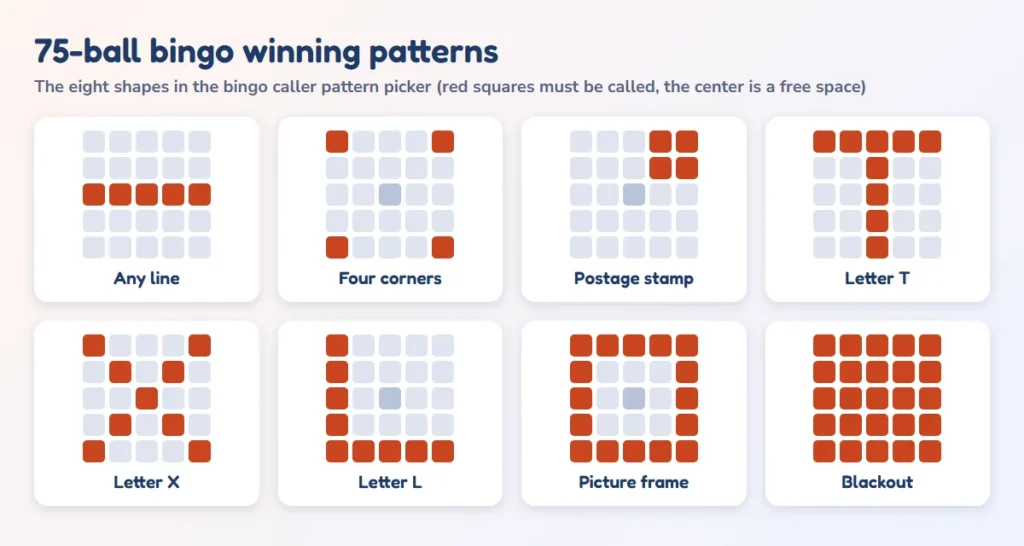
| Pattern | Squares covered | Numbers needed | Difficulty |
|---|---|---|---|
| Any single line (row, column or diagonal) | 5 | 5, or 4 through the center | Fast: a good opening round |
| Four corners | 4 | 4 | Fast, pure luck |
| Postage stamp (a 2 x 2 block in a corner) | 4 | 4 | Fast: good for kids |
| Letter T (top row plus the N column) | 9 | 8 | Medium |
| Letter X (both diagonals) | 9 | 8 | Medium to long |
| Letter L (B column plus the bottom row) | 9 | 9 | Medium to long |
| Picture frame (the outer ring) | 16 | 16 | Long |
| Blackout (the whole card) | 25 | 24 | Longest: the grand prize |
A sensible running order for an evening is one line, then four corners, then an X or a T, then a picture frame, with blackout last. The prizes get bigger as the rounds get longer, and the crowd stays in the game because every round feels different. Always say aloud which pattern is in play before the first call, and keep it displayed on the board so nobody has to guess.
How to check a winner fairly
Disputes usually start in the last 60 seconds of a round, so it helps to have a clear routine. When someone calls bingo, pause auto-call so no new number can arrive while you check. Ask the player to read the numbers that make up their winning pattern, and type them into Check a winning card. The bingo caller compares the list with every number called so far and tells you whether all of them are in the Calls so far record.
Check that the numbers form the pattern you announced as well. The bingo caller confirms that the numbers were called, but only a human can see whether they form a line, a corner set or a picture frame on that particular card, so look at the card too. If two players call bingo on the same number, they share the prize, or you run a short tiebreaker, and you should decide which before the game begins.
If a player called early by mistake, tell them it was a false call and continue from where you paused. If a number was called by accident, use undo, which returns the ball to the top of the deck, and say so out loud so players who already marked it can erase it. Keeping to the same routine every round makes disputes rare.
75-ball, 90-ball, 80-ball and 30-ball games compared
The tool covers four common versions of bingo, so a single page can serve a US family night, an Indian kitty party and a kindergarten class. The right one depends on the cards your players hold, which is why the game type must match the card type before you start.
| Game | Numbers | Card layout | Typical use | Calls for a full game |
|---|---|---|---|---|
| 75-ball bingo | 1 to 75, with B-I-N-G-O letters | 5 x 5 with a free center | US bingo, parties, classrooms | Up to 75 |
| 90-ball bingo (tambola or housie) | 1 to 90, no letters | 3 rows by 9 columns, 15 numbers | UK bingo, India, kitty parties | Up to 90 |
| 80-ball bingo | 1 to 80 | 4 x 4 grid | Quick games and some UK venues | Up to 80 |
| Junior 30-ball | 1 to 30 | Small grid | Young children learning numbers | Up to 30 |
If you are hosting 90-ball games with prizes such as Early Five and Full House, use the dedicated tambola number caller, which opens with the right game type and prize list. You can also print tickets from the 90-ball bingo cards page. The same tool sits behind both pages, so everything you learn here carries over.
Using the caller in classrooms and at fundraisers
A teacher can use a free bingo caller for far more than a Friday treat. Calling numbers 1 to 75 is a natural way to practice number recognition, place value and reading numerals aloud. Switch to the junior 30-ball game for early learners, or ask older students to take turns as the bingo caller, which gives them practice with speaking clearly and with reading numbers in order. Our classroom bingo cards pair well with the bingo caller, and the blank bingo cards let students fill in their own numbers or words.
For a school or club fundraiser the checklist is short. Decide the pattern order and prizes in advance, print more cards than you expect players so late arrivals can join, set auto-call to a pace your slowest player can follow, and put the bingo caller on a big screen so the whole room sees each call.
Charging per card and giving a prize per round is a classic format that has raised money for generations of PTAs and community groups. Check your local rules on raffles and games of chance before you sell cards, because they differ from place to place.
Because nothing is uploaded and no account is needed, the bingo caller is also safe for school devices, where installing software or signing up for services is often not allowed. Background reading on the history and rules of the game is available in the Wikipedia article on American bingo, which explains how the 75-ball version and its letter columns developed.
More bingo tools to use with the caller
The caller is one piece of a game night. These pages cover the rest, from the cards to online play and the traditional tambola version:
- Bingo card generator to make cards with numbers 1 to 75 or your own words, in a PDF or ready to print.
- Printable bingo cards for ready-made sets and themes.
- Blank bingo cards for hand-filled games.
- Play bingo online to host a live game where guests join by link.
- Tambola number caller for 90-ball games, with the usual prizes.
- How to play tambola for the rules, prizes and hosting tips.
Read the guide: Bingo Calls and Nicknames, for the ideas and steps behind this page.
Frequently asked questions
10 quick answers
What is a bingo caller?
A bingo caller is the person or tool that draws the numbers and announces them to the players. This one picks from a shuffled list of all 75 numbers, shows the letter and number on a big ball, and can say each call aloud so players can mark their cards.
Is this really a free bingo caller?
Yes. The free bingo caller has no sign-up, no limit on the number of games and nothing to install. It runs in your browser, so you can use it on a laptop, tablet or phone, and the game stays on your device.
How does the bingo number generator work?
The bingo number generator makes a list of every number in the game, shuffles it once with your browser’s secure random generator and reads from the top. That means each number appears once, nothing repeats, and no one can predict the next ball. New game reshuffles the list.
Can I use it as an online bingo caller on Zoom or Google Meet?
Yes. Open the page, turn on big-screen mode and share that browser tab. Players can read every call on the screen, and if you share tab or computer audio they will hear the voice as well. Players need their own cards, which they can print or open from the card generator.
What does a virtual bingo caller need from the players?
Only a card and a way to mark it. A virtual bingo caller is the host’s tool, so guests do not install anything. For guests to join by link and have their cards mark themselves, use the live game on the play bingo online page alongside it.
How do bingo calls work for numbers 1 to 75?
Each call is a letter plus a number. B covers 1 to 15, I covers 16 to 30, N covers 31 to 45, G covers 46 to 60 and O covers 61 to 75. A call such as “N 38” tells the player to look in the N column for 38. The bingo caller 1-75 shows the letter and number on the big ball and marks it on the board.
How long does a game of bingo take?
It depends on the pattern, the number of cards and the call speed. In our simulation a single line with 30 cards takes a median of 21 calls, which is about 3 minutes at 8 seconds a call. A blackout takes around 66 calls, roughly 9 minutes at 8 seconds a call. See the tables above for other speeds.
Can I undo a number I called by mistake?
Yes. Press the undo button or the U key and the last number goes back to the deck, becoming the next call. Tell the players out loud so anyone who marked it can erase their mark.
Does it work for 90-ball bingo or tambola?
Yes, the same tool has a 90-ball game with traditional calls and the usual tambola prizes. Open the tambola number caller page, which starts with that setting, or switch the game type here.
Does the game save if I close the page?
Yes. The game is stored in your browser, so if you reload or reopen the page on the same device, it resumes where you left off. Press New game when you want a fresh shuffle.