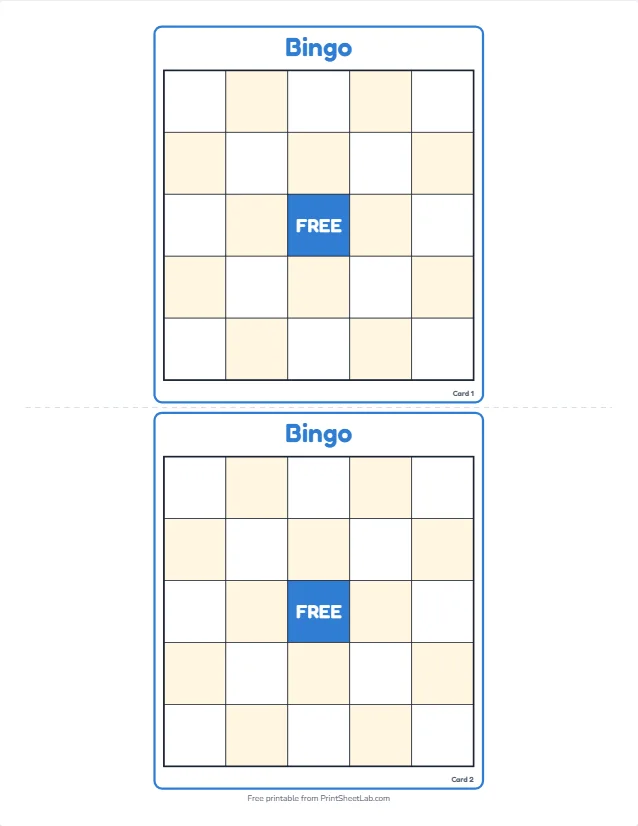
A bingo card template is a ready-made grid of squares that you fill with numbers, words or pictures, then print once for every player. This page gives you a bingo card template in five sizes, from a 3×3 card for young children to a 7×7 card for long games, and the card maker at the top opens each one as an empty grid you can fill in seconds. You also get plain steps for building the same grid by hand in Word, Google Docs and Excel, and the numbers that show how many different cards one list can make.
In short: press one of the five grid buttons above (5×5, 4×4, 3×3, 6×6 or 7×7) to open the full-screen editor with a blank card. Type your words in the Items tab, pick colors in Design, then print up to 100 different cards from the Print tab. It is free, needs no sign-up, and nothing you type is uploaded. The output is a PDF or a printout, not a Word, Docs or Excel file.
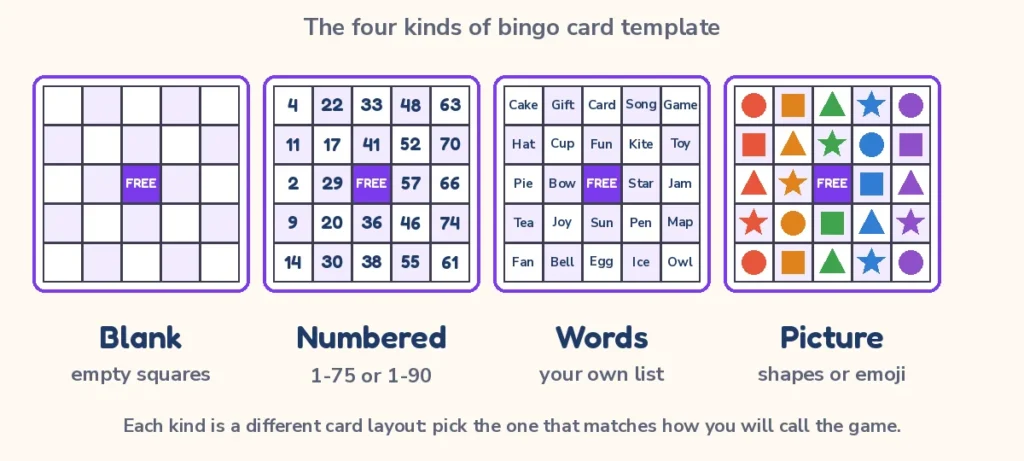
The four kinds of bingo card template
When people search for a template they usually mean one of four different things, and picking the right kind saves a lot of time. The kind you need depends on how you will call the game: by drawing numbered balls, by reading out words, by showing pictures, or by letting players fill in the squares themselves.
| Kind | What is in the squares | Best for | Where to get it here |
|---|---|---|---|
| Blank | Nothing: empty squares you fill by hand, with an optional free space | Teachers who write their own prompts, drawing games, players who fill the card before the game | Blank bingo cards and the five grid buttons above |
| Numbered 1-75 or 1-90 | Random numbers sorted into the B-I-N-G-O columns (75-ball) or 3 by 9 tickets (90-ball) | Halls, fundraisers, family nights and anyone with a number caller | Bingo card generator, 90-ball bingo cards |
| Themed with words | A list of 24 or more words or short phrases, shuffled differently on every card | Baby showers, holidays, classrooms, road trips, meetings | Printable bingo cards hub and its occasion pages |
| Picture | Emoji, icons or small pictures instead of text | Pre-readers, animals, shapes, foods, feelings | Picture bingo for kids and the card maker |
The same grid underlies all four kinds of bingo card template. A numbered card is a word card whose words happen to be numbers, and a picture card is a word card whose words happen to be icons. That is why one editor can produce all of them, and why the five buttons above start from a blank grid: whatever you put in the squares decides which kind of bingo card template you end up with.
If you want ready-made numbers, the numbered cards are generated on the bingo card generator page, and the numbers you will call are laid out on the matching bingo number chart. If you want a full set of themed examples, the printable bingo cards hub lists every occasion page.
Bingo card template free: pick your grid size
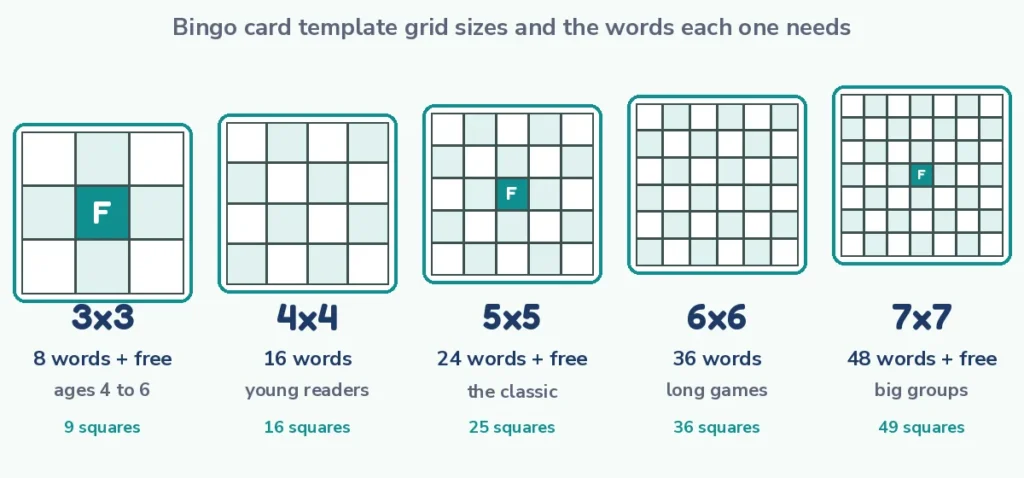
Every size below is a free bingo card template that you can open, fill and print without an account. The buttons at the top of this page start the editor on a blank grid of the size you choose, and you can still change the grid size inside the editor if you change your mind. The grid you pick sets how many words you need, how long a game lasts and how small the squares end up on the page. Each bingo card template size works the same way, so you can switch later.
| Grid | Squares | Words needed | Free space | Good for | Note |
|---|---|---|---|---|---|
| 3×3 | 9 | 8 | Yes (center) | Ages 4 to 6, pre-readers, 5-minute games | Wins come fast: a line is only 3 squares |
| 4×4 | 16 | 16 | No | Ages 5 to 8, animals, fruits, feelings, sight words | No free space, so the list must have at least 16 words |
| 5×5 | 25 | 24 | Yes (center) | The classic: parties, classrooms, offices, families | Free space in the center, 24 words needed |
| 6×6 | 36 | 36 | No | Older groups who want a longer game | No free space, 36 words needed |
| 7×7 | 49 | 48 | Yes (center) | Big groups, long breaks, blackout games | 48 words needed, plenty of squares to scan |
A free space is the square in the middle of an odd grid that counts as already marked. In the card maker it can carry its own text, an emoji or a picture, so you can put a logo, a star or the word FREE there. Even grids such as 4×4 and 6×6 have no center square, so every square needs a word.
If your list has more words than the card has squares, each card draws a different selection, and that is a feature: it makes the cards more different from one another. The computed section further down shows exactly how different.
Which size should I choose?
Start from the players, not the grid when you choose a bingo card template. A child who is learning to read will do best with 9 or 16 squares and pictures. A mixed-age family can use 5×5 and be done in ten minutes. A work meeting that needs ten minutes of filler can use 4×4. A group that wants to keep playing until the coffee arrives can use 7×7 and call for a blackout. In every case the bingo card template is the same free tool with a different grid.
Editable bingo card template: change every square
An editable bingo card template is only useful if you can change the part that matters, which is the content of the squares. In the editor above everything you see is editable, so the bingo card template adapts to your list, and the five tabs follow the order you would work in.
| Tab | What you do there |
|---|---|
| Setup | Choose the card type (custom words, bingo 75, tambola 90, bingo 80, junior 30 or card deck), the grid size from 3×3 to 7×7, and the card title |
| Items | Type or paste your words and emoji, add pictures, and set the free space text, emoji or picture |
| Design | Pick a color theme and font, set the text size, ALL CAPS, borders, rounded corners, square style, alternate tint, backgrounds, a logo and a footer line |
| Templates | Load one of 30 starter templates such as baby shower, Christmas, classroom or road trip, then edit it |
| Choose 1 to 100 different cards, 1, 2, 4 or 6 per page, Letter or A4, portrait or landscape, cut guides, then download the PDF or print |
Two controls are worth knowing from the start when you edit a bingo card template. Shuffle re-deals the arrangement on every card, and Undo takes back your last change, so you can experiment with colors without fear. The preview has a zoom, so you can check that the longest word fits its square before you print a hundred copies.
You can also share the card list with a link. The link carries your words only, so a co-host can open the same list and print their own copies. If you would rather play on phones than on paper, the same list works in play custom bingo online, where guests join by link and the cards mark themselves.
An honest note about editing
The bingo card template in the card maker is editable in the sense that you change the content and the look before printing. It does not export a Word, Google Docs or Excel file. What comes out is a PDF or a print job, and a PDF cannot be reopened as an editable table in any reliable way. If you need a file that you can keep editing in an office program, build the grid in that program with the steps below, and use the card maker when you want many different cards quickly.
Bingo template printable: print settings that work
A bingo template printable should print cleanly on whatever paper you have, and the Print tab gives you the choices that decide that. Here is how each setting changes the result of your bingo card template.
| Setting | Options | When to use each |
|---|---|---|
| Cards per page | 1, 2, 4 or 6 | 1 for big cards that children mark with chips, 2 for the classic party card, 4 or 6 to save paper and cut apart |
| Paper size | Letter or A4 | Letter in the US and Canada, A4 almost everywhere else |
| Orientation | Portrait or landscape | Portrait for tall 5×5 cards, landscape for wide layouts and 2 cards side by side |
| Number of cards | 1 to 100, all different | One per player, plus a few spares for latecomers and mistakes |
| Cut guides | On or off | On if you will cut cards apart, off for a clean full-page card |
| Names on cards | Optional | Useful for name-tag games and for classroom sets that must come back |
Use the preview before you print the bingo card template. It shows how the cards sit on the page and lets you zoom in on the squares. If a word is too long for a square, shorten it, lower the text size or use a larger grid size per card by printing fewer cards per page.
Print and laminate tips
- Use heavier paper for cards you want to keep. Ordinary copy paper works for one-time parties, but card stock survives dry-erase markers and several rounds.
- Laminate for classrooms. A laminated card can be wiped clean and reused all year with a dry-erase marker or counters, which cuts printing to a single run.
- Choose markers to match the square size. Chips or small stickers need squares of about three quarters of an inch or more; dabbers and crayons work in smaller squares.
- Print in black and white when you can. A black-and-white theme saves ink and still reads clearly; keep the alternate tint light so numbers stay readable.
- Test one page first. Print one page, check the longest word and the free space, then print the full set.
How to make a bingo card template in Word, Google Docs and Excel
You may want a file you can keep editing in an office program, so here are the steps for each one. They are general instructions for a bingo card template, so menu names can differ slightly between versions, but the idea is the same everywhere: a table of equal squares with centered text.
Bingo card template Word: step by step
To build a bingo card template Word file, you need one table and a few formatting steps. A 5×5 bingo card template takes about five minutes.
- Open a blank document to start your bingo card template, go to Insert > Table and drag out a grid of 5 columns by 5 rows.
- Click inside the table, open Table Properties and set the row height to 1 inch (choose Exactly) and the column width to 1 inch, so every square is the same size. The Layout tab also has Distribute Rows and Distribute Columns.
- Select the whole table and use Layout > Align Center so text sits in the middle of each square both ways.
- Select the table and increase the font size to 18 or 20 points. Bold fonts read better from a distance.
- Add borders from Table Design > Borders > All Borders and pick a thicker line if you like.
- Click the center square, type FREE and apply a background color with Shading so it stands out as the free space.
- To add a title, insert one more row on top, select all of its cells and choose Merge Cells in the Layout tab, then type BINGO.
- Copy the finished table as many times as you need and type different words in each copy, or save it as a template (.dotx) and reuse it.
Word has no built-in shuffle for a bingo card template, so you have to type the words in a different order on every card. That is the main reason people build the list in Excel or Sheets first and paste it across, as described below.
Bingo card template Google Docs: steps
For a bingo card template Google Docs file the process is similar, and a shared Doc lets other people edit the words with you.
- Open a new Doc and choose Insert > Table then a 5×5 grid.
- Right-click inside the table and choose Table properties. Set a minimum row height of 1 inch, set the column width to 1 inch, and set cell vertical alignment to middle.
- Select the table and press Ctrl+Shift+E (Cmd+Shift+E on a Mac) to center the text horizontally. Raise the font size to 18 or 20.
- In the same Table properties panel, set a table border width of 1 or 2 points and choose a border color.
- Click the center cell, type FREE and set a cell background color in Table properties.
- Use File > Make a copy to create one Doc per card style, or copy the table down the page for several cards.
Your Docs bingo card template can also be set to landscape in File > Page setup, which helps if you place two cards on one sheet.
Bingo card template Excel (and Google Sheets)
A bingo card template Excel sheet has one advantage over the other two: it can shuffle for you. Here is the basic layout first, then the shuffle.
- Select columns A to E and set the column width to about 13 characters, then select rows 1 to 5 and set the row height to about 72 points. Those two numbers give roughly square cells, and you can check by eye and adjust.
- Select A1:E5, then use Home > Borders > All Borders, turn on Wrap Text, and press both Center and Middle Align.
- Raise the font size to 18 or 20, and bold the text if it is hard to read.
- Shade cell C3 and type FREE in it.
- In Google Sheets, right-click the column letters and choose Resize columns, then do the same for the rows; borders and alignment are in the toolbar and the Format menu.
Shuffling a word list into a bingo card in a spreadsheet
Put your word list in column H, starting in H2. In column I, type =RAND() beside every word and fill down. Then sort the two columns by column I (Data > Sort); each time you sort or recalculate, the words land in a new random order. The top 24 words are your next card.
If your version of Excel supports dynamic arrays (Microsoft 365 and Excel 2021), you can skip the helper column and write =SORTBY(H2:H41, RANDARRAY(ROWS(H2:H41))) in one cell and let the result spill down. In Google Sheets, the matching formula is =SORT(H2:H41, RANDARRAY(ROWS(H2:H41)), TRUE). Press F9 in Excel to reshuffle.
To fill the grid from the shuffled list, put the shuffled words in J2 downward and type =INDEX($J$2:$J$26,(ROW()-1)*5+COLUMN()) in A1, then copy it across A1:E5. Overwrite C3 with FREE. Before you print each card, copy the grid and use Paste Special > Values, otherwise the next recalculation changes it.
One warning for numbered cards: RANDBETWEEN can return the same number twice in one column, so do not use it on its own for a B-I-N-G-O column. Shuffling a list of unique numbers, as above, avoids repeats. And remember that the first number you need to place is range-aware: B holds 1 to 15, I holds 16 to 30, N holds 31 to 45, G holds 46 to 60 and O holds 61 to 75.
The faster way: a different card for every player in one click
The office-program bingo card template is fine for one card. It becomes slow when you need thirty different ones, because every card has to be shuffled, pasted as values, formatted and printed. The bingo card template in the card maker above does that work in one step: you enter the list once, choose how many cards you want, and every card is a different random arrangement of your list.
- Open a grid button at the top of this page, or load a starter bingo card template from the Templates tab.
- Type your words in the Items tab, one per line, with emoji or pictures if you like.
- Style the card in the Design tab and check the preview.
- Print up to 100 different cards as one PDF, with cut guides if you will cut them apart.
You get a PDF of your bingo card template for printing or sharing. If you need Word-style editing, keep the card maker for the shuffle and the PDF, and use your own office file for notes, the rules page and the prize list.
How many different cards can one template make?
The most common worry with a home-made bingo card template is duplicates: two players holding the same card and shouting bingo together. The numbers below are exact, computed from combinations, and show that the risk is tiny for a 5×5 card and real only for very small grids.
Different word sets from a list of N words
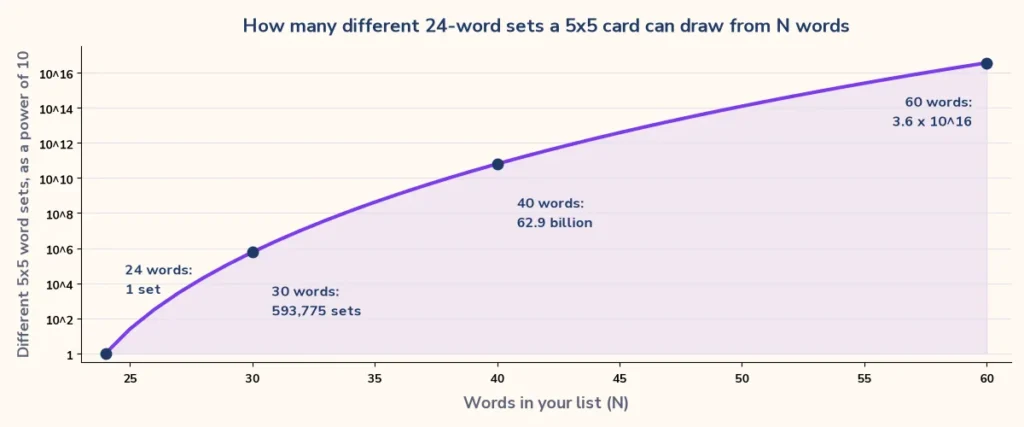
When your list has N words and the card has k squares to fill, the number of different sets of words is the number of combinations C(N, k). Because the order of the words on the card also changes the card, the number of different cards is C(N, k) multiplied by k factorial (k!). The first table shows the sets, with the free space already taken out of k.
| Card | N = k (list equals squares) | N = k + 4 | N = k + 8 | N = 2k |
|---|---|---|---|---|
| 3×3 (8 words) | 1 | 495 | 12,870 | 12,870 |
| 4×4 (16 words) | 1 | 4,845 | 735,471 | 601,080,390 |
| 5×5 (24 words) | 1 | 20,475 | 10,518,300 | 3.22 x 10¹³ |
| 6×6 (36 words) | 1 | 91,390 | 177,232,627 | 4.43 x 10²⁰ |
| 7×7 (48 words) | 1 | 270,725 | 1.42 x 10⁹ | 6.44 x 1027 |
Read the 5×5 row like this: a list of exactly 24 words gives one word set, a list of 28 words gives 20,475 sets, a list of 32 words gives 10,518,300 sets, and a list of 48 words gives 3.22 x 10¹³ sets. The starter templates have between 24 and 32 items each, so a 30-item 5×5 bingo card template has 593,775 possible word sets.
Different arrangements of the same words
Even a list with no spare words still makes different cards, because the arrangement changes. A 5×5 card with a free space has 24! different arrangements, a figure of about 6.20 x 10²³. The table gives each size and the chance that at least two of your players hold identical cards.
| Card (list equals squares) | Arrangements (k!) | Identical pair, 10 players | Identical pair, 30 players | Identical pair, 100 players |
|---|---|---|---|---|
| 3×3 (8 words) | 40,320 | 0.11% | 1.07% | 11.56% |
| 4×4 (16 words) | 2.09 x 10¹³ | under 0.0001% | under 0.0001% | under 0.0001% |
| 5×5 (24 words) | 6.20 x 10²³ | under 0.0001% | under 0.0001% | under 0.0001% |
| 6×6 (36 words) | 3.72 x 1041 | under 0.0001% | under 0.0001% | under 0.0001% |
| 7×7 (48 words) | 1.24 x 1061 | under 0.0001% | under 0.0001% | under 0.0001% |
Those percentages come from the standard birthday-problem formula: the chance that nobody shares a card is the product of (1 – i/T) for i from 0 to the number of players minus one, where T is the number of arrangements. A 3×3 card with 8 words has only 40,320 arrangements, so with 30 players there is about a one in a hundred chance that two cards match. A 4×4 card pushes it down to a few in a hundred billion, and a 5×5 card makes it vanish.
The practical lesson is that a 3×3 bingo card template is fine for a classroom of ten but deserves a longer list if you have a hundred players, while 5×5 and larger bingo card templates never give you duplicate cards in practice.
How alike are two cards? Overlap by list size
Identical cards are rare, but cards that share many words are common, and that decides how often several players reach a line on the same call. For two cards that each take k words from a list of N, the expected number of shared words is k x k / N.
| Words in your list | Shared words, 3×3 (8 each) | Shared words, 4×4 (16 each) | Shared words, 5×5 (24 each) | Share of a 5×5 card in common |
|---|---|---|---|---|
| 24 | 2.7 | 10.7 | 24.0 | 100% |
| 26 | 2.5 | 9.8 | 22.2 | 92% |
| 30 | 2.1 | 8.5 | 19.2 | 80% |
| 36 | 1.8 | 7.1 | 16.0 | 67% |
| 48 | 1.3 | 5.3 | 12.0 | 50% |
| 60 | 1.1 | 4.3 | 9.6 | 40% |
| 72 | 0.9 | 3.6 | 8.0 | 33% |
At 24 words every card has the same words, so the whole game depends on the order. At 30 words two 5×5 cards share about 19 words on average, which is 80 percent. At 48 words they share about 12, and at 72 words about 8. If you hate ties, make the list at least twice as long as the card; if you want a gentle game where many people finish close together, keep it near the card size.
The mathematics behind this is the combination, a topic with a short summary on Wikipedia. The table above is the same arithmetic applied to bingo cards.
How many pages for your players?
The Print tab lets you fit 1, 2, 4 or 6 cards on a page. The number of sheets of paper is the number of players divided by the cards per page, rounded up. Here are the sheets for several group sizes, one card per player.
| Players | 1 per page | 2 per page | 4 per page | 6 per page |
|---|---|---|---|---|
| 10 | 10 | 5 | 3 | 2 |
| 20 | 20 | 10 | 5 | 4 |
| 30 | 30 | 15 | 8 | 5 |
| 50 | 50 | 25 | 13 | 9 |
| 100 | 100 | 50 | 25 | 17 |
For 30 players, a page of 2 cards needs 15 sheets, a page of 4 needs 8 sheets (the last has two cards), and a page of 6 needs 5 sheets. Add two or three spare cards for latecomers; because every card is different, spares do not clash with anyone.
Layout guide: grid size, age and group
Choosing the grid is a design decision as much as a math one, and every bingo card template benefits from the same few rules. This guide pairs each size with the group it suits and the way you would call it, so you can pick without guessing.
| Group | Grid | Content | Calling style | Typical round |
|---|---|---|---|---|
| Ages 4 to 6 | 3×3 | Pictures, colors, shapes, letters | Show a card or say a word | Under 5 minutes |
| Ages 6 to 8 | 4×4 | Sight words, animals, numbers to 20 | Read the word aloud | 5 to 8 minutes |
| Ages 8 to 12 | 5×5 | Vocabulary, math facts, trivia | Read a clue, not the answer | 8 to 12 minutes |
| Teens and adults | 5×5 or 6×6 | Humor, events, tasks, names | Call or watch for events | 10 to 20 minutes |
| Family party | 5×5 | Mixed pictures and short words | One host calls, children help | 10 to 15 minutes |
| Office or Zoom | 4×4 or 5×5 | Meeting phrases, tasks, introductions | Mark during the meeting | Whole meeting |
| Hall or fundraiser | 5×5 numbered | 1-75 numbers with a free space | Use a number caller | Several rounds |
| Long game | 7×7 | Big word lists | Blackout or two lines | 20 minutes or more |
Design details that make a card easier to read
- Keep words short. Aim for one to three words per square; long phrases shrink the text.
- Use high contrast. Dark text on a white or very light tint reads best, and the alternate tint option should stay pale.
- Pick one clear font. Rounded fonts suit children and a simple sans-serif suits an office game.
- Give the free space a different look. A colored square or an emoji makes it obvious that it needs no call.
- Add a footer. A short line such as the event name or date turns a plain card into a keepsake.
Template pages for every occasion
If you would like to start from a finished example rather than a blank grid, the pages below each hold a ready-made card list that opens in the card maker. Every one of them is also a bingo card template you can edit, so use whichever is closest to your event.
- Baby shower bingo for gifts and games at a shower.
- Christmas bingo for family evenings and classroom parties.
- Road trip bingo for long drives.
- Classroom bingo for review and icebreakers.
- Sight words bingo for early readers.
- Blank bingo cards for a plain grid.
- All printable bingo cards in the hub.
When your cards are printed you will need a way to call. The bingo caller draws and shows each number, and it comes with the matching bingo number chart so you can see which numbers are gone. Printing plain grids for other purposes? The printable paper section has ruled and gridded sheets.
Read the guide: How to Make Bingo Cards, for the ideas and steps behind this page.
Frequently asked questions
10 quick answers
What is a bingo card template?
A bingo card template is a pre-made grid of squares, usually 5×5, that you fill with numbers, words or pictures and print. Using a bingo card template means you set the layout once and only change the content for each game, instead of drawing a new grid every time.
Is there a free bingo card template I can print?
Yes. The grid buttons at the top of this page are a free bingo card template in five sizes, from 3×3 to 7×7. You do not need an account, and you can print up to 100 different cards as a PDF.
Can I download an editable bingo card template for Word?
Not from this page. The card maker produces a PDF or a print job, not a Word file. To get a file you can keep editing in Word, insert a 5×5 table, set equal row heights and column widths, center the text and shade the middle square, using the steps above.
How do I make a bingo card template in Google Docs?
Choose Insert > Table and pick 5×5, open Table properties to set the row height, column width and middle vertical alignment, center the text, and give the middle cell a background color. Then copy the table for as many cards as you need.
Can I make a bingo card template in Excel?
Yes. Set the columns and rows to equal sizes, add borders, center the text and shade the middle cell. You can also put your words in a column beside a RAND() helper column and sort by it to shuffle them, or use SORTBY with RANDARRAY in Microsoft 365.
How many words does a bingo card template need?
A 5×5 bingo card template card with a free space needs 24 words. A 4×4 card needs 16, a 3×3 card with a free center needs 8, a 6×6 card needs 36 and a 7×7 card with a free space needs 48. More words than squares is fine: each card then gets a different selection.
Will two players ever get the same card from a bingo card template?
On a 5×5 card, practically never: even with 24 words there are about 6.2 x 10^23 arrangements. On a 3×3 card with 8 words there are 40,320, so with 30 players the chance of at least one identical pair is about 1 percent.
What is the best grid size for children?
Use 3×3 for ages 4 to 6 and 4×4 for ages 5 to 8, with pictures or very short words. They finish quickly, which keeps attention, and the smaller grid is less overwhelming for a child who is just learning to scan a card.
How many bingo cards fit on a page?
The Print tab of the bingo card template offers 1, 2, 4 or 6 cards per page on Letter or A4 paper. Two per page is the classic party size. Choose 4 or 6 only when the words are short, because squares get smaller.
Do I need to sign up to use the bingo card template?
No. The card maker runs in your browser, is free, and nothing you type is uploaded. You can work on a laptop, tablet or phone, and share the word list with a link that carries the words only.