A VAT calculator adds value added tax to a price without VAT or takes it back out of a price that already includes it. Type the amount, pick the country and the calculator fills in the rate, such as 20% for the UK, then shows the net price, the VAT and the gross price with the working.
Quick answer: To add VAT, multiply the net price by the rate: £250 × 20% = £50 of VAT, so the price with VAT is £300. To remove VAT, divide the gross price by 1 plus the rate: £300 ÷ 1.20 = £250, and the VAT is £300 − £250 = £50. The UK standard rate is 20%, the reduced rate is 5% and the zero rate is 0%.
How to use the VAT calculator
The tool above works in both directions and updates as you type, so there is no Calculate button. Follow these steps for any amount in pounds, euros or any other currency.
- Choose Add VAT if you know the price before VAT, Remove VAT if you know the price with VAT, or From the VAT amount if you only know the tax on the invoice.
- Type the amount. The currency menu at the top right changes the symbol to pounds, euros, dollars or rupees.
- Pick the country. The standard rate is filled in for the United Kingdom and every EU member state, and the answer shows that country’s reduced rates too.
- To use a different rate, type it in the VAT rate box or tap a quick rate such as 5% or 0%. Clear the box to go back to the country rate.
- Read the headline answer, the three boxes for net, VAT and gross, and the step-by-step working. Use Copy result to paste the sentence into an email or an invoice note.
| Box | What to type | What you get |
|---|---|---|
| Amount | The price. Net if you add VAT, gross if you remove VAT, the tax itself in the third mode. | The other two figures, rounded to the penny or cent. |
| Country | United Kingdom, one of the 27 EU members, or Other. | The standard rate plus the reduced rates for that country. |
| VAT rate | Optional. Any rate from 0 to 100, for example 5, 7.5 or 25.5. | Overrides the country rate for the whole calculation. |
How to calculate VAT: the VAT calculation formula
VAT is a percentage of the net price, which is the price before tax. The VAT calculation formula has two lines. Write the rate as a decimal by dividing it by 100, so 20% becomes 0.20.
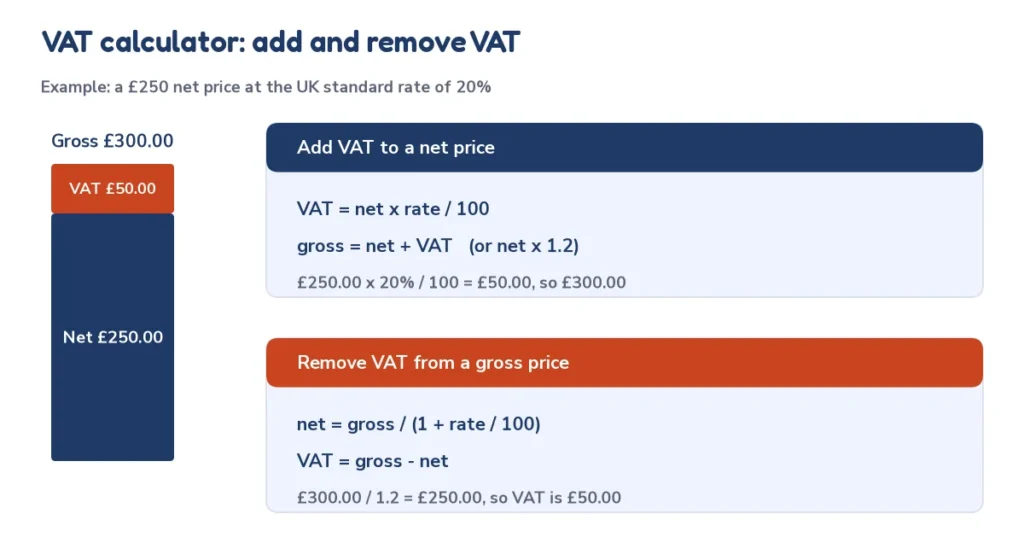
- VAT = net price × rate ÷ 100
- Gross price = net price + VAT, which is the same as net price × (1 + rate ÷ 100)
The second form is the quickest on a phone calculator: at 20% you multiply by 1.2, at 5% by 1.05 and at 21% by 1.21. The same two lines work for every country, because only the rate changes.
Worked example: add VAT at 20%
A designer charges £250.00 net for a logo and the UK standard rate of 20% applies. VAT = £250.00 × 20 ÷ 100 = £50.00, and the price with VAT is £250.00 + £50.00 = £300.00. Multiplying £250.00 by 1.2 gives the same £300.00, so you can add VAT in one step. The VAT calculator shows this exact working when you type 250 and choose United Kingdom.
Worked example: add VAT at the 5% reduced rate
Some goods and services in the UK carry the reduced 5% rate, and GOV.UK gives children’s car seats and home energy as examples. For a net price of £80.00, VAT = £80.00 × 5 ÷ 100 = £4.00 and the gross price is £84.00. Type 5 in the rate box to see this, or choose the 5% quick rate.
Reverse VAT calculator: how to remove VAT from a price
A reverse VAT calculator starts from the gross price, the amount you paid with VAT included, and works back to the net price. Many people get this wrong by taking 20% off the gross price. That removes too much, because the VAT was added to the net price and is a smaller share of the larger gross price.
- Net price = gross price ÷ (1 + rate ÷ 100)
- VAT = gross price − net price
Worked example: remove 20% VAT from £300.00
Net price = £300.00 ÷ 1.20 = £250.00. VAT = £300.00 − £250.00 = £50.00. A quick check confirms it: £250.00 × 1.2 = £300.00. Taking 20% off £300.00 directly would give £240.00, which is wrong by £10.00.
The VAT fraction shortcut
Because VAT is rate ÷ (100 + rate) of the gross price, each rate has a fixed fraction. At 20% the VAT is exactly one sixth of the gross price, so £300 ÷ 6 = £50. The reverse VAT calculator uses the same math, and this table lets you check it by hand.
| VAT rate | Fraction of gross | VAT as % of gross | Divide gross by | VAT in a £1,000 gross price |
|---|---|---|---|---|
| 5% | 1/21 | 4.76% | 1.0500 | £47.62 |
| 7% | – | 6.54% | 1.0700 | £65.42 |
| 10% | – | 9.09% | 1.1000 | £90.91 |
| 19% | – | 15.97% | 1.1900 | £159.66 |
| 20% | 1/6 | 16.67% | 1.2000 | £166.67 |
| 21% | – | 17.36% | 1.2100 | £173.55 |
| 23% | – | 18.70% | 1.2300 | £186.99 |
| 25% | 1/5 | 20.00% | 1.2500 | £200.00 |

Worked example: find the net price from the VAT amount
If an invoice shows only the tax, for example £36.00 of VAT at 20%, divide the VAT by the rate: net price = £36.00 ÷ 0.20 = £180.00, and the gross price is £180.00 + £36.00 = £216.00. Choose the From the VAT amount mode and type 36 to get the same answer.
VAT calculator UK: 20%, 5% and 0% rates
This VAT calculator UK setting uses the three rates that GOV.UK lists in October 2026. The standard rate is 20% and applies to most goods and services. The reduced rate is 5%, for example for children’s car seats and home energy. The zero rate is 0% for items such as most food and children’s clothes, so the price stays the same but the sale is still reported. Some supplies, such as postage stamps and financial and property transactions, are exempt from VAT altogether.
GOV.UK also says businesses must register for VAT when their VAT taxable turnover is more than £90,000, and that registered businesses usually send a VAT return every three months. The standard rate has been 20% since 4 January 2011, when it rose from 17.5%. A business below the threshold can still register voluntarily, which lets it reclaim the VAT it pays on purchases.
UK quick lookup: VAT on common prices
| Net price | VAT at 20% | Gross at 20% | VAT at 5% | Gross at 5% |
|---|---|---|---|---|
| £10.00 | £2.00 | £12.00 | £0.50 | £10.50 |
| £25.00 | £5.00 | £30.00 | £1.25 | £26.25 |
| £50.00 | £10.00 | £60.00 | £2.50 | £52.50 |
| £100.00 | £20.00 | £120.00 | £5.00 | £105.00 |
| £250.00 | £50.00 | £300.00 | £12.50 | £262.50 |
| £500.00 | £100.00 | £600.00 | £25.00 | £525.00 |
| £1,000.00 | £200.00 | £1,200.00 | £50.00 | £1,050.00 |
| £5,000.00 | £1,000.00 | £6,000.00 | £250.00 | £5,250.00 |
VAT rates in Europe: standard and reduced rates by country
The VAT rates in Europe differ from country to country. The European Commission explains that the EU VAT Directive sets the framework: the standard rate must be at least 15% with no maximum, and countries may apply up to two reduced rates as low as 5% to listed categories of goods and services. Some countries also use a super-reduced rate below 5%, a zero rate or a parking rate of at least 12%.
The table below shows the rates published on the EU’s Your Europe website, last checked on 13 July 2026, with the United Kingdom added from GOV.UK. It leaves out region-specific rates such as the Canary Islands and the Azores. Rates change, so always confirm with your national tax authority before you issue an invoice.
| Country | Standard rate | Reduced rates | Super-reduced | Parking rate |
|---|---|---|---|---|
| United Kingdom | 20% | 5% / 0% | – | – |
| Austria | 20% | 10 / 13% | – | 13% |
| Belgium | 21% | 6 / 12% | – | 12% |
| Bulgaria | 20% | 9% | – | – |
| Croatia | 25% | 5 / 13% | – | – |
| Cyprus | 19% | 5 / 9% | 3% | – |
| Czechia | 21% | 12 / 0% | – | – |
| Denmark | 25% | 0% | – | – |
| Estonia | 24% | 9% | – | – |
| Finland | 25.5% | 10 / 13.5% | – | – |
| France | 20% | 5.5 / 10% | 2.1% | – |
| Germany | 19% | 7% | – | – |
| Greece | 24% | 6 / 13 / 17% | 4% | – |
| Hungary | 27% | 5 / 18% | – | – |
| Ireland | 23% | 9 / 13.5% | – | – |
| Italy | 22% | 5 / 10% | 4% | – |
| Latvia | 21% | 5 / 12% | – | – |
| Lithuania | 21% | 5 / 12% | – | – |
| Luxembourg | 17% | 8% | 3% | 14% |
| Malta | 18% | 5 / 7% | – | 12% |
| Netherlands | 21% | 9% | – | – |
| Poland | 23% | 5 / 8% | – | – |
| Portugal | 23% | 6 / 13% | – | 13% |
| Romania | 21% | 11% | – | – |
| Slovakia | 23% | 5 / 19% | – | – |
| Slovenia | 22% | 5 / 9.5% | – | – |
| Spain | 21% | 10% | 4% | – |
| Sweden | 25% | 6 / 12% | – | – |
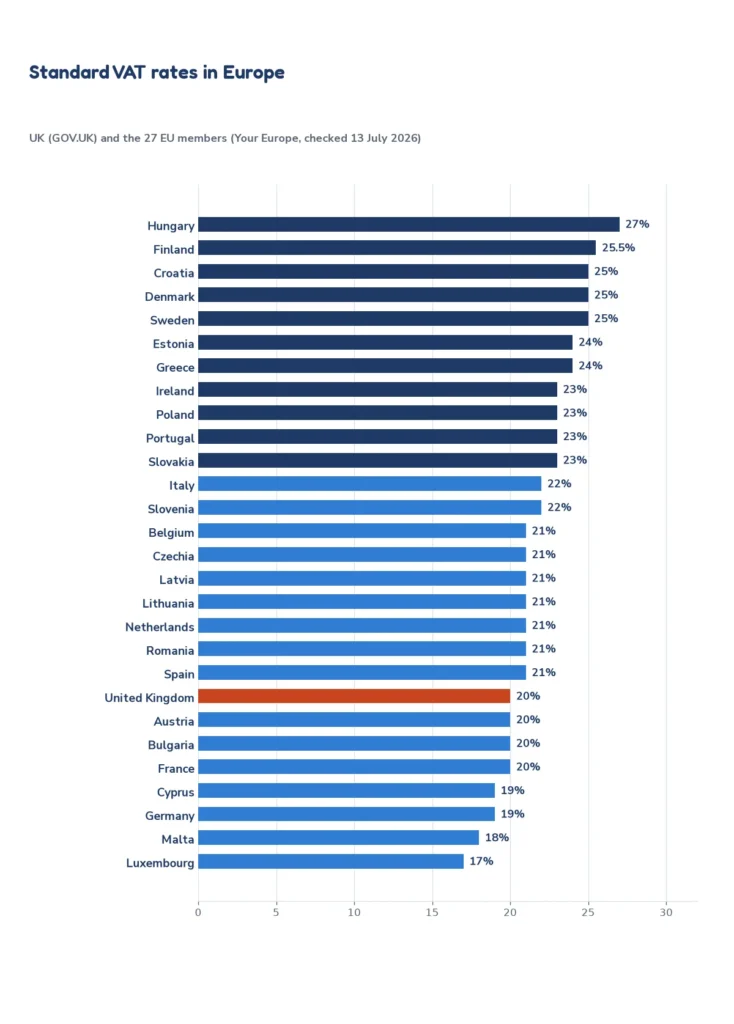
To use any of these rates, pick the country in the calculator or type the reduced rate in the VAT rate box. For example, Germany’s standard rate is 19% and its reduced rate is 7%, so €100 net becomes €119.00 or €107.00. Ireland’s standard rate is 23% and Finland’s is 25.5%, which makes €200 net into €246.00 and €251.00.
VAT invoice example with several rates
A UK invoice can mix rates, so each line needs its own VAT. This example uses the three UK rates and adds each line with the same formula as the calculator.
| Line | Net | VAT rate | VAT | Gross |
|---|---|---|---|---|
| Website design | £850.00 | 20% | £170.00 | £1,020.00 |
| Children’s car seat | £120.00 | 5% | £6.00 | £126.00 |
| Children’s clothing | £60.00 | 0% | £0.00 | £60.00 |
| Invoice total | £1,030.00 | £176.00 | £1,206.00 |
The customer pays £1,206.00. Of that, £176.00 is VAT collected for HMRC and £1,030.00 is the seller’s net income. If you only have the gross total, use the reverse VAT calculator on each line rather than on the total, because the lines have different rates.
VAT calculation questions and answers
Try these practice questions on paper first, then check each one with the VAT calculator. They also work as a short classroom exercise on percentages.
- Add 20% VAT to £45. VAT = £45 × 0.20 = £9.00, so the price is £54.00.
- A coat costs £150 including 20% VAT. What is the price before VAT? £150 ÷ 1.2 = £125.00, and the VAT is £25.00.
- A receipt shows a total of £212.40 with 20% VAT included. How much is the VAT? £212.40 ÷ 6 = £35.40 of VAT, and the net price is £177.00.
- A German shop sells a €60 net item at 19%. What does the customer pay? VAT = €60 × 0.19 = €11.40, so the customer pays €71.40.
VAT calculator add and remove: common mistakes
- Taking the percentage off the gross price. Removing 20% from £120 leaves £96, but the correct net price is £100. Always divide by 1.2.
- Using the standard rate for everything. Reduced and zero rates exist, so check the rate for the goods or service before you invoice.
- Mixing up net, gross and the VAT amount. Net is before VAT, gross is after VAT, and the VAT amount is the difference.
- Using an old rate. Rates change from time to time, so check the rate on the day of the sale. The calculator lets you type the new rate straight away.
When to use a VAT calculator: real-life examples
- Freelancers and contractors. Quote £2,400.00 net for a job and the client pays £2,880.00 with 20% VAT. If you are VAT registered, the £480.00 of VAT goes to HMRC.
- Online shopping. A £480.00 shelf includes £80.00 of VAT, so the price before VAT is £400.00. Comparing net prices is how business buyers compare suppliers.
- Expenses. A £95.99 receipt includes £16.00 of VAT. A VAT-registered business can usually reclaim that tax, so the cost to the business is £79.99.
VAT calculator questions people ask
How do I calculate VAT on my calculator?
To add 20% VAT, type the net price, multiply by 1.2 and press equals. To remove 20% VAT, type the gross price, divide by 1.2 and press equals. For a different rate, use 1 plus the rate as a decimal, such as 1.05 for 5% or 1.21 for 21%.
How does a VAT calculator work backwards?
A VAT calculator that works backwards divides the gross price by 1 plus the rate. For £120 with 20% VAT, £120 ÷ 1.2 = £100 net, so the VAT is £20. It is the exact opposite of adding VAT, which multiplies by 1.2.
What is a VAT calculation example for a small business?
A café buys flour for £300 plus 20% VAT, a total of £360, and sells cakes for £1,200 plus 20% VAT, a total of £1,440. It collected £240 of VAT and paid £60, so it owes HMRC the difference of £180 on its VAT return.
Frequently asked questions
8 quick answers
How do I calculate VAT?
Multiply the net price by the VAT rate divided by 100. At 20%, £250 × 0.20 = £50 of VAT, and the price with VAT is £300. To remove VAT, divide the gross price by 1.20.
What is the VAT rate in the UK?
The UK standard VAT rate is 20%, the reduced rate is 5% and the zero rate is 0%, according to GOV.UK. The standard rate has been 20% since 4 January 2011.
How do I add VAT to a price?
Multiply the price before VAT by 1 plus the rate as a decimal. For 20% VAT, multiply by 1.2, so £100 becomes £120. The VAT is the difference, £20.
How do I remove VAT from a price?
Divide the price including VAT by 1 plus the rate. For 20% VAT, divide by 1.2, so £120 becomes £100. Do not take 20% off the total, because that leaves £96.
Which EU country has the highest VAT rate?
Hungary has the highest standard rate in the EU at 27%, followed by Finland at 25.5%, then Croatia, Denmark and Sweden at 25%. Luxembourg has the lowest at 17%.
Do I need to register for VAT in the UK?
Businesses must register when their VAT taxable turnover is more than £90,000, according to GOV.UK. Below that they can register voluntarily. Check GOV.UK for current rules.
Is the VAT calculator free and accurate?
Yes. It is free, runs in your browser, and rounds to the penny or cent with the working shown. Rates were checked in October 2026, and you can type any rate yourself.
Is VAT the same as sales tax?
No. VAT is charged at every stage of the supply chain, and businesses reclaim the VAT they pay. US sales tax is charged once, on the final sale to the consumer.
Related calculators and worksheets
- GST calculator for Australia, New Zealand, India and Singapore
- Canada sales tax calculator for GST, HST, PST and QST by province
- Discount, tax and tip calculator for US sales tax and percent-off prices
- Percentage calculator for percent increase and percent of a number
- Markup calculator for pricing before VAT
- Money worksheets and decimals worksheets to practice the math
Sources and further reading
- GOV.UK: VAT rates for the UK standard, reduced and zero rates
- GOV.UK: how VAT works for registration and VAT returns
- Your Europe: VAT rules and rates for the EU rates table
- European Commission: VAT rates for the rules on standard, reduced and zero rates
This calculator gives general information, not tax advice. VAT rules depend on the goods, the seller and the country, so check with your tax authority or an accountant before you file a return.
Last updated: October 2026.