A date calculator adds or subtracts days, weeks, months and years from a date and tells you the new date and its weekday. Pick a start date, type an amount and choose add or subtract; the answer, the week number and the written working appear straight away.
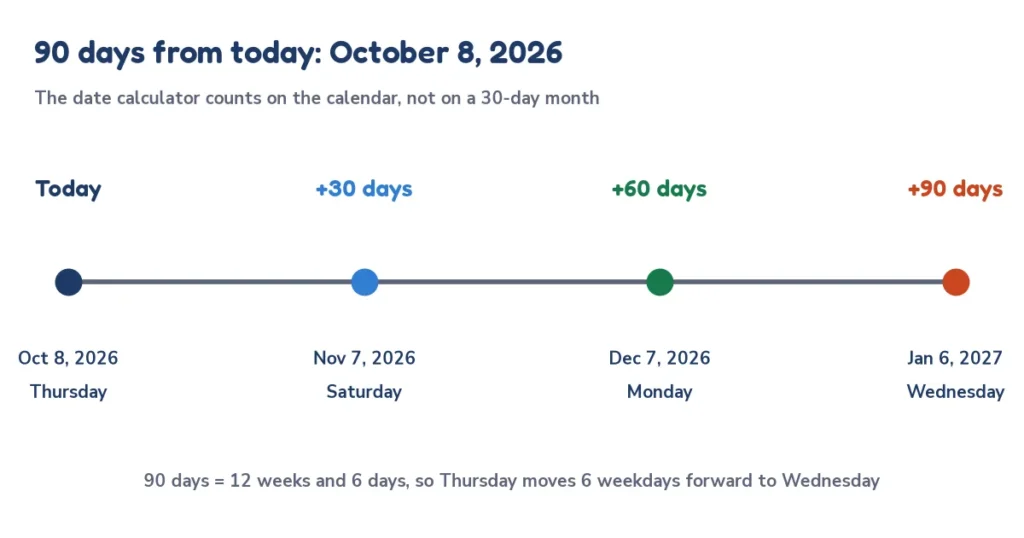
Quick answer: 90 days from October 8, 2026 is Wednesday, January 6, 2027. Add the days to the start date on the calendar, or count 12 weeks and 6 days: from a Thursday, 6 extra days lands on a Wednesday.
How to use this date calculator
- Choose Add to the date or Subtract from the date.
- Pick the start date. It opens on today, so the first answer is already a date from today.
- Type the years, months, weeks and days you want to move. Use the quick buttons for common amounts such as 30, 60, 90 or 100 days.
- Read the new date, the weekday, the ISO week number and the table of other amounts. Tap Copy result to paste it.
| Input | Rule | Example |
|---|---|---|
| Years and months | Added first, keeping the day of the month | Oct 8 + 6 months = Apr 8 |
| Weeks | Each week is 7 days | 3 weeks = 21 days |
| Days | Counted one by one on the calendar | Oct 8 + 90 days = Jan 6 |
| Subtract | The same steps in the other direction | Oct 8 − 90 days = Jul 10 |
How the date calculator works
The formula has two stages: new date = (start date + total months) + total days, where total months = years × 12 + months and total days = weeks × 7 + days. For a subtraction, both totals are taken away instead. Every date is turned into a plain day number first, so leap years, month lengths and daylight saving never cause a one-day error.
- Rule 1, months first. Years and months move the month and keep the day of the month.
- Rule 2, month-end. If that day does not exist in the new month, the answer is the last day of that month.
- Rule 3, days last. Weeks and days are counted on the calendar, one day at a time, across month and year boundaries.
Date calculator: add days to a date
To add days to a date, count forward on the calendar, one day at a time, so months of 28, 30 and 31 days all work out. Day 1 is the day after the start date. In the date calculator the days box does this: 30 days from October 8, 2026 is Nov 7, 2026, a Saturday.
What is the date in 90 days? The 90 days from today answer
If you want to know what is the date in 90 days, the date calculator starts from today and adds 90 days. From October 8, 2026 the answer is Wednesday, January 6, 2027, in ISO week 1, day 6 of the year. Common versions of the question are 30, 60, 90, 100 and 180 days from today; the table gives all of them from the same start date.
| Days from Oct 8, 2026 | Date | Weekday | ISO week |
|---|---|---|---|
| 7 days | Oct 15, 2026 | Thursday | Week 42 |
| 14 days | Oct 22, 2026 | Thursday | Week 43 |
| 21 days | Oct 29, 2026 | Thursday | Week 44 |
| 30 days | Nov 7, 2026 | Saturday | Week 45 |
| 45 days | Nov 22, 2026 | Sunday | Week 47 |
| 60 days | Dec 7, 2026 | Monday | Week 50 |
| 90 days | Jan 6, 2027 | Wednesday | Week 1 |
| 100 days | Jan 16, 2027 | Saturday | Week 2 |
| 120 days | Feb 5, 2027 | Friday | Week 5 |
| 180 days | Apr 6, 2027 | Tuesday | Week 14 |
| 270 days | Jul 5, 2027 | Monday | Week 27 |
| 365 days | Oct 8, 2027 | Friday | Week 40 |
Subtract days from a date
To subtract days from a date, count backward the same way. 90 days before October 8, 2026 was Friday, July 10, 2026. Use this to find a date in the past, such as the start of a 90-day period that ends today, the day a warranty or notice period began, or what the date was 100 days ago.
Date calculator by weeks
A week is always 7 days, so adding weeks is the simplest case: the weekday never changes. Twelve weeks from a Thursday is a Thursday. Weeks are common for pregnancy trimesters, school terms, project sprints and notice periods.
| Weeks from Oct 8, 2026 | Date | Weekday |
|---|---|---|
| 1 week | Oct 15, 2026 | Thursday |
| 2 weeks | Oct 22, 2026 | Thursday |
| 4 weeks | Nov 5, 2026 | Thursday |
| 6 weeks | Nov 19, 2026 | Thursday |
| 8 weeks | Dec 3, 2026 | Thursday |
| 10 weeks | Dec 17, 2026 | Thursday |
| 12 weeks | Dec 31, 2026 | Thursday |
| 16 weeks | Jan 28, 2027 | Thursday |
| 20 weeks | Feb 25, 2027 | Thursday |
| 26 weeks | Apr 8, 2027 | Thursday |
| 40 weeks | Jul 15, 2027 | Thursday |
| 52 weeks | Oct 7, 2027 | Thursday |
Add months to a date: the month-end rule
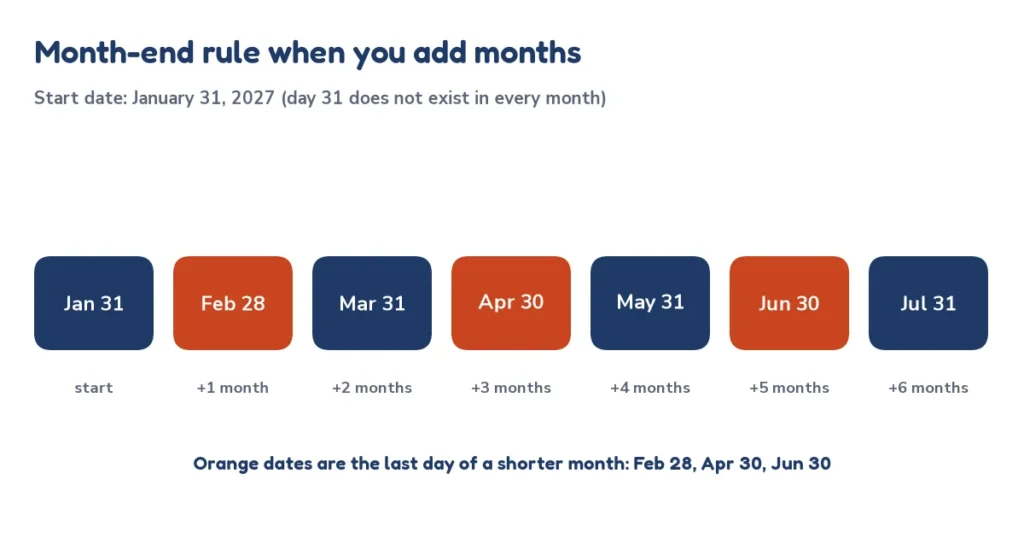
When you add months to a date, keep the day of the month and move the month. The only problem is a day that does not exist in the new month. Six months from August 31, 2026 should be February 31, 2027, but February is shorter, so the date calculator uses the last day of the month: Sunday, February 28, 2027. The same rule applies when subtracting and when adding years to February 29.
| Add to the start date | From Jan 31, 2027 | From Jan 31, 2028 (leap year) |
|---|---|---|
| 1 month | Feb 28, 2027 | Feb 29, 2028 |
| 2 months | Mar 31, 2027 | Mar 31, 2028 |
| 3 months | Apr 30, 2027 | Apr 30, 2028 |
| 4 months | May 31, 2027 | May 31, 2028 |
| 5 months | Jun 30, 2027 | Jun 30, 2028 |
| 6 months | Jul 31, 2027 | Jul 31, 2028 |
| 12 months | Jan 31, 2028 | Jan 31, 2029 |
Whether this matches a contract depends on its wording, because some agreements say “30 days” and others say “one month”. Spreadsheets use the same rule: Excel and Google Sheets give the same answers with the EDATE function.
Months from today
| Months from Oct 8, 2026 | Date | Weekday |
|---|---|---|
| 1 month | Nov 8, 2026 | Sunday |
| 2 months | Dec 8, 2026 | Tuesday |
| 3 months | Jan 8, 2027 | Friday |
| 4 months | Feb 8, 2027 | Monday |
| 5 months | Mar 8, 2027 | Monday |
| 6 months | Apr 8, 2027 | Thursday |
| 9 months | Jul 8, 2027 | Thursday |
| 12 months | Oct 8, 2027 | Friday |
| 18 months | Apr 8, 2028 | Saturday |
| 24 months | Oct 8, 2028 | Sunday |
Combining years, months, weeks and days
You can fill in all four boxes at once. The date calculator adds the years and months together first, then the weeks and days. Adding 1 year, 2 months, 3 weeks and 4 days to October 8, 2026 means 14 months (December 8, 2027) plus 25 days, which is Sunday, January 2, 2028. To subtract 2 months and 3 weeks from the same date, take away 2 months to reach August 8, then 21 days: Saturday, July 18, 2026. The order matters only at month ends, and the tool always uses this order.
Days from today to holidays and big dates
Reverse the question and you get a countdown: how many days from today until a date. From October 8, 2026 these are the days to some popular dates; the date calculator confirms each one when you type the number of days. For a live countdown that updates every day, use the days until calculator.
| Date | Calendar date | Weekday | Days from Oct 8, 2026 |
|---|---|---|---|
| Halloween | Oct 31, 2026 | Saturday | 23 days |
| Thanksgiving (US) | Nov 26, 2026 | Thursday | 49 days |
| Christmas Day | Dec 25, 2026 | Friday | 78 days |
| New Year’s Day | Jan 1, 2027 | Friday | 85 days |
| Valentine’s Day | Feb 14, 2027 | Sunday | 129 days |
Adding a year: 365 or 366 days?
A year is not always 365 days. When you add 1 year, the date calculator keeps the same month and day, so the number of days depends on whether a February 29 falls in between. Adding a year to February 29 gives February 28 in a common year, the same last-day rule as for months.
| Start date | Plus 1 year | Days between |
|---|---|---|
| Oct 8, 2026 | Oct 8, 2027 | 365 days |
| Feb 28, 2027 | Feb 28, 2028 | 365 days |
| Mar 1, 2027 | Mar 1, 2028 | 366 days |
| Feb 29, 2028 | Feb 28, 2029 | 365 days |
Dates, time zones and daylight saving
The date calculator works with calendar dates only, so there is no time of day to shift. This matters in programs and spreadsheets that add 24 hours at a time: across a daylight saving change a day can be 23 or 25 hours long and a naive calculation is off by one. Counting whole calendar days, as this tool does, avoids that, and the same date is the same date in every time zone.
Date calculator for contracts and deadlines
Legal and business deadlines depend on the exact wording. Some documents count from the day after an event, some include the first day, some skip weekends and holidays, and some say “one month” instead of “30 days”. Use the date calculator to see the calendar answer, then check the wording of the notice, contract or court rule, or ask the person who set the deadline. Nothing here is legal advice.
Day of the week after adding days
The day of the week depends on the days left after removing whole weeks. Divide the number of days by 7 and move forward by the remainder. 90 ÷ 7 = 12 remainder 6, so from a Thursday you land on a Wednesday. The date calculator shows the weekday for every result.

| Remainder of days ÷ 7 | Weekday from a Thursday | Meaning |
|---|---|---|
| 0 (exact weeks) | Thursday | Same weekday |
| 1 | Friday | Thursday plus 1 day |
| 2 | Saturday | Thursday plus 2 days |
| 3 | Sunday | Thursday plus 3 days |
| 4 | Monday | Thursday plus 4 days |
| 5 | Tuesday | Thursday plus 5 days |
| 6 | Wednesday | Thursday plus 6 days |
Week number: ISO weeks and the date calculator
The date calculator reports the ISO week number, the international standard in which weeks start on Monday and week 1 is the week with the first Thursday of the year (ISO week date). This can differ from the US habit of starting weeks on Sunday and calling the week with January 1 week 1, so check which system a form or planner uses. Some years have 53 ISO weeks, such as 2026.
| Year | Weekday of Jan 1 | ISO week of Jan 1 | ISO weeks in the year |
|---|---|---|---|
| 2025 | Wednesday | Week 1 of 2025 | 52 |
| 2026 | Thursday | Week 1 of 2026 | 53 |
| 2027 | Friday | Week 53 of 2026 | 52 |
| 2028 | Saturday | Week 52 of 2027 | 52 |
| 2029 | Monday | Week 1 of 2029 | 52 |
| 2030 | Tuesday | Week 1 of 2030 | 52 |
Date formats around the world
The same date is written in several ways, which causes real mistakes: 08/10/2026 is August 10 in the United States and October 8 in most other countries. The date calculator shows the answer in all common forms and uses the long form for the big answer. See Wikipedia on date notation in the United States and the ISO 8601 standard.
| Format | Oct 8, 2026 looks like | Where it is used |
|---|---|---|
| US (month/day/year) | 10/08/2026 | United States |
| Day/month/year | 08/10/2026 | UK, Europe, India, Australia and most countries |
| Year-month-day (ISO 8601) | 2026-10-08 | International standard; sorts correctly; common in technical and government records |
| Long form | Thursday, October 8, 2026 | Unambiguous everywhere |
Date calculator in Excel and Google Sheets
Spreadsheets store dates as numbers, so adding days is plain addition. These formulas work in both Excel and Google Sheets, with the start date in cell A1.
| Goal | Formula | Notes |
|---|---|---|
| Add 90 days | =A1+90 | Format the cell as a date |
| Subtract 90 days | =A1-90 | Counts back on the calendar |
| Add 6 months | =EDATE(A1,6) | Uses the month-end rule |
| Add 1 year | =EDATE(A1,12) | Feb 29 + 1 year = Feb 28 |
| Weekday name | =TEXT(A1,”dddd”) | Example: Thursday |
| ISO week number | =ISOWEEKNUM(A1) | Weeks start on Monday |
Common mistakes with date math
- Counting the start date. Day 1 is the day after the start date. To count the start date as day 1, add one day less.
- Treating a month as 30 days. Six months is not 180 days; from October 8 it is 182 days. Use months when a contract says months.
- Landing on a weekend. 30 days from October 8, 2026 is a Saturday. If deadlines move to the next business day, use the business days calculator.
- Mixing date formats. Always check whether 08/10 means August 10 or October 8.
Real-life uses for a date calculator
- Deadlines and notices: a 30, 60 or 90 day notice, return window or payment term.
- Travel and visas: the date a stay limit ends, counted from arrival.
- Projects: sprint end dates and milestones in weeks.
- Health and pregnancy: follow-up dates in weeks; use the due date calculator for due dates.
- Planning: the date 100 days from a start, the date a subscription renews, or the day a loan term ends.
Frequently asked questions
9 quick answers
What is the date 90 days from today?
From October 8, 2026, 90 days from today is Wednesday, January 6, 2027. The date calculator starts from the current date, so the answer is always correct for the day you open it.
How do I add days to a date?
Count forward on the calendar from the start date, so the next day is day 1. In the date calculator, pick the start date, type the number in the days box and read the new date.
How do I subtract days from a date?
Choose Subtract from the date, type the days and read the result. For example, 90 days before October 8, 2026 is Friday, July 10, 2026.
What is the date 6 months from now?
Keep the same day of the month and move the month forward by 6. Six months from October 8, 2026 is Thursday, April 8, 2027. If the day does not exist, the last day of the month is used.
Does the date calculator count weekends?
Yes. It counts every calendar day, including Saturdays and Sundays. For working days only, use the business days calculator.
How do I find the day of the week for a date?
Enter the date with zero days to add. The result shows the weekday. Or move forward from a known weekday by the days left after dividing by 7.
What is the week number of a date?
The calculator shows the ISO week number, with weeks starting on Monday and week 1 containing the first Thursday of the year. October 8, 2026 is in ISO week 41.
Is a month always 30 days?
No. Months have 28 to 31 days, so adding 1 month is not the same as adding 30 days. October 8 plus 1 month is November 8, which is 31 days later.
Can the date calculator find the days between two dates?
Yes, use the days between dates calculator for that. It gives days, weeks, months and working days between any two dates.
Related calculators
- Days between dates calculator: the number of days between two dates
- Business days calculator: add or count weekdays only
- Days until calculator: a countdown to any date
- Age calculator: exact age in years, months and days
- Time calculator: add and subtract hours and minutes
- Printable calendars and the full calculator list
Sources and further reading
Last updated: October 2026.