The best virtual bingo ideas keep one rule from classic bingo (a caller reveals things at random, players mark them) and change what is on the card: numbers, words, pictures, trivia answers or things you can spot in each other’s rooms. This guide gives you 20 formats for work, family and school, the setup for a video call, and something most lists skip: a simulation of how many calls a game really needs with 10, 20, 30, 40 or 50 remote players.
In short: for a first game, share the free bingo caller in big-screen mode, give each player a card from the bingo card generator, and play a single line. With 20 players and 75-ball numbers the median first line lands on call 22, about 2.2 minutes at six seconds per call. Word cards from a pool of 45 need only 14 calls.
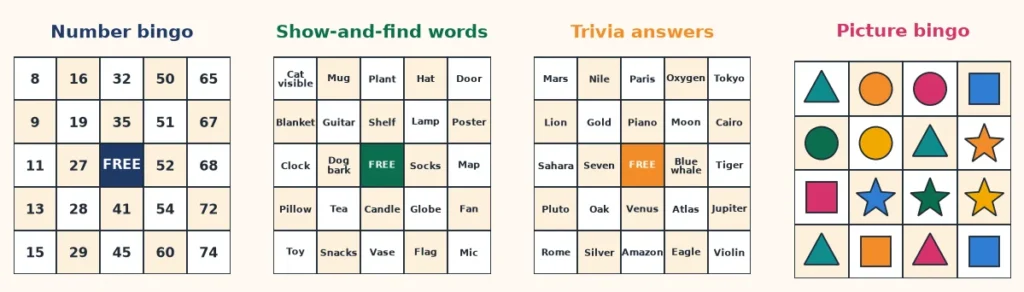
Virtual bingo ideas at a glance: 20 formats that work on a call
Good virtual bingo ideas share three traits. Players need nothing but a card and a screen, the host can run a round in under ten minutes, and the squares give people something to notice or share instead of only waiting for luck. The table lists 20 formats and the card or tool that fits each one. Every card in it can be edited before you print it or play it online.
| # | Idea | Best for | Card or tool |
|---|---|---|---|
| 1 | Classic 75-ball line bingo | Any group | 75-ball cards + bingo caller |
| 2 | Pattern rounds: four corners, X, blackout | Groups that want a longer night | bingo patterns guide |
| 3 | Show-and-find bingo (things in your room) | Family, friends, teams | Custom word card, 5×5 |
| 4 | Listen-for bingo (sounds heard on the call) | Teams, families | Custom word card, 5×5 |
| 5 | Trivia bingo (answers on the card) | Quiz fans, classrooms | Custom word card + your question list |
| 6 | Picture bingo | Young children, mixed ages | picture bingo for kids |
| 7 | Music bingo (name that tune) | Friends, kitty parties | music bingo cards |
| 8 | Emoji bingo | Teens, families | emoji bingo |
| 9 | Human bingo in small groups | New teams, new classes | human bingo |
| 10 | Meeting and buzzword bingo | Work teams | meeting bingo |
| 11 | Getting-to-know-you bingo | Onboarding, clubs | getting-to-know-you bingo |
| 12 | Holiday bingo | Families, offices | Christmas bingo, Halloween bingo |
| 13 | Baby shower bingo | Guests in many cities | baby shower bingo |
| 14 | Bridal shower bingo | Bridesmaids, relatives | bridal shower bingo |
| 15 | Birthday bingo | Family birthdays | birthday bingo |
| 16 | Kitty party bingo | Kitty groups meeting online | kitty party bingo |
| 17 | Classroom review bingo | Teachers, tutors | classroom bingo |
| 18 | Sight words and alphabet bingo | Early readers | sight words bingo, alphabet bingo |
| 19 | Large-print bingo for grandparents | Older relatives | bingo for seniors |
| 20 | Movie and Bollywood bingo | Film fans | Bollywood bingo |
The rest of this guide goes through these ideas in four groups: number games, word games, picture and trivia games, and occasion games. After that come the hosting setup, the game-length data and run sheets. If you want a longer look at the basics of hosting a game with friends, the guide to playing bingo online with friends covers a first evening in detail, and the online bingo game page runs a live game with guests joining by link.
Virtual bingo games with numbers: the classic 75-ball round
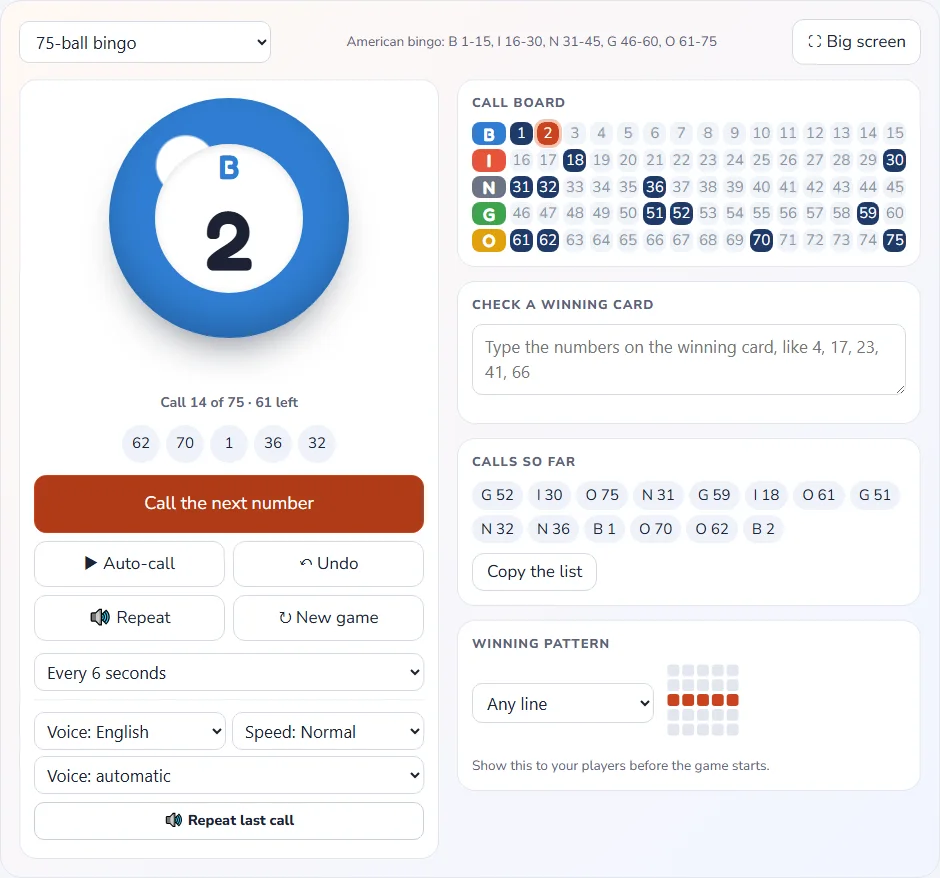
Number bingo is the simplest of the virtual bingo games because the numbers 1 to 75 need no explanation. Every player holds a 5 by 5 card with the letters B, I, N, G and O across the top, the host calls a letter and a number, and the first complete pattern wins. The bingo caller draws every number exactly once in shuffled order, so nobody has to trust a human to avoid repeats, and it keeps a call board and the last five calls on screen for anyone who looked away for a second.
Idea 1: a single-line opener
Start every virtual bingo night with a single line, any row, column or diagonal. It is quick, nobody is left far behind, and it teaches newcomers how to mark and claim, which makes it the safest of all the virtual bingo ideas to open with. With 20 players the median game ends on call 22, and half of all games end between call 19 and call 26.
Idea 2: pattern rounds
Once the group is warmed up, change the target. Four corners takes a median of 35 calls with 20 players, an X takes 51 and a full-card blackout takes 67. Pattern rounds are the easiest of the virtual bingo ideas to scale up. Announce the pattern in the chat before each round, and keep a picture of it on your shared screen if you can. The bingo patterns guide shows each pattern as a diagram.
Idea 3: speed rounds and slow rounds
The caller can auto-call every 3, 4, 5, 6, 8, 10, 15, 20 or 30 seconds, with a pause button. On a video call, where audio lags and people squint at a second screen, 8 to 10 seconds suits most mixed groups, while experienced players enjoy 5. For the traditional rhyming nicknames, see the guide to bingo calls and nicknames. A 90-ball game for housie fans uses the tambola number caller in the same way.
Online bingo ideas with your own words
Word cards are where virtual bingo ideas get personal, and where online bingo ideas can match any group. Instead of numbers, each square holds a short phrase that a host can call, that a player can spot, or that is likely to happen during the call.
The custom bingo online game lets you paste your own list, choose a 5 by 5 or 4 by 4 card, and share one link so every guest receives a different card. You choose between revealing each call yourself or letting the game call automatically so that phones mark themselves.
Idea 4: show-and-find bingo
The host calls an item, and players who have it in view mark the square and hold it up to the camera. It turns a living room into a scavenger hunt without anyone leaving their chair, and it works for any age. This is the first of the word-based games, and here are 24 squares you can paste into the card maker as they are.
| Squares 1 to 6 | Squares 7 to 12 | Squares 13 to 18 | Squares 19 to 24 |
|---|---|---|---|
| A mug | A plant | A clock | A blanket |
| A candle | A guitar or other instrument | A map or globe | A pillow |
| A lamp | A framed photo | A stuffed toy | A pair of socks |
| A hat | A bookshelf | A pet in view | Slippers |
| A window | A poster | A water bottle | A snack |
| A door | A fan | A flag | A tray of tea or coffee |
That list has 24 items, which is exactly one 5 by 5 card with a free center. Add 6 to 20 spare items so that the cards differ from one another, because a pool of 30 words gives 593,775 different sets of 24 and a pool of 45 gives 3,773,655,750,150. The simulation further down shows why a bigger pool also lengthens the game.
Idea 5: listen-for bingo
In listen-for bingo the squares are sounds and phrases that tend to come up on a video call: a door closing, someone laughing, “can you hear me?”, a notification ping, a dog barking, “you’re on mute”. Players mark a square when they hear it, which means the host does not call anything. Of all the formats it is the quietest, so run it for a fixed 10 or 15 minutes, then ask who has a line. It suits a catch-up call because it adds a little game without interrupting the conversation.
Idea 6: virtual trivia bingo
Virtual trivia bingo is a hybrid of a quiz and a card game. The squares hold answers, not questions: Mars, the Nile, oxygen, Cairo, a blue whale. The host reads a question (“Which planet is known as the red planet?”), players find the answer on their card and mark it. Nobody is eliminated, a lucky card can beat a knowledgeable player, and there is no scoreboard to dread, which makes it friendlier than a pure quiz for mixed groups.
Write one question for each answer on the list and keep the questions in the order you plan to read them or shuffle them. In the custom online game the host reveals each call, which suits trivia, because you read the question yourself and then reveal the answer item. Trivia calls take longer than other calls, so use a smaller pool (see the timing section) and play a line or two lines, not a blackout.
Virtual bingo for kids: picture and sight-word games
Virtual bingo for kids needs shorter rounds, and the formats that work for children are mostly visual, bigger pictures and a gentler pace. Children under seven often cannot read fast enough for a word card, so use pictures or letters, and keep the grid small. The picture bingo for kids pages cover animals, food, weather and more, and sight words bingo and alphabet bingo fit early readers.
Idea 7: a 3×3 or 4×4 picture card
A smaller grid fills quickly, and the simulation shows how fast. With a free center on a 3×3 card a single line needs only two calls with 20 players, which is far too quick. Drop the free square, and the median becomes 4 calls with 20 players on a pool of 16 pictures. A 4×4 card with a pool of 24 pictures takes 8 calls. Both make a comfortable first game for a child who is learning to scan a card.
Idea 7b: teacher-led review
For a lesson, call the definition and let students find the word, as in the classroom bingo set. The guide to bingo activities for the classroom has 15 more lesson ideas. Keep to about ten minutes for each round with the youngest groups, and let a parent or a helper on the child’s side mark the card when a small child cannot use a mouse.
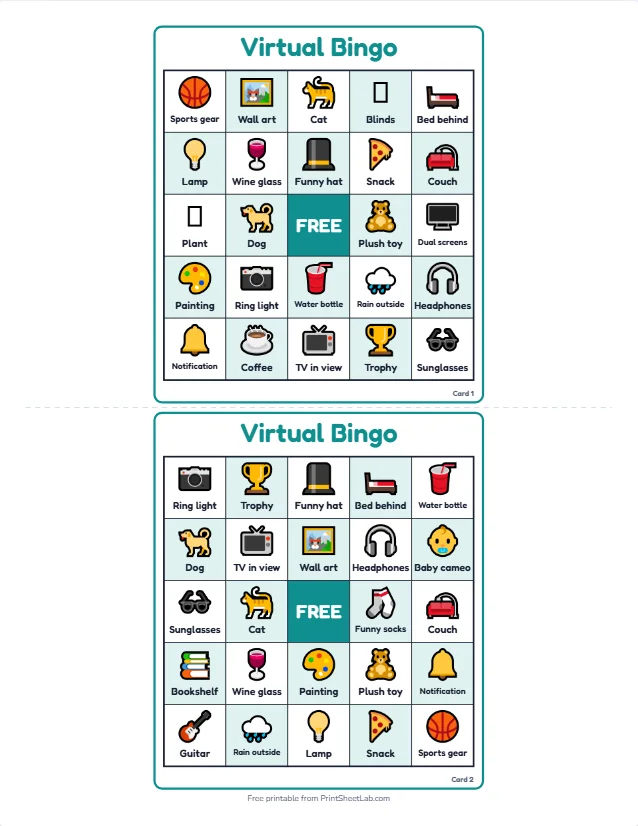
Virtual bingo for work: team ideas that stay friendly
Virtual bingo for work is one of the most popular virtual bingo ideas because it lowers the stakes of small talk. A team that has never met can still laugh at a square that says “a pet joins the call”. Keep the content kind, because the best team games never target anyone: the squares should describe situations that happen to everyone, never habits of a named colleague, and joining should always be optional.
Idea 8: buzzword and meeting bingo
The squares are phrases that crop up in meetings. Players mark them silently and cheer at a line, which gives a long call a light touch. Use meeting bingo for a recurring status meeting, and agree beforehand that the game stays playful and is never used in a real client call or to mock a speaker.
Idea 9: getting-to-know-you and human bingo
The squares are facts: “has lived in three countries”, “plays an instrument”, “likes cold coffee”. Players find someone who matches by asking in the chat or in small groups. Human bingo and getting-to-know-you bingo ready-made lists fit onboarding sessions and new classes. Let people opt out of any square they do not want to answer.
Idea 10: a holiday party round
For an end-of-year call, a themed card in the office colors is enough: Christmas, New Year or a company-themed list. Read the corporate ideas in the corporate tambola guide for prize and run-of-show tips, and see Zoom bingo for squares written specifically for video calls.
Remote bingo games for families and milestones
Remote bingo games shine when people who cannot be in one room share a celebration. Because everyone watches the same shared caller, a game works as well across two time zones as across two streets. These are the occasions where virtual bingo ideas work best.
- Baby showers: guests mark gifts as they are opened; read the full guide in baby shower bingo for rules and prizes, or the baby shower bingo ideas guide.
- Bridal showers: the squares are moments from the day; see bridal shower bingo.
- Birthdays: birthday bingo and the birthday party games for kids guide.
- Grandparent calls: a 4×4 large-print card with a slow caller, as in bingo for seniors.
- Festivals: Diwali bingo, Holi bingo, Christmas bingo and New Year’s bingo work as shared traditions across distances.
- Kitty parties online: kitty party bingo and the kitty party games guide.
If your family plays tambola or housie, the same ideas apply with 1 to 90 tickets. The how to play tambola guide explains the prizes, and the party games hub lists every online game.
How to host virtual bingo games on a video call
Hosting any of these virtual bingo ideas is mostly a matter of putting the caller where everyone can see it. The diagram shows the usual arrangement: the host shares the caller, players keep their card on a second device or on paper, and a chat window handles claims.
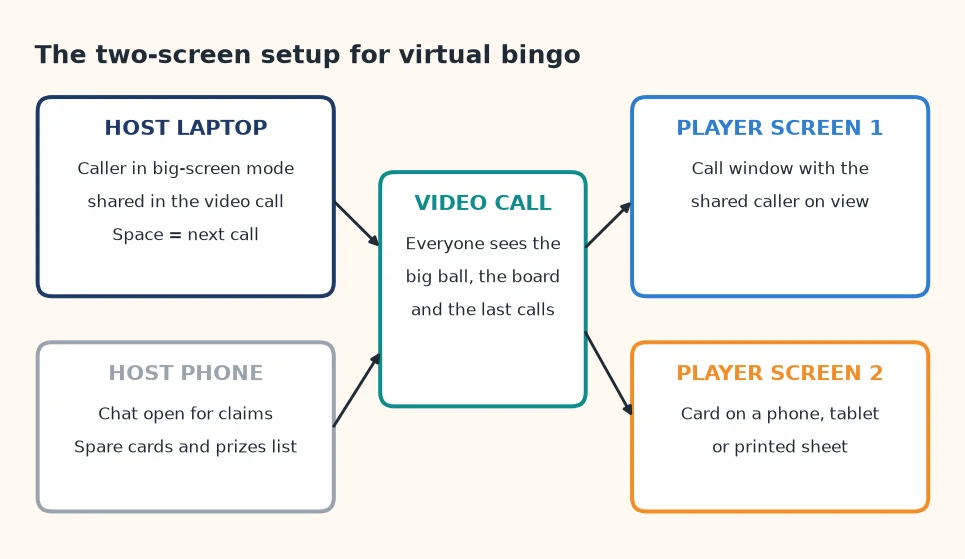
- Open the free bingo caller for 75-ball games, choose the pattern and the call speed, and press Big screen.
- Share that window or tab in your video call. Press Esc to leave the big screen when you need your other windows.
- Send the cards. Print and email them, send a link, or run a live game where guests open a link and get a card on their phone (see the cards section below).
- Explain the round in the chat: the pattern, how to claim, and what the prize is.
- Call. Press Space or Enter for the next call, P to pause or switch on auto-call, U to undo the last call and R to repeat it.
- Check the claim by reading the winning numbers back. The caller has a “Check a winning card” box where you type them and see whether all were called.
The caller can speak each number in English or Hindi, with a choice of speed and voice. If your video call does not carry the shared window’s sound, read each call aloud yourself, because players who cannot hear the voice will otherwise watch the screen and miss calls. The game is saved in the browser, so a reload does not lose the numbers called.
Virtual bingo cards: print, share or play on screen
There are three practical ways to get virtual bingo cards to remote players, whichever of the virtual bingo ideas you choose, and the best choice depends on your guests’ devices and patience.
| Method | How it works | Best when | Watch out for |
|---|---|---|---|
| Print and mail or email PDFs | Make a set of up to 100 different cards in the bingo card generator and download the PDF; guests print or view it | Older players, classrooms, offline play | Players must mark their own card and may miss a call |
| Share a link to the words | The Share link carries the words only; each person then makes their own cards | Creative groups and teachers | Recipients need a few minutes to build their own cards |
| Live online game | The Play online button opens a game where guests join by link, pick a name and get a card that marks itself | Phones, big groups, no printing | Needs a stable connection for every guest |
For numbered virtual bingo cards you can write “Card 1”, “Card 2” and so on, which makes checking a win quick: the player says the card number and the host looks at it. Prints come in 1, 2, 4 or 6 per page, on Letter or A4 paper, with cut guides and a caller sheet. For a blank starting point, see the blank bingo cards page, and the how to make bingo cards guide for the full picture.
Whichever format you choose, the maker prints up to 100 different cards per set, so a bigger group needs several sets, and it cannot promise that two sets never share a card. In the live game the card maker is replaced by the game itself, which gives each guest a different card from your list. The best bingo card generator guide lists what to compare before you pick a tool.
How long does a game take? A simulation of 10 to 50 players
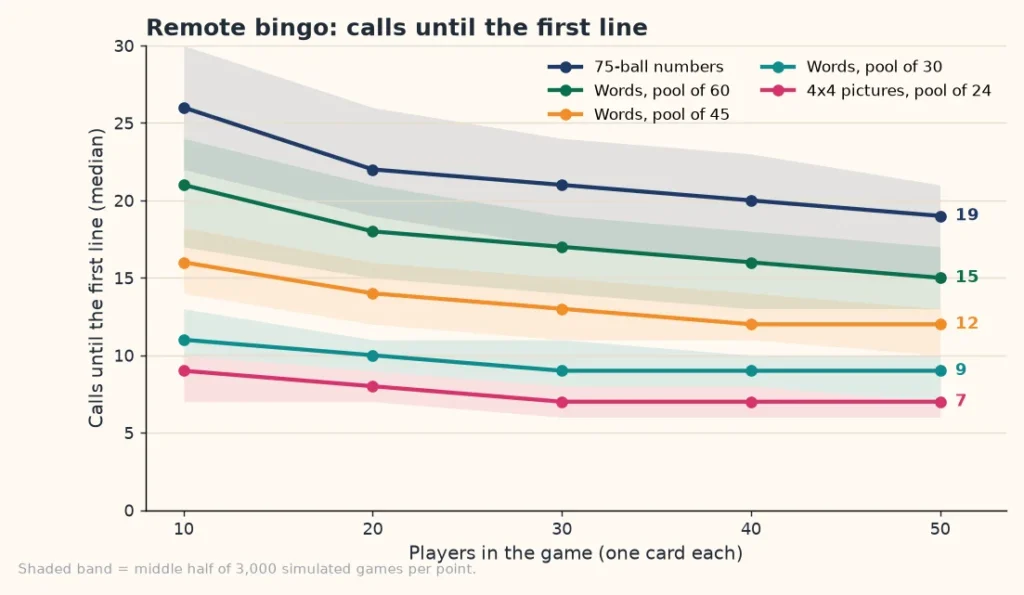
A common planning guess for virtual bingo is “about 15 minutes”, but the real figure depends on the card. To put numbers on these virtual bingo ideas, we simulated 3,000 games for every combination of format and group size. Each player holds one random card. The game calls items in random order and stops when the first card completes the pattern. The tables show the median number of calls and, in brackets, the middle half of all games.
Calls until the first line
| Format | 10 players | 20 players | 30 players | 40 players | 50 players |
|---|---|---|---|---|---|
| 75-ball numbers | 26 (22 to 30) | 22 (19 to 26) | 21 (17 to 24) | 20 (16 to 23) | 19 (15 to 21) |
| Words, pool of 60 | 21 (17 to 24) | 18 (15 to 21) | 17 (14 to 19) | 16 (13 to 18) | 15 (13 to 17) |
| Words, pool of 45 | 16 (14 to 18) | 14 (12 to 16) | 13 (11 to 15) | 12 (11 to 14) | 12 (10 to 13) |
| Words, pool of 30 | 11 (10 to 13) | 10 (9 to 11) | 9 (8 to 11) | 9 (8 to 10) | 9 (7 to 10) |
| 4×4 pictures, pool of 24 | 9 (7 to 10) | 8 (7 to 9) | 7 (6 to 8) | 7 (6 to 8) | 7 (6 to 7) |
| 3×3, pool of 16, no free square | 5 (4 to 5) | 4 (3 to 5) | 4 (3 to 4) | 4 (3 to 4) | 3 (3 to 4) |
Two things stand out for virtual bingo ideas of every kind. First, adding players barely speeds a game up: going from 10 to 50 players with 75-ball cards saves 7 calls. Second, the pool size matters more than the group size. A pool of 30 words ends a typical game on call 10 with 20 players, whereas a pool of 60 needs 18. If you want a longer game, add words; if you want a shorter one, trim the list.
Calls for each pattern, 20 players
| Format | Line | Four corners | X | Blackout |
|---|---|---|---|---|
| 75-ball numbers | 22 (19 to 26) | 35 (28 to 42) | 51 (46 to 55) | 67 (65 to 69) |
| Words, pool of 60 | 18 (15 to 21) | 27 (22 to 31) | 41 (37 to 44) | 54 (53 to 55) |
| Words, pool of 45 | 14 (12 to 16) | 21 (17 to 24) | 31 (29 to 34) | 41 (40 to 42) |
| Words, pool of 30 | 10 (9 to 11) | 14 (12 to 17) | 21 (20 to 23) | 28 (28 to 29) |
| 4×4 pictures, pool of 24 | 8 (7 to 9) | 12 (10 to 14) | 17 (16 to 19) | 22 (21 to 22) |
A blackout takes about three times as many calls as a single line on every format. For 75-ball bingo that is 67 calls instead of 22, so a blackout makes a good final round, when most cards are nearly full.
How long the calls take in minutes
Time for any of these virtual bingo ideas depends on how long you spend on each call, so we used planning figures: 6 seconds per number call, 10 seconds per word call, 12 seconds per picture and 30 seconds for each trivia question and answer. These are assumptions to adjust, not measurements. With 20 players the picture below shows the result.
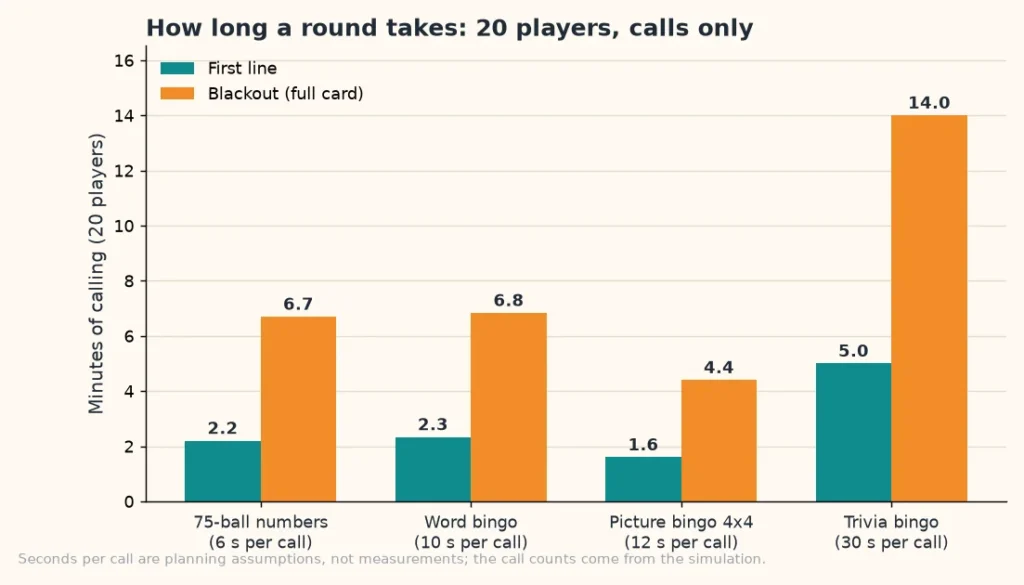
A trivia blackout runs about 14 minutes of questions, which is more than most groups want. That is why we recommend a line, or two lines at most, for virtual trivia bingo, and a smaller pool of 30 answers. A numbers blackout is 6.7 minutes, which fits one round of a longer evening.
How often two players win on the same call
In a virtual game a tie is not a failure, but you should have a rule ready. We counted the games in which two or more cards completed the first line on the same call.
| Format | 10 players | 20 players | 30 players | 50 players |
|---|---|---|---|---|
| 75-ball numbers | 8% | 11% | 12% | 15% |
| Words, pool of 45 | 11% | 13% | 15% | 18% |
| Words, pool of 30 | 18% | 21% | 24% | 25% |
| 4×4 pictures, pool of 24 | 22% | 27% | 28% | 33% |
| 3×3, pool of 16, no free square | 32% | 40% | 44% | 52% |
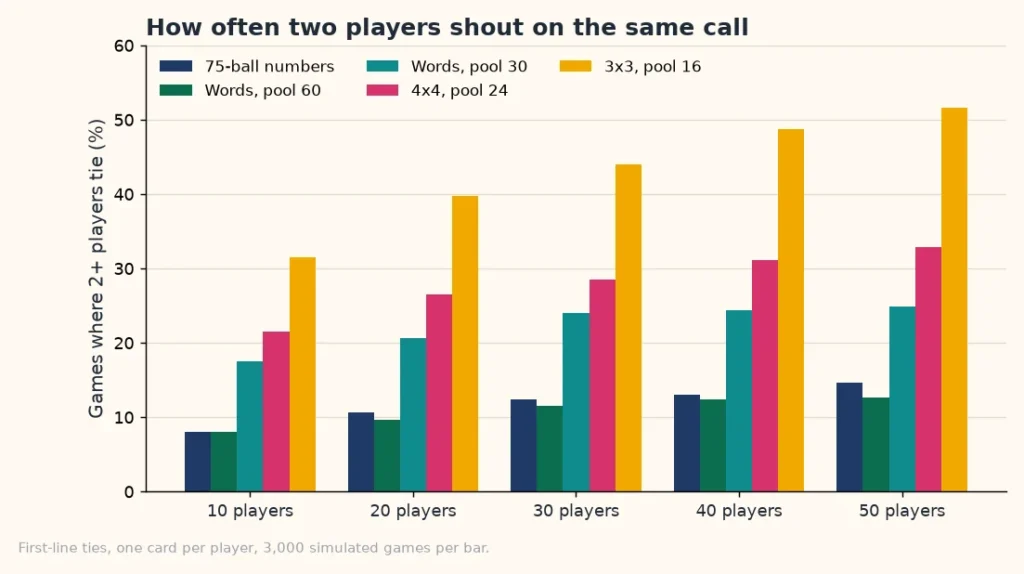
With 75-ball numbers and 30 players about 12% of games have a tie. Small word pools and small grids tie more often, up to 52% of games for a 3×3 card with 50 players. Decide beforehand: share the prize, split it, or run a quick tiebreak in which each tied player names a number from 1 to 75 and the next call decides who was closest.
How full the cards are when the game ends
On average a 75-ball card has only 7.1 numbers marked, apart from the free space, when the first line completes with 20 players. A word card from a pool of 45 has 7.5. That is why we like to run a second and a third pattern: most players spend a first round holding a card that is far from complete, and a longer pattern keeps them involved.
Run sheets for a short, medium or long virtual bingo night
The numbers above turn the virtual bingo ideas into a timetable. This table assumes 20 players and 2.5 minutes per round for checking a claim, awarding a prize and resetting the cards, plus 5 minutes of welcome and closing chat.
| Session | Format and rounds | Calls | Calling time | Total with breaks |
|---|---|---|---|---|
| Short, 20 minutes | 75-ball numbers: line, four corners | 57 | 5.7 min | 16 min |
| Short, 25 minutes | Trivia bingo, pool of 30: line, four corners | 24 | 12 min | 22 min |
| Medium, 35 minutes | Word bingo, pool of 45: line, corners, X, blackout | 107 | 18 min | 33 min |
| Long, 50 minutes | 75-ball numbers: line, corners, X, blackout, plus a 10 minute chat break | 175 | 18 min | 42 min |
Totals will vary because every game is random: a typical game lands within a few calls of the medians in the tables. Keep a spare round in your pocket, such as a second line or a quick picture round, in case a game ends early.
Keeping the game fair for everyone
Cheating is rare in friendly games, but disputes are common when a connection drops or two people unmute together. A few habits prevent most of them, whichever format you pick, and the best virtual bingo ideas all lean on the same rules.
- Claim in the chat or by unmuting, not by both. The host takes the earliest message with a time stamp.
- Read the card back. The winner lists the squares, and the host checks each one against the call board or the “Calls so far” list.
- Number the cards so the host can find a card quickly, and ask the winner to show it on camera for the record.
- Agree on late claims. A common rule: a claim made after the next call does not count unless the host says so.
- Use the undo and repeat keys if a call was misheard, so nobody marks a number that was never confirmed.
If you play for real money, remember that rules about bingo and raffles vary by country and state; check local requirements first. For a friendly game, small non-cash prizes keep things relaxed.
Prizes that suit a video call include choosing the next song or theme, becoming the caller for the next round, and a small gift sent later to a winner drawn from every round.
Fixing the most common problems
The caller is too fast or too slow
Ask in the first round. A relaxed pace of 8 to 10 seconds suits mixed groups, children and older relatives; 5 seconds is for veterans. Slow calling gives players on shaky connections time to catch up.
Players cannot see the shared screen
Paste the last called numbers into the chat every few calls, and tell players that the “Calls so far” list has a copy button. Printed cards plus a chat message are a robust fallback.
Accessibility
Choose a large text size and strong contrast when you design the card, use the voice option, and slow the calls for players who need more time. Always offer a way to take part without a camera. The seniors card uses 4×4 squares and larger text for this reason.
For background on how the 75-ball and 90-ball games differ, there is an overview of the game on Wikipedia.
More bingo to play and print
- Printable bingo cards: the hub for all themed sets.
- Bingo card generator: make cards from your own words or 75-ball numbers.
- Bingo caller: the free number caller used throughout this guide.
- Play bingo online: a live game with guests joining by link.
- How to play bingo: the basic rules.
- Bingo number chart: a printable 1 to 75 chart.
Frequently asked questions
9 quick answers
What are the best virtual bingo ideas?
The most reliable virtual bingo ideas are classic 75-ball line bingo, show-and-find bingo with items in each player’s room, trivia bingo and holiday-themed word cards. Pick the one that matches the group: numbers for any crowd, words for teams and families, pictures for children.
How do you play bingo virtually?
Most games follow one routine. Share a number caller or a call list on a video call, give every player a different card, and have players mark what is called. The first player to complete the chosen pattern claims in the chat, and the host checks the card before awarding the prize.
How long does virtual bingo take?
The virtual bingo ideas built on a single line take about 10 to 22 calls with 20 players. At six seconds per call, that is 1 to 2.2 minutes. A full blackout takes roughly three times as long.
How many people can play virtual bingo?
As many as the video call allows. The simulation covers 10 to 50 players, and the game barely changes with group size. The card maker prints up to 100 different cards per set, so larger groups need several sets.
Can kids play virtual bingo?
Yes, and many formats suit children. Use a 3×3 or 4×4 picture card, keep rounds under ten minutes, and have a helper mark the card for the youngest children. Remove the free center on a 3×3 card, otherwise a line takes only about two calls.
Is virtual bingo good for work?
Virtual bingo ideas for work make a gentle icebreaker when it stays optional and kind. Use squares about situations everyone shares, never about a named person, and keep a round under 15 minutes.
What do I need for virtual trivia bingo?
A list of answers for the cards, a matching list of questions that you read in order, and a calling method. The host reveals each answer after the question, so the pace is set by the questions, not by a timer.
Are the cards really free?
Yes. Every one of these virtual bingo ideas runs on free tools: the card maker, the caller and the live game are free to use and need no sign-up. Cards are created in your browser, and nothing you type is uploaded to an account.
What if two players win at once?
Share the prize, split it or run a tiebreak. In our simulation about 12% of 30-player number games end with a tie for the first line.