Meeting bingo is a light-hearted game that turns a long call or a weekly team meeting into something people actually watch for. Every participant holds a card of things that tend to happen at work, such as a frozen screen, a pet wandering into view or the phrase “per my last email”, and crosses a square off whenever it happens. The card maker above has a ready-made set loaded: 29 squares, a free center and up to 100 different cards per print.
In short: press Edit and print this card, change any square so it fits your team, pick a color theme and download one PDF. Each person gets a different card built from 24 of the 29 squares plus a free space. It runs in your browser, needs no sign-up and uploads nothing.
What meeting bingo is, and why teams play it
Anyone who has sat through a long meeting knows the pattern. Somebody starts talking while on mute, someone asks whether the screen is visible, and a manager promises to “circle back” on a topic that never returns. Most people smile quietly at these moments. The game simply gives that private smile a shared place to live.
The rules of meeting bingo are the rules of ordinary bingo, so nobody needs a briefing. Mark a square when it happens, complete a row, a column or a diagonal and say “Bingo”. The middle square is free, which means a line through the center needs only four real events. Because the squares are things people say and do anyway, meeting bingo asks nothing of the speaker. It does not interrupt the agenda.
People who run remote teams often use it for a second reason: attention. A bingo card is a small, gentle task that keeps a listener engaged through a status update. Meeting bingo also works as a quiet team ritual. After a few rounds, people begin to share the same running jokes, and that shared vocabulary does more for morale than many formal exercises.
The idea has an older cousin in office culture, usually called buzzword bingo, where the squares are the jargon of a particular industry. For a short background on that tradition, see the Wikipedia entry on buzzword bingo. The meeting bingo set on this page mixes jargon with the practical mishaps of video calls, so it works for a hybrid meeting just as well as for a fully remote one.
Meeting bingo cards: the 29 squares in this set
The set has 29 squares in five families. Each card shows 24 of them at random, so each person holds a different board while every square remains equally likely to be marked. The table lists every square exactly as it appears on the cards.
| Family | Squares in the set | What to know |
|---|---|---|
| Sound and connection | “You are on mute”, “Can you hear me?”, Echo, Frozen screen, Background noise, Typing noises, Two people talk at once | The audio and bandwidth squares. Almost every remote meeting produces two or three of these in the first ten minutes. |
| Screens and slides | “Can you see my screen?”, “Can everyone see this?”, “Let me share”, “Next slide, please”, Spreadsheet shown | Everything that happens when someone shares a window. Presentation-heavy meetings fill this family fastest. |
| Rooms and cameos | Pet appears, Child appears, Doorbell rings, Coffee mug raised, Camera off, Virtual background | What happens in the rooms behind the cameras. Keep these light and kind: nobody should be put on the spot for a family member walking in. |
| Phrases | “Let us circle back”, “Per my last email”, “Take this offline”, “I will follow up”, “Great point”, “Quick question”, “Any questions?”, “Sorry, go ahead” | The stock phrases of working life. These are the classic buzzword squares: easy to hear, easy to mark. |
| Rhythm of the meeting | Late joiner, Awkward silence, Over time | Three squares about timing. Over time is the slowest to fill and the one everyone secretly hopes for. |
A sample card, square by square
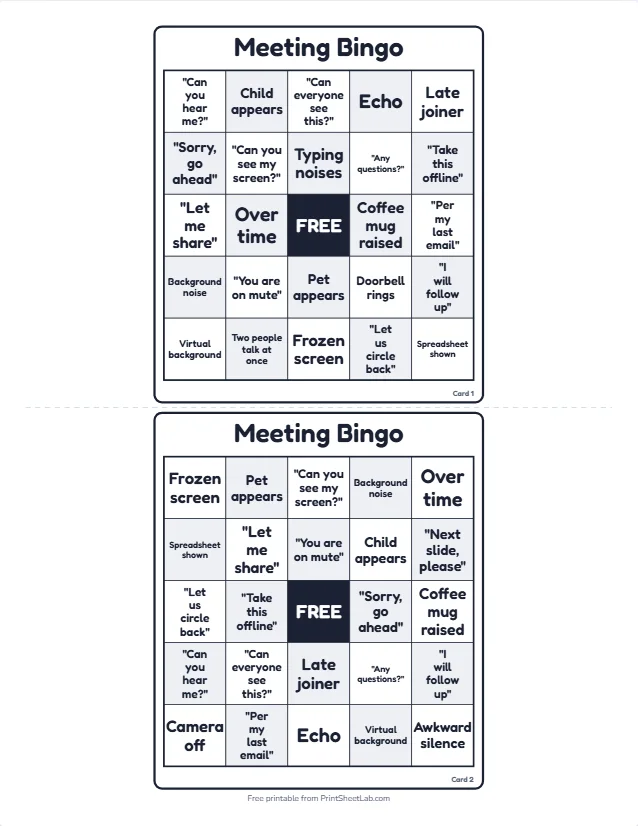
The preview image above shows two real cards. Card 1 opens with “Can you hear me?” in the top-left corner and Late joiner in the top-right. Its middle row reads “Let me share”, Over time, FREE, Coffee mug raised, “Per my last email”. That card leaves out five squares: “Next slide, please”, Camera off, “Quick question”, Awkward silence and “Great point”.
Card 2 contains three of those missing squares (“Next slide, please”, Camera off and Awkward silence) and leaves out a different five: Typing noises, Doorbell rings, Two people talk at once, “Quick question” and “Great point”. So a guest holding card 1 waits for a doorbell, while the person holding card 2 is hoping for a slide request. That is the point of printing different cards: nobody can simply copy a neighbor’s progress.
The free center can say anything. Many teams type the name of the meeting or the team mascot there. You can also use an emoji or a picture, such as a company logo.
Meeting bingo printable: print it, show it on screen or both
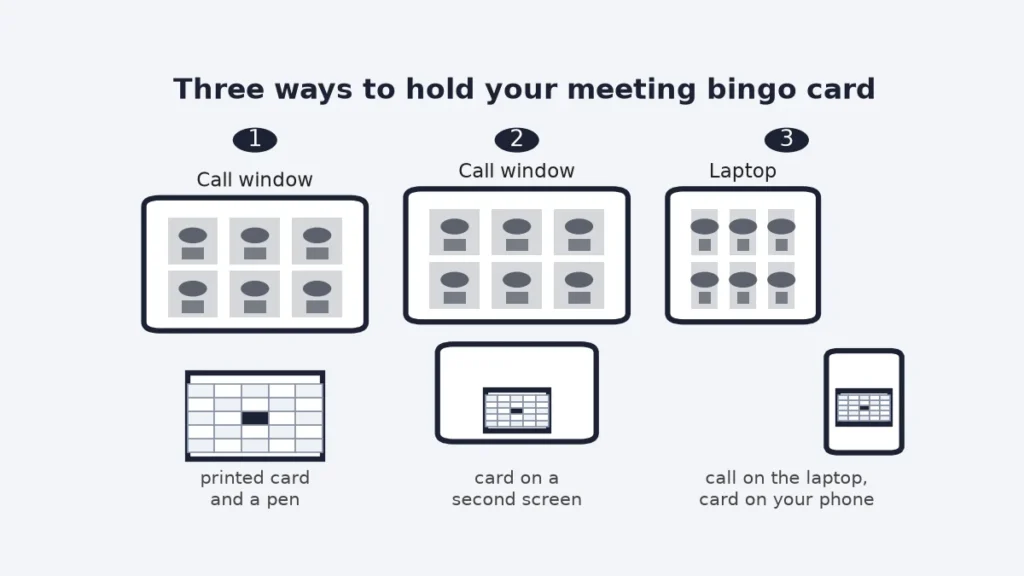
A meeting bingo printable can live on paper or on a second screen, and the choice depends on where your meeting happens. Both versions use the same PDF, so you do not have to decide in advance. The diagram below shows the three arrangements people use most.
Printed cards
Paper is the most reliable option for in-person meeting bingo, or a hybrid game in a conference room. Hand out one card per person with a pen, put a stack of spare cards near the door and decide where finished cards go. A pen mark is satisfying, nobody has to worry about notifications and a card on the table gives people something to do with their hands. For remote teams, ask everybody to print a card before the call, or email the PDF the day before.
On a screen
If your team plays meeting bingo entirely remotely, a second monitor or a phone works well. Open the PDF on the second screen and use an annotation tool to draw over squares, or simply keep track in your head and say “bingo” when you have a line. A phone held beside the laptop is the easiest, because you can tap squares with a stylus or a finger. The one thing to avoid is covering the call window: if the card hides the speaker, the game defeats its own purpose.
Whichever you choose
Use the Print tab in the card maker to pick one card or many, one to six per page, Letter or A4, portrait or landscape. A shareable link copies your words (not pictures) so a co-organizer can open the same set. Remember that each person must print or open their own card from the same set; printing a single card and showing it to everyone means everybody marks the same squares and the first bingo arrives at the same moment for all.
How to run work meeting bingo, step by step
Work meeting bingo takes about five minutes to set up. The steps below suit a weekly team meeting, an all-hands call or a training day. Run meeting bingo once as an experiment, listen to feedback and then decide whether it belongs in the regular rhythm.
- Get agreement first. Tell the group in advance that meeting bingo is coming and that taking part is optional. A message the day before is enough.
- Pick the squares. Open the Items tab, delete anything that would embarrass a person and add two or three squares that belong to your team, such as the name of a recurring project.
- Print or share the cards. Print one card per person plus about ten percent spare, or send the PDF to remote colleagues.
- Explain the rules in one sentence. “Mark a square when it happens, complete a line, say Bingo in the chat or out loud.”
- Play through the agenda. Keep the meeting as the priority. The game runs in the background. When someone calls bingo, confirm the line with the group and move on.
Where do you call bingo? In a room, a quiet “bingo” is fine. On a video call, a message in the chat is more polite than speaking over a colleague. Agree on this at the start: a single word typed into the chat is enough, and the host can read it out when there is a natural pause.
Rules that keep it fair
- A square counts once it has really happened in the meeting, not in a side conversation.
- The free center is already marked.
- The host or a volunteer is the referee for borderline cases, for example whether “I will circle back” counts as “Let us circle back”.
- Call “Bingo” only for a complete row, column or diagonal, unless you have agreed on a different pattern such as four corners.
- The first caller wins the round. If two people call at the same moment, both win.
Team meeting bingo: prizes, etiquette and what to avoid
The success of team meeting bingo depends less on rules than on tone. Meeting bingo works when people feel included and fails when it feels like a way of mocking colleagues. Treat these points as the real rules.
| Do | Do not |
|---|---|
| Make taking part optional. Some people prefer to just listen. | Do not require anyone to play or report their score. |
| Choose squares about situations and phrases everyone uses, including senior leaders. | Do not include squares about a specific person, accent, age or appearance. |
| Laugh at the situation (the frozen screen), never at the person (the one who froze). | Do not mark a square out loud in a way that singles someone out. |
| Remove “Child appears” or “Late joiner” if they could embarrass someone. | Do not turn a family cameo into a spotlight moment. |
| Keep it to one round per meeting and stop if the agenda is at risk. | Do not play in meetings about sensitive topics such as layoffs or performance. |
Prizes for meeting bingo should be tiny and symbolic. A shout-out in the next meeting, the right to choose the next meeting’s opening song or a coffee voucher is plenty. A big prize creates pressure to compete, and the whole point is relief from pressure. If your workplace has rules about gifts, a title such as “Bingo champion of the week” costs nothing.
Rounds and patterns
Most teams play meeting bingo with a simple first line. For a longer meeting, add a second round for four corners or an X shape. The same card can serve for several patterns: after the first win, everyone keeps their marks and the host announces a new target. A full-card blackout is possible, but as the simulation below shows, it rarely happens in a one-hour call.
Corporate bingo ideas for different kinds of meetings
Corporate bingo is meeting bingo dressed for the occasion. The 29 squares in this meeting bingo set suit a general video call, yet each type of meeting has its own vocabulary. Use the table as a starting list and type your own squares into the Items tab.
| Meeting type | Square ideas to add | Squares to drop |
|---|---|---|
| Weekly team stand-up | “Blocked on”, “Quick update”, “Ship it”, a recurring project name | Awkward silence, Over time |
| All-hands or town hall | “Exciting journey”, “Pivot”, “Alignment”, Applause, Slide with a chart | Pet appears, Child appears |
| Client or customer call | “Per our agreement”, “Next steps”, “Timeline”, Product demo | “Per my last email”, Camera off |
| Training session | “Let us do a quick poll”, Breakout rooms, “Homework”, A handout is shared | Late joiner |
| Conference talk | Q&A line, “Thanks for having me”, a QR code, Typo on a slide | Typing noises |
| Online all-company party | Karaoke, Trivia, Cheers, Funny hat | Spreadsheet shown |
The best corporate bingo sets are written by the team itself. Ask two or three colleagues for their favorite recurring moments and add them as squares. A shared card with in-jokes does far more for team spirit than a generic one. Many managers also run a quick vote: each person submits one square and the host chooses the best 24.
Buzzword bingo: build squares from your own jargon
Buzzword bingo works best when the squares are real phrases from your own workplace. Listen to a few recorded or remembered meetings and write down the words that come up again and again. Typical candidates are “synergy”, “bandwidth”, “deep dive”, “low-hanging fruit” and “move the needle”, but your industry will have its own set. Keep each phrase short, since squares of one to three words print largest.
A good buzzword bingo set mixes frequency. Eight phrases that appear in nearly every meeting give people early marks and keep them engaged. Eight that appear about once a month create the occasional thrill. Eight that appear almost never make a blackout truly rare. This meeting bingo page starts from a mixed set of phrases and mishaps, so you can swap in jargon only where it fits.
Writing a set in the Items tab
Open the Items tab in the card maker and delete squares you do not want. Type each new phrase on its own line, and add an emoji or small picture if you like. For a 5×5 card with a free space you need at least 24 squares. If you type more than 24, the extras are used on other cards, which makes each person’s card more distinctive.
If you want to start from nothing, the blank bingo cards page opens the maker with empty squares, and the bingo card generator gives you all card types, including numbered cards.
Playing on Zoom, Teams or Meet
The meeting bingo card maker is an independent browser tool. It does not connect to Zoom, Teams, Google Meet or any other call software, and it does not appear inside them. Everything below uses features that your call software already has, such as screen sharing and the chat window.
Cards for the call
- Print the PDF or send it to colleagues by email or chat before the call.
- Ask everyone to keep their own card visible, on paper or on a second screen.
- Put the word “Bingo” in the chat when you have a line. The host reads it out and confirms.
- The host can pin a short reminder of the rules in the meeting chat.
Add a number round
If you want a short break from meeting bingo squares, run a classic number round between agenda items. Open the bingo caller in a browser tab, press the big-screen button and share that tab with your call software. The caller shows the called number in large type, and everyone can mark it on a numbered card from the bingo card generator. It is a five-minute energizer, not a replacement for the squares.
Play online with a shared link
For a larger group you can host a live game instead of passing around a PDF. Play bingo online deals self-marking 75-ball cards to anyone who opens your link, and play custom bingo online does the same with your own words. For tips on hosting a mixed group, see the guide on how to play bingo online with friends.
Group size and round length
How long a round of meeting bingo lasts depends on three things: how many people are playing, how big the card is and how often the squares really happen. The first table uses a card grid of 3×3, 4×4 and 5×5, in a 60-minute meeting where each square has a 50% chance of happening during the hour. The numbers come from the simulation described below.
| Card size | 5 players | 10 players | Best use |
|---|---|---|---|
| 3×3 (8 squares + free) | 99% | 100% | Short stand-ups of 15 to 30 minutes |
| 4×4 (16 squares) | 84% | 93% | Standard weekly meetings |
| 5×5 (24 squares + free) | 77% | 89% | Long meetings or workshops |
The table shows the share of meetings that produced at least one bingo. A small card is much quicker. That is why a stand-up of fifteen minutes works better with a 3×3 card, while a half-day workshop suits 5×5.
Will anyone win? A meeting bingo simulation
Hosts want to know whether a game of meeting bingo will end with a winner or just fade away. We simulated it. The model gives each player a 5×5 card with a free center and 24 of the 29 squares in random positions. Every square then happens at a random moment according to a simple chance per hour, and any complete row, column or diagonal wins. Each result comes from 6,000 simulated meetings. This is a model with assumptions, not a measurement of real meetings, so use it as a guide.
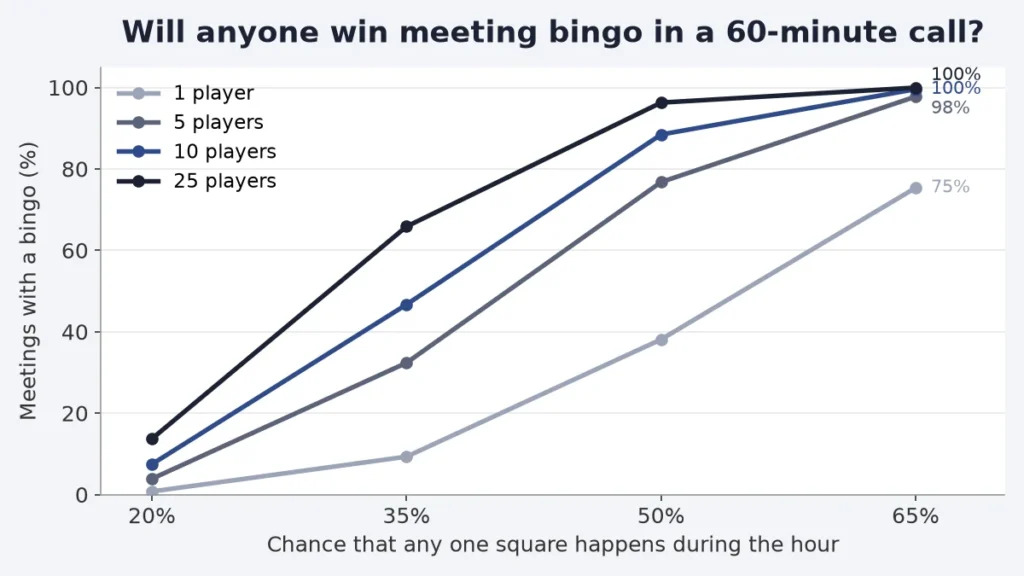
| Chance a square happens in an hour | Squares that happen per hour (average) | 1 player | 5 players | 10 players | 25 players |
|---|---|---|---|---|---|
| 20% | 5.8 | 1% | 4% | 7% | 14% |
| 35% | 10.2 | 9% | 32% | 47% | 66% |
| 50% | 14.6 | 38% | 77% | 88% | 96% |
| 65% | 18.8 | 75% | 98% | 100% | 100% |
Read it like this: if each of your squares has a one in three chance of happening during a given hour, about ten different squares will happen. With ten players, about 47% of such meetings produce a winner. If squares are rare, at only 20%, a one-hour meeting rarely produces a bingo for a small group. The remedy is to choose squares that really happen, which is why the set starts from common mishaps and phrases.
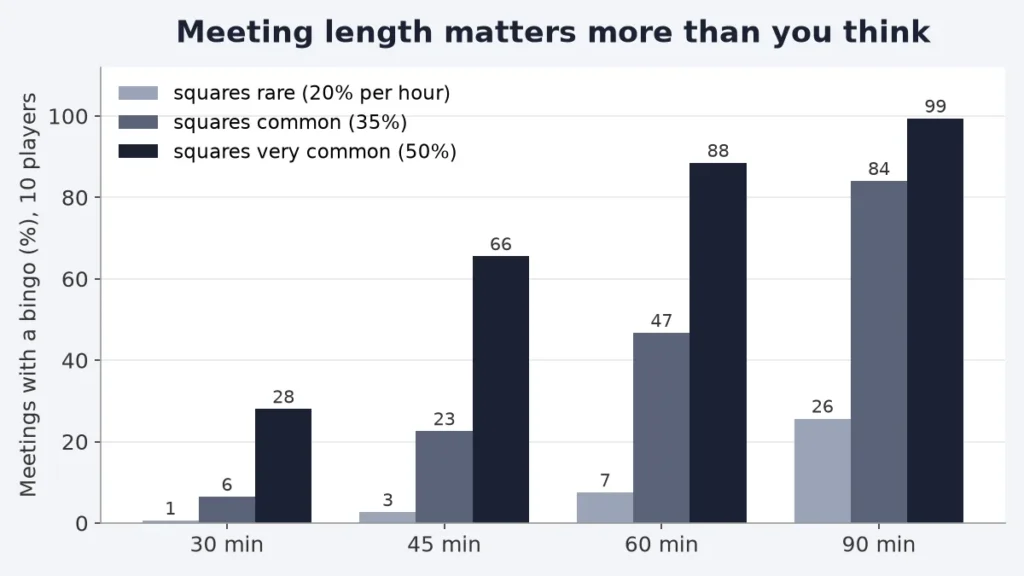
Length matters a great deal. With ten players and very common squares (50% per hour), a 30-minute meeting gives a winner 28% of the time, 45 minutes gives 66% and 90 minutes gives 99%. With only moderately common squares, a short meeting almost never ends in a win, and a 90-minute meeting is needed for a good chance. In meetings that did end with a bingo, the first one with ten players and very common squares came at about minute 39.
The practical advice for meeting bingo is simple. For meetings under 45 minutes, use a 3×3 card, or let people shout bingo for any four marked squares in a pattern. For anything longer, keep the 5×5 card, and add squares that really happen in your team. If you are unsure, run the game for two weeks and note which squares were never marked, then replace them.
Customize the squares for your team
The card maker is the full-screen editor that opens when you press Edit and print this card. Meeting bingo is already loaded. It has five tabs and nothing you type leaves your browser.
Setup and Items
Setup chooses the card type and the grid size, from 3×3 to 7×7. In Items you can rename any of the 29 squares, delete the ones that do not fit, add new ones and give each an emoji or a picture.
A 5×5 card with a free space needs 24 words, a 4×4 card needs 16 and a 3×3 card needs 8. With 29 squares there are 118,755 different ways to choose 24 of them, and each choice can be arranged in 24 factorial orders, so the number of possible cards is roughly 7.4e+28. In practice no two cards will match.
Design, Templates and Print
Design controls the look. You can choose a color theme, fonts, text size, ALL CAPS, borders, rounded corners, tiles, alternate tints, backgrounds, a logo, a title as text or a picture and a footer line. The meeting set opens in a clean black-and-white theme that suits office printing; add your company logo and brand color to make the cards feel official, or keep it plain.
The Templates tab switches to another starter set whenever you want, and Print lets you pick the number of cards (1 to 100), cards per page, Letter or A4 and cut guides, then download the PDF.
Five minutes from start to PDF
- Press Edit and print this card above the article.
- Open Items and swap in two or three squares from your own team.
- Open Design and add a logo or change the color theme.
- Open Print, choose the number of cards and Letter or A4.
- Download the PDF and send it to your team.
More bingo for teams and parties
- Office Bingo: the full guide behind this page
- Zoom bingo is the sister set for virtual happy hours and remote team parties, with pictures of things in people’s rooms.
- Human bingo sends people around a room to find a colleague for each square.
- Getting to know you bingo is a good opener for new teams.
- Printable bingo cards lists every template in one place.
- Icebreaker questions to open a meeting with a quick round.
- Would you rather questions for the last five minutes of a team call.
Frequently asked questions
10 quick answers
How do you play meeting bingo?
Every person gets a card of squares such as “You are on mute” or Echo. When one of them happens in the meeting, they mark it. The first person to complete a row, a column or a diagonal says Bingo and wins a small prize.
Is meeting bingo free to print?
Yes. The cards open in the card maker above, and you can download the PDF without an account. There is no watermark and your words stay in your browser.
Can I use meeting bingo in Zoom, Teams or Google Meet?
Yes, in the sense that you can use any call software. The tool is a separate browser page and does not connect to those products. Share the PDF, ask people to keep their own card, and use the chat to call bingo.
How many squares does a card need?
A 5×5 card with a free center needs 24 different squares, a 4×4 card needs 16 and a 3×3 card needs 8. This set has 29, so each card leaves out five.
Will meeting bingo disrupt the meeting?
Not if you keep meeting bingo quiet. The game happens on each person’s own card, and bingo is called in the chat. If it ever distracts from the agenda, stop the round.
Can I change the squares?
Yes. The Items tab lets you rename, remove or add squares, each with an emoji or a picture. Add jargon from your own team and drop anything that could embarrass a colleague.
What is a good prize?
Something tiny and symbolic: a shout-out in the next meeting, the choice of the next opening song or a small voucher. Avoid anything that makes people compete hard.
How long does a game of meeting bingo last?
It depends on the length of the meeting. In the simulation, ten players with common squares had a winner in about 88% of 60-minute meetings, and the first win came around minute 39.
Is meeting bingo appropriate for every workplace?
No. Skip it in serious meetings, keep it optional and never include squares about a person. A kind, inclusive tone is the main rule.
Are the simulation numbers exact?
No. They come from 6,000 simulated meetings per row and rest on assumptions about how often squares happen. A real team can be faster or slower.