A time card calculator adds up the hours on a weekly or biweekly time card from your clock in and clock out times. Enter each day, subtract unpaid breaks, and the calculator gives total hours in hours and minutes and in decimal hours, with overtime and a pay estimate when you add an hourly rate.
Quick answer: Hours worked = clock out − clock in − unpaid break. A shift from 8:00 AM to 5:15 PM with a 30 minute break is 9:15 − 0:30 = 8:45, which is 8.75 decimal hours (45 ÷ 60 = 0.75).
How to use the time card calculator
- Choose one week or two weeks, and whether your card has in, out and break columns or four punches with a lunch out and in.
- Type your clock in and clock out for each day. Times such as 9, 9:30, 9am, 0930 and 17:45 all work.
- Add the unpaid break in minutes, or set a default break that applies to every longer shift.
- Pick a rounding rule if your employer rounds punches, and add your hourly rate and overtime rules for a pay estimate.
- Read your total hours, regular and overtime hours and gross pay, then print the card, download a CSV or copy the summary.
| Option | What it does | Typical use |
|---|---|---|
| In, out, break | Subtracts one unpaid break per day | Most weekly time cards |
| Four punches | Adds the morning and afternoon blocks separately | Time clocks with a lunch punch |
| Rounding | Rounds each punch to the nearest 5, 6, 10 or 15 minutes | Workplaces that round to a clock increment |
| Weekly overtime | Counts hours after a threshold (default 40) at a multiplier (default 1.5) | Weekly pay in the United States |
| Daily overtime | Also counts hours above a daily limit | Employers or states with daily overtime rules |
| Two weeks | Totals two cards with overtime figured week by week | Biweekly payroll |
This time card calculator runs in your browser and keeps your entries on your device. Use the full screen button above the calculator for more room, and the Minutes to decimal tab when you only need a conversion.
How a time card is calculated, step by step
The time card calculator repeats one simple calculation for each day. It converts both punches to minutes, subtracts the earlier from the later, takes off the unpaid break, and adds the days together. A clock out earlier than the clock in is treated as the next day, so a night shift works.
| Day | Clock in | Clock out | Unpaid break | Hours | Decimal hours |
|---|---|---|---|---|---|
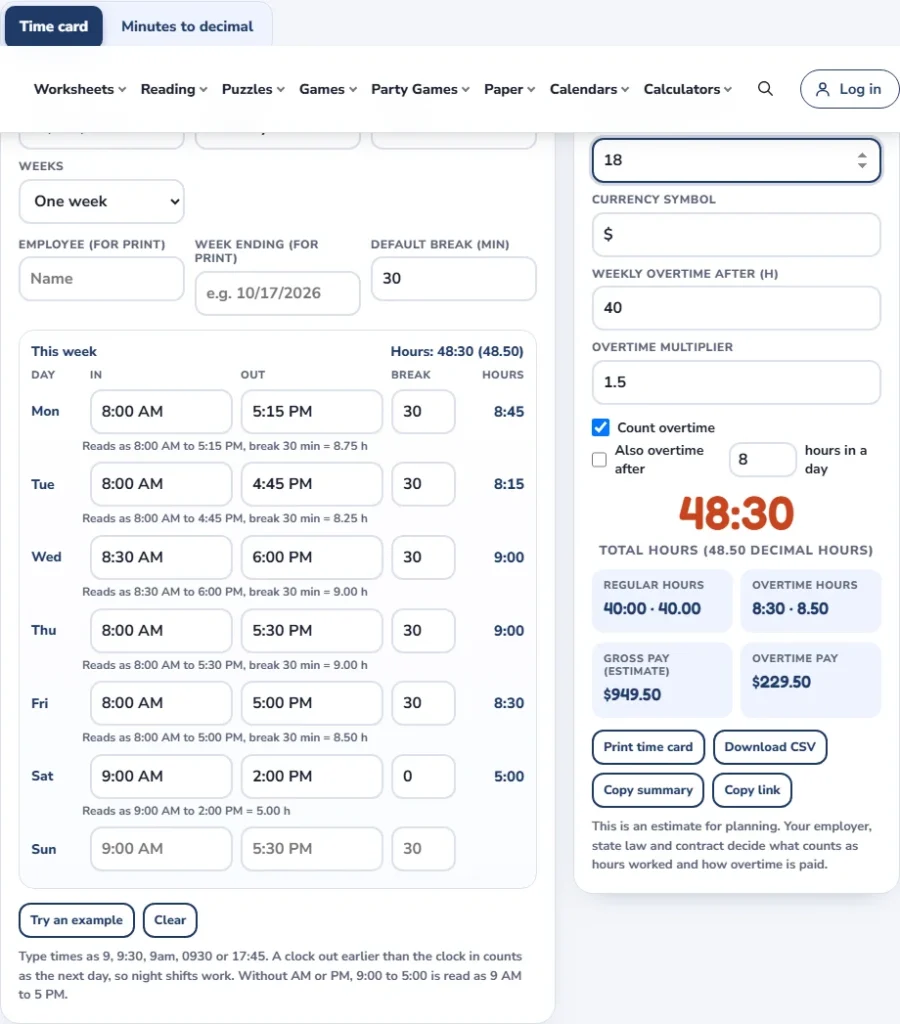
| Monday | 8:00 AM | 5:15 PM | 30 min | 8:45 | 8.75 |
| Tuesday | 8:00 AM | 4:45 PM | 30 min | 8:15 | 8.25 |
| Wednesday | 8:30 AM | 6:00 PM | 30 min | 9:00 | 9.00 |
| Thursday | 8:00 AM | 5:30 PM | 30 min | 9:00 | 9.00 |
| Friday | 8:00 AM | 5:00 PM | 30 min | 8:30 | 8.50 |
| Saturday | 9:00 AM | 2:00 PM | 0 min | 5:00 | 5.00 |
| Total | 48:30 | 48.50 |
The week totals 48:30, or 48.50 decimal hours. With a 40 hour threshold, that is 40:00 regular and 8:30 overtime. At $18.00 an hour with time and a half, regular pay is $720.00 and overtime pay is $229.50, for a gross estimate of $949.50 before taxes and deductions.
Minutes to decimal chart for time cards
Payroll systems usually want decimal hours. Divide the minutes by 60 and add the result to the whole hours. Here is the full chart for 5 minute steps, and the Minutes to decimal tab converts any value.
For a full converter with seconds, rounding and a whole timesheet column, use the minutes to decimal calculator.
| Minutes | Decimal of an hour | Minutes | Decimal of an hour |
|---|---|---|---|
| 0 | 0.000 | 30 | 0.500 |
| 5 | 0.083 | 35 | 0.583 |
| 10 | 0.167 | 40 | 0.667 |
| 15 | 0.250 | 45 | 0.750 |
| 20 | 0.333 | 50 | 0.833 |
| 25 | 0.417 | 55 | 0.917 |
So 7 hours 45 minutes is 7 + 45 ÷ 60 = 7.75 hours, and 8 hours 10 minutes is 8 + 10 ÷ 60 = 8.17 hours when rounded to two decimals. Going the other way, 6.4 hours is 6 hours and 0.4 × 60 = 24 minutes.
Overtime on a time card: each week stands alone
In the United States, the federal Fair Labor Standards Act requires covered employers to pay at least one and one-half times the regular rate for hours over 40 in a workweek, as set out in 29 U.S.C. 207(a). The Department of Labor regulation at 29 CFR 778.104 adds that each workweek stands alone: hours are not averaged over two weeks.
| Week 1 + week 2 hours | Two-week total | Overtime hours (each week alone) | Average above 40? |
|---|---|---|---|
| 40 + 40 | 80 | 0 | No |
| 30 + 50 | 80 | 10 | No |
| 45 + 35 | 80 | 5 | No |
| 50 + 30 | 80 | 10 | No |
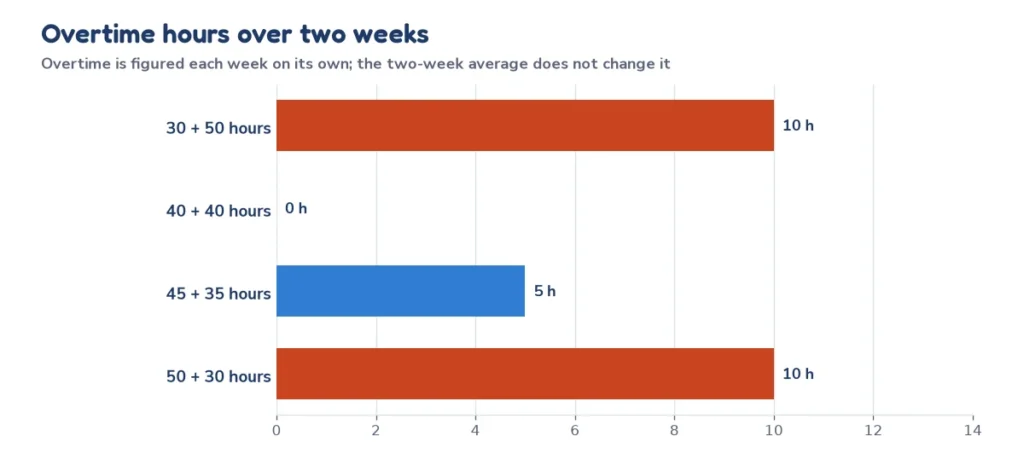
A two-week total of 80 hours does not mean there is no overtime: 30 hours one week and 50 the next gives 10 overtime hours in the second week, even though the average is 40. The biweekly option in the calculator follows that weekly rule. Some states and employers also add daily overtime after a set number of hours, so check your state labor department and your contract, and turn on the daily overtime option when it applies.
Time card rounding: what 5, 6, 10 and 15 minute rounding does
Many time clocks round each punch to the nearest 5 minutes, tenth of an hour or quarter hour. Federal guidance in 29 CFR 785.48(b) says that practice is accepted when it is used so that it does not, over time, fail to compensate employees for all the time they actually work. The calculator lets you see the effect on your own card.
Take one week of five shifts with a 30 minute break each day and punches that fall a few minutes either side of the hour. The same punches give different totals under each rule.
| Rounding rule | Week total | Decimal hours |
|---|---|---|
| Exact punches | 42:14 | 42.23 |
| Nearest 5 minutes | 42:15 | 42.25 |
| Nearest 6 minutes | 42:24 | 42.40 |
| Nearest 10 minutes | 42:20 | 42.33 |
| Nearest 15 minutes | 42:00 | 42.00 |
Rounding can move a total up or down, and that is the point of the rule: it should average out. If your total is consistently lower under the rounding rule than your exact punches, raise it with payroll. The calculator shows both so you can compare.
Meal breaks, rest breaks and overnight shifts
A bona fide meal period is not worktime, as 29 CFR 785.19 explains, and the employee must be completely relieved from duty. Short rest breaks are different: 29 CFR 785.18 says rest periods of about 5 to 20 minutes are customarily paid and must be counted as hours worked. So enter a lunch break as an unpaid break, but do not subtract a short paid coffee break.
Overnight shifts work without any special setting. A shift from 10:00 PM to 6:00 AM with a 30 minute break is 8:00 − 0:30 = 7:30, or 7.50 decimal hours. The calculator counts the clock out as the next day because it is earlier than the clock in.
Biweekly time card calculator
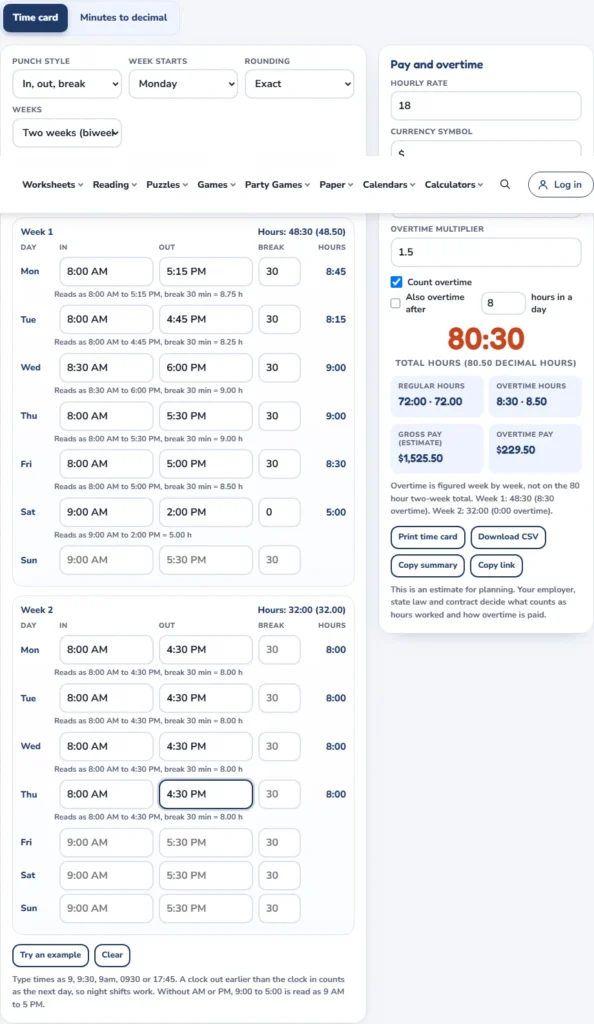
Switch to two weeks to total a biweekly time card. The calculator figures overtime for each week separately and adds the two weeks, so it matches the weekly rule above. A typical example is a 48:30 week followed by a 32:00 week, which is 80:30 in total but only 8:30 of overtime.
Timecard calculator or time clock calculator: is there a difference?
People search for a timecard calculator, a time card calculator and a time clock calculator and mean the same thing: add up the hours between the punches on a time clock or a paper card. The wording changes by industry, but the arithmetic does not. This time clock calculator reads your punches, takes off unpaid breaks and returns the hours in the format payroll asks for.
Split shifts and four-punch time cards
Time clocks with a lunch punch record four times a day: in, lunch out, lunch in and out. The paid time is the morning block plus the afternoon block, so the lunch gap is left out automatically.
| Punch | Time | Block |
|---|---|---|
| Clock in | 7:45 AM | |
| Lunch out | 12:00 PM | Morning: 4:15 |
| Lunch in | 12:30 PM | |
| Clock out | 4:15 PM | Afternoon: 3:45 |
| Total | 8:00 |
The day comes to 8:00, or 8.00 decimal hours, with a 30 minute lunch that is not paid. The calculator does the same sum when you switch Punch style to Four punches.
Tips for an accurate time card
- Record punches as they happen. Memory a week later is less reliable than a note on your phone.
- Keep your own copy of each week so you can compare it with the pay stub.
- Use the same time format all week, with AM and PM or a 24 hour clock.
- Write the unpaid break next to every shift that had one, even when it was the usual 30 minutes.
- Check the total on payday against your own card and ask about any difference right away.
Time card, work hours or overtime calculator: which one?
| Tool | Best for |
|---|---|
| Time card calculator | A full week of clock in and out times, rounding, overtime, pay and a printable card |
| Work hours calculator | Quick hours between two times with breaks, one day at a time |
| Overtime calculator | Overtime pay when you already know the hours |
| Hourly to salary calculator | Turning an hourly rate into annual, monthly or biweekly pay |
| Time calculator | Adding and subtracting hours and minutes |
Common time card mistakes
| Mistake | What goes wrong | Fix |
|---|---|---|
| Reading 7:45 as 7.45 hours | The decimal is 7.75, so pay is short | Divide the minutes by 60 |
| Forgetting AM and PM | 9:00 to 5:00 can be read as a 20 hour shift | Add AM and PM or use 24 hour times |
| Subtracting a paid rest break | Hours come out too low | Only subtract bona fide unpaid meal periods |
| Averaging two weeks for overtime | Overtime is missed in the longer week | Figure each week on its own |
| Rounding the total twice | Punch rounding and total rounding add up | Round punches only, once |
Frequently asked questions
10 quick answers
How do I calculate hours on a time card?
Subtract the clock in from the clock out, subtract any unpaid break, and add the days. A shift from 8:00 AM to 5:15 PM with a 30 minute break is 8 hours 45 minutes, or 8.75 hours.
How do I convert minutes to decimal hours?
Divide the minutes by 60. Thirty minutes is 0.5, 15 minutes is 0.25, 45 minutes is 0.75, and 10 minutes is about 0.17.
How do I calculate a biweekly time card?
Total each week on its own and add the two weeks. Overtime is figured per week, so 30 and 50 hours gives 10 overtime hours, not none.
Does a time card calculator include overtime?
This one does. It counts hours over a weekly threshold (40 by default) at a multiplier (1.5 by default) and can add daily overtime if your employer uses it.
How does time card rounding work?
Each punch is moved to the nearest 5, 6, 10 or 15 minutes before the hours are added. Federal guidance accepts rounding that does not, over time, short the employee, so compare the rounded total with your exact punches.
How do I handle a night shift that crosses midnight?
Enter the real clock in and clock out. A clock out earlier than the clock in is counted as the next day, so 10:00 PM to 6:00 AM is 8 hours before the break.
Are unpaid breaks subtracted from my hours?
Bona fide meal periods where you are fully relieved of duty are not worktime, so they are subtracted. Short rest breaks of about 5 to 20 minutes are usually paid and not subtracted.
Can I print or save my time card?
Yes. Use Print time card for a paper copy, Download CSV for a spreadsheet, or Copy link to come back to the same card later.
Is the pay estimate exact?
No. It is gross pay before taxes and deductions and assumes the rate and overtime rules you enter. Your employer, state law and your contract decide the real figures.
What is the difference between a time card and a timesheet?
The two terms are often used for the same record of hours worked. A time card usually lists clock in and out punches, while a timesheet may list hours by project or task.
Related calculators
- Work hours calculator for hours between two times with breaks
- Overtime calculator for time and a half and double time
- Hourly to salary calculator for annual and biweekly pay
- Time calculator to add and subtract hours and minutes
- Date and time calculators for the full set
- All free calculators
Sources and further reading
- 29 U.S.C. 207: Maximum hours: the 40 hour workweek and the one and one-half times rate
- 29 CFR 778.104: Each workweek stands alone: no averaging of hours over two weeks
- 29 CFR 785.48: Use of time clocks: rounding practices
- 29 CFR 785.19: Meal periods: bona fide meal periods are not worktime
- 29 CFR 785.18: Rest: short rest periods are counted as hours worked
This page gives general information and is not legal or payroll advice. Rules differ by country, state and job, so check with your employer or your labor department. Last reviewed: October 2026.