A subscript generator converts the text you type into Unicode subscript characters that you can copy and paste anywhere: H2O becomes H₂O. This page also makes superscript, italic, cursive, bold and gothic text, because they use the same Unicode characters and the same copy-and-paste approach.
Quick answer: Type your text, choose a style and press Copy. Digits and the letters a, e, h, i, j, k, l, m, n, o, p, r, s, t, u, v and x have subscript forms, so H2O becomes H₂O and x2 becomes x² as a superscript.
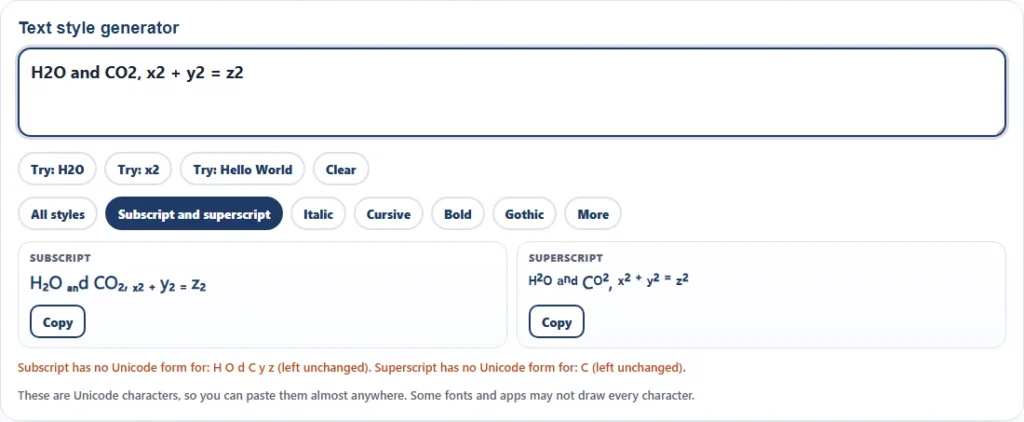
How to use the subscript generator
- Type or paste your text in the box. Try the H2O and x2 examples to see how it works.
- Pick a group: Subscript and superscript, Italic, Cursive, Bold, Gothic or More. All styles shows everything.
- Press Copy next to the style you want.
- Paste it into your chat, bio, document, spreadsheet or post.
The subscript generator runs in your browser. Your text is not sent anywhere and is saved only on your device.
Subscript text: which characters can be converted
Wikipedia explains that Unicode has subscripted and superscripted versions of a number of characters, including a full set of Arabic numerals, so that polynomials, chemical formulas and other equations can be written in plain text without markup. Not every letter has a subscript form, though. Subscript text from any subscript generator works for digits and a limited set of letters.
| Type | Characters with a subscript form | Characters with no subscript form |
|---|---|---|
| Digits | 0₀ 1₁ 2₂ 3₃ 4₄ 5₅ 6₆ 7₇ 8₈ 9₉ | none |
| Lowercase letters | aₐ eₑ hₕ iᵢ jⱼ kₖ lₗ mₘ nₙ oₒ pₚ rᵣ sₛ tₜ uᵤ vᵥ xₓ | b c d f g q w y z |
| Symbols | + ₊ − ₋ = ₌ ( ₍ ) ₎ | other symbols |
| Capital letters | none | A to Z |
When a letter has no subscript form, the generator leaves it unchanged and tells you which characters were skipped. That is why H2O becomes H₂O, with the capital letters staying as they are, and why a word like "word" only partly converts.
Superscript generator: exponents, units and ordinals
A superscript generator has better coverage. Digits, plus, minus, equals and brackets all have superscript forms, and so do most lowercase letters and many capitals. The only lowercase letter missing from the Unicode set used here is q.
| Type | Characters with a superscript form | Characters left unchanged |
|---|---|---|
| Digits | 0⁰ 1¹ 2² 3³ 4⁴ 5⁵ 6⁶ 7⁷ 8⁸ 9⁹ | none |
| Lowercase letters | aᵃ bᵇ cᶜ dᵈ eᵉ fᶠ gᵍ hʰ iⁱ jʲ kᵏ lˡ mᵐ nⁿ oᵒ pᵖ rʳ sˢ tᵗ uᵘ vᵛ wʷ xˣ yʸ zᶻ | q |
| Capital letters | Aᴬ Bᴮ Dᴰ Eᴱ Gᴳ Hᴴ Iᴵ Jᴶ Kᴷ Lᴸ Mᴹ Nᴺ Oᴼ Pᴾ Rᴿ Tᵀ Uᵁ Vⱽ Wᵂ | C F Q S X Y Z |
Common uses are exponents such as x² and 10⁶, units such as m/s² and cm³, trademark-style marks and ordinal suffixes such as 1ˢᵗ.
Subscript and superscript copy and paste in formulas
Wikipedia notes that H₂O, written with the subscript 2 character, is meant to be the same as H2O with subscript markup. It also notes that in many fonts these characters are actually designed as numerator and denominator glyphs, so they can look slightly different from true subscripts. This table shows common formulas as typed text and as copied characters.
| Typed text | Subscript or superscript result | Used for |
|---|---|---|
| H2O | H₂O | Water |
| CO2 | CO₂ | Carbon dioxide |
| H2SO4 | H₂SO₄ | Sulfuric acid |
| C6H12O6 | C₆H₁₂O₆ | Glucose |
| x1, x2, x3 | x₁ x₂ x₃ | Variables |
| a^2 + b^2 | a² + b² | Algebra |
| 10^-3 | 10⁻³ | Powers of ten |
| m/s2 | m/s² | Units |
Subscript vs superscript: when to use which
Subscripts sit below the line and superscripts above it. In general, subscripts label or index something, and superscripts raise a number to a power or point to a note.
| Use | Style | Example |
|---|---|---|
| Atoms in a chemical formula | Subscript | H₂O, CO₂ |
| Index of a variable or sequence | Subscript | x₁, aₙ |
| Exponent or power | Superscript | x², 10⁶ |
| Isotope mass number | Superscript | ¹⁴C |
| Units squared or cubed | Superscript | m², cm³ |
| Footnote or reference marker | Superscript | Source¹ |
| Ordinal suffix | Superscript | 1ˢᵗ, 2ⁿᵈ |
Copy and paste tips by device
- Computer: press Copy in the subscript generator, click in the target field and press Ctrl + V on Windows or Cmd + V on Mac.
- iPhone and Android: tap Copy, then touch and hold in the text field and choose Paste.
- Documents: if the pasted characters look different in Word or Docs, switch the font to one with wide Unicode coverage such as Arial, Segoe UI or Noto Sans.
- Spreadsheets: subscript and superscript characters work in cells, and they keep their meaning when the sheet is exported as text.
Common mistakes with fancy text
- Using styled letters for a password. Many systems normalize or reject them.
- Styling a whole paragraph. It is hard to read, and screen readers can struggle with it.
- Expecting the subscript generator to turn capital letters into subscripts. Unicode has no subscript capitals.
- Using the characters for a real equation in a paper or web page. Use proper markup there, as the standards bodies recommend.
- Forgetting a plain-text version for search, spell check and accessibility.
Italic font generator
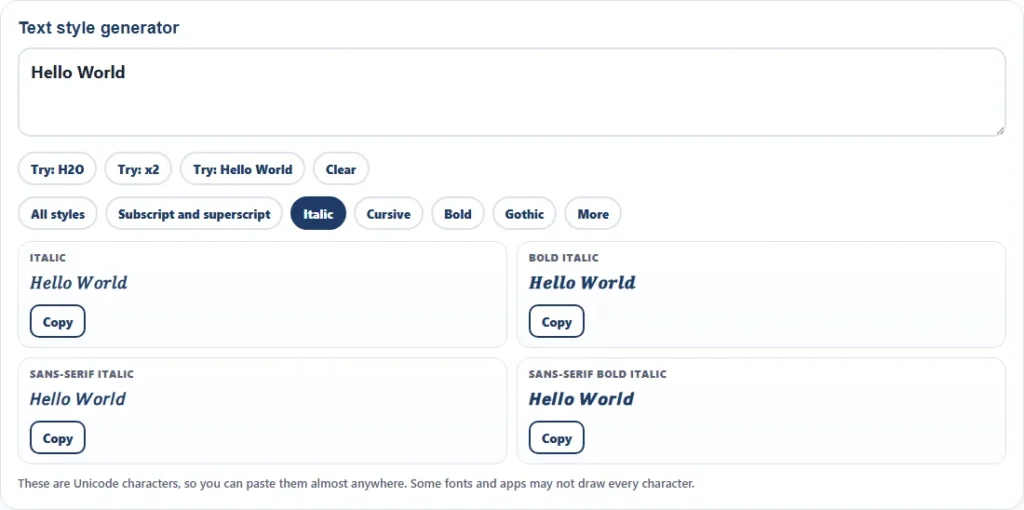
The italic font generator uses the Unicode Mathematical Alphanumeric Symbols block, which holds styled forms of Latin and Greek letters and digits, according to Wikipedia. The block runs from U+1D400 to U+1D7FF and has been in Unicode since version 3.1 in 2001. These characters were designed so that mathematicians could tell letter styles apart, but they work as plain text in many apps.
| Style | Example | Notes |
|---|---|---|
| Italic | 𝐻𝑒𝑙𝑙𝑜 𝑊𝑜𝑟𝑙𝑑 | Slanted serif letters. Letters only, digits stay plain |
| Bold italic | 𝑯𝒆𝒍𝒍𝒐 𝑾𝒐𝒓𝒍𝒅 | Heavy slanted serif |
| Sans-serif italic | 𝘏𝘦𝘭𝘭𝘰 𝘞𝘰𝘳𝘭𝘥 | Clean slanted letters |
| Sans-serif bold italic | 𝙃𝙚𝙡𝙡𝙤 𝙒𝙤𝙧𝙡𝙙 | Heavy slanted sans-serif |
The small letter h is the one gap in the italic block, because it was already encoded as the Planck constant symbol. The generator uses that character in its place, which is why italic h looks slightly different in some fonts.
Font generator cursive: script and bold script
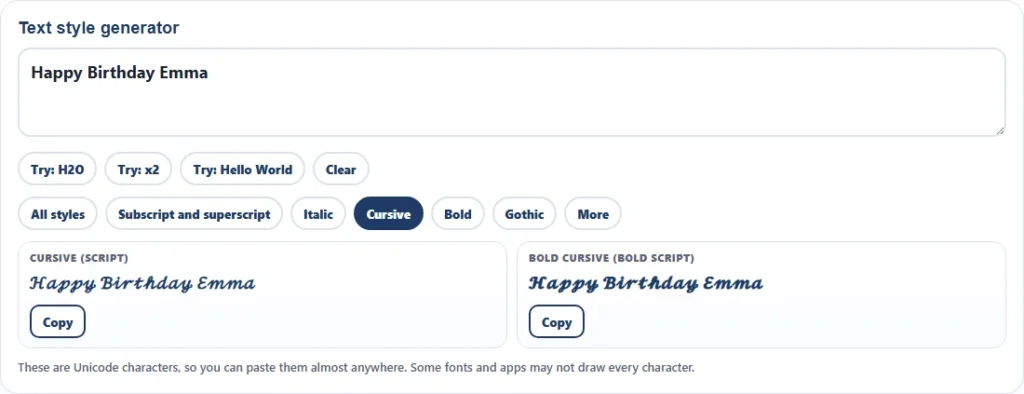
The cursive style is the script alphabet from the same Unicode block. It gives flowing capital letters and rounded lowercase letters that work for names, headings and invitations. Like italic, a few letters are stored elsewhere in Unicode, so the generator swaps in those characters: capital B, E, F, H, I, L, M and R, and lowercase e, g and o.
- Cursive (script): light, rounded letters. Example: Happy Birthday Emma.
- Bold cursive (bold script): heavier strokes that stay readable at small sizes.
- Gothic (fraktur): blackletter capitals for a formal or old-style look.
- Double-struck: outlined letters, familiar from number sets in math.
How to type subscript and superscript without a generator
If you are working in an editor that supports formatting, use its subscript and superscript commands instead. They keep real text, which is better for search, spell check and screen readers.
| Where | Subscript | Superscript |
|---|---|---|
| Microsoft Word | Ctrl + = | Ctrl + Shift + = |
| Google Docs | Ctrl + , | Ctrl + . |
| HTML | <sub>2</sub> | <sup>2</sup> |
| Windows Alt codes | not available | Alt + 0178 for ², Alt + 0179 for ³, Alt + 0185 for ¹ |
Where fancy text works and where it does not
- Works well: social profiles, chat apps, usernames where Unicode is allowed, notes, email subject lines and documents that use common fonts.
- May fail: fonts without the characters show empty boxes, and some systems strip or flag unusual characters in names and passwords.
- Accessibility: screen readers may read styled characters letter by letter or skip them, so keep important information in plain text.
- Search: styled letters are different characters from normal letters, so a search for the plain word may not find them.
- Math: Wikipedia reports that the W3C and the Unicode Consortium recommend markup for mathematical content, and encoded characters where the meaning belongs in the text, such as phonetic transcription.
Fancy text generator ideas
- Chemistry notes, lab reports and homework where markup is not available.
- Footnote markers and powers in a plain-text email or spreadsheet cell.
- Name styling for a profile, a gaming tag or a message, in cursive or gothic.
- Italic or bold emphasis in a place that has no formatting buttons.
- Invitations and signs where a script style is wanted.
Frequently asked questions
10 quick answers
What is a subscript generator?
It converts typed text into Unicode subscript characters that you can copy and paste, such as H2O to H₂O.
Why do some letters not change to subscript?
Unicode has subscript forms only for digits, a few symbols and about seventeen lowercase letters. The generator leaves other letters unchanged.
Which letters have a subscript form?
a, e, h, i, j, k, l, m, n, o, p, r, s, t, u, v and x, plus the digits 0 to 9 and the symbols + − = ( ).
How do I type subscript in Word?
Select the text and press Ctrl + =. For superscript press Ctrl + Shift + =.
Can I use these characters in a username?
Some sites allow them and some do not. Check the rules of the site, and keep a plain-text alternative.
Is the italic font generator a real font?
No. It uses Unicode mathematical letters that look italic, so you can paste the result without installing a font.
Why does the letter h look different in italic?
The italic small h in the Unicode math block is stored as the Planck constant symbol, so the generator uses that character.
Will cursive text work everywhere?
It works in most modern apps and browsers. A font that lacks the script characters will show boxes instead.
Do these characters hurt accessibility?
They can. Screen readers may read them oddly, so use them for decoration and keep key information in plain text.
Is the subscript generator free?
Yes. It is free, runs in your browser and does not store or send your text.
Related calculators
- Word counter for words, characters and reading time
- Scientific notation calculator for powers of ten
- Roman numeral converter for numerals in text
- Random name picker for choosing names
- All free calculators
Sources and further reading
- Unicode subscripts and superscripts (Wikipedia): which characters exist and how fonts draw them
- Mathematical Alphanumeric Symbols (Wikipedia): the block used for italic, bold, script and gothic letters
Last reviewed: October 2026.